Adobe Campaign Migration Steps from UAT to Production | Community
Skip to main content
New Participant
January 7, 2017
Solved

Adobe Campaign Migration Steps from UAT to Production

  • January 7, 2017
  • 1 reply
  • 1636 views

Hi,

I am facing the issue while migrating campaign from UAT to Production.

I had done with Following steps :

1. Right Click on campaign-> Action->Exported the Package

2. In Production tools->Advanced->import package.

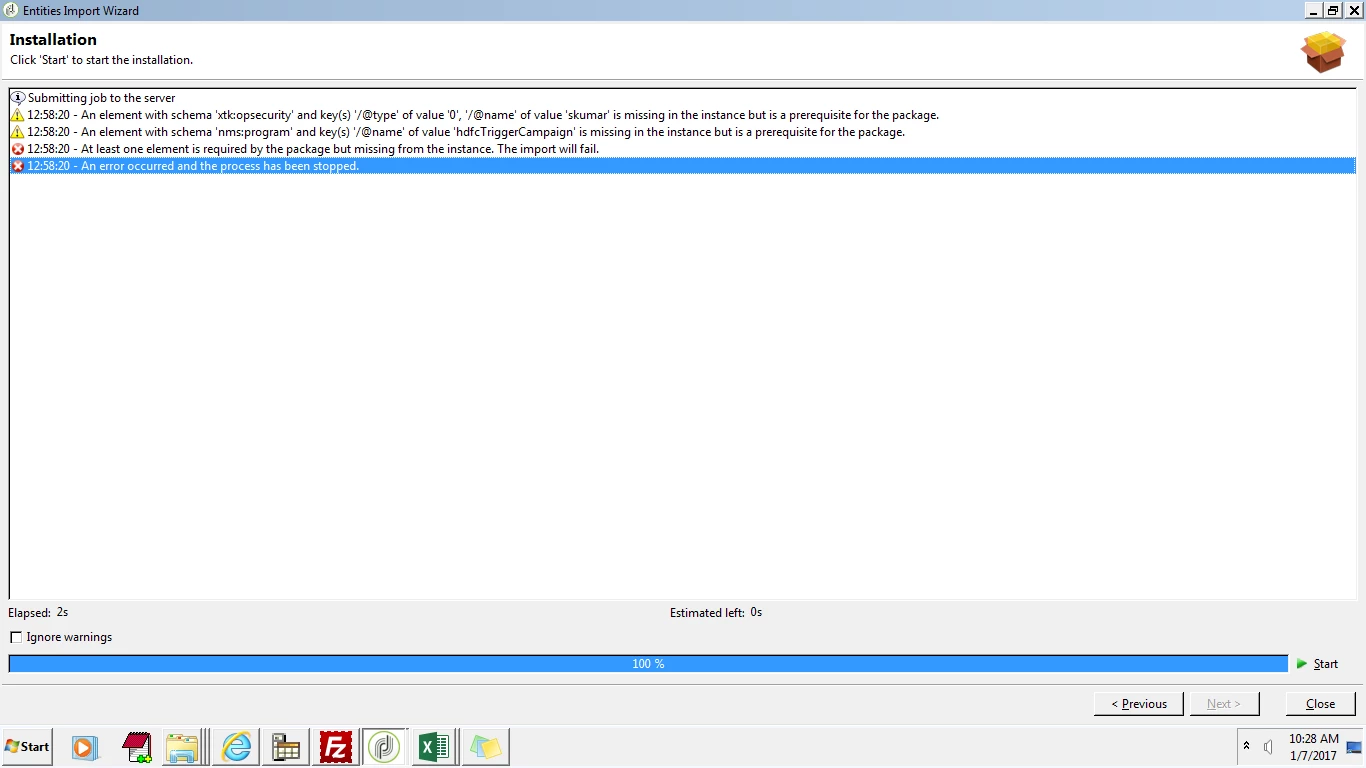
I Maintained the Folder Structure and unique internal name. Pleas find the error and help me out on the same
This post is no longer active and is closed to new replies. Need help? Start a new post to ask your question.
Best answer by abhishekpatil

Hi Sakthikumar,

Its always better to create a package rather than exporting components directly.

In your case, you should also migrate the components associated with the Campaign as they are not present in Destination instance.

1)Campaign which you are trying to migrate is in the Program folder - hdfcTriggerCampaign which is not present in the destination instance.

2)Campaign might have a operator(assigned operator/operator in the alert activity) which is not in the destination instance.

Hence migrate these missing components before migrating Campaign.

Regards,

Abhishek

1 reply

abhishekpatil
abhishekpatilAccepted solution
New Participant
January 11, 2017

Hi Sakthikumar,

Its always better to create a package rather than exporting components directly.

In your case, you should also migrate the components associated with the Campaign as they are not present in Destination instance.

1)Campaign which you are trying to migrate is in the Program folder - hdfcTriggerCampaign which is not present in the destination instance.

2)Campaign might have a operator(assigned operator/operator in the alert activity) which is not in the destination instance.

Hence migrate these missing components before migrating Campaign.

Regards,

Abhishek