Audit log in Adobe campaign classic | Community
Skip to main content
Level 3
April 21, 2025
Solved

Audit log in Adobe campaign classic

Hi @parthasarathy 

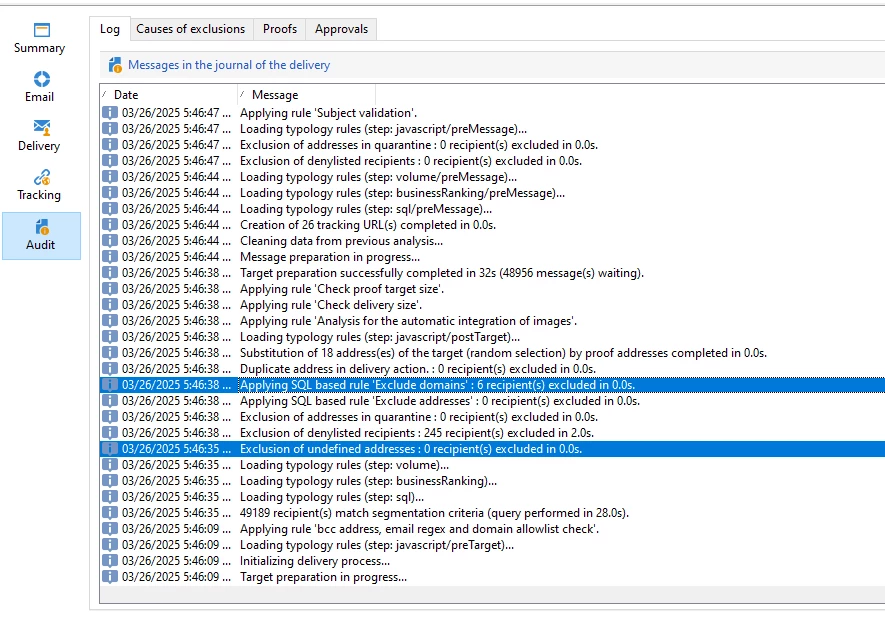
Request to explain the difference between highlighted ones in Adobe campaign classic.

1.Applying SQL based rule 'Exclude domains'

2.Exclusion of undefined addresses 


ParthaSarathy
ParthaSarathyAccepted solution
New Participant
April 21, 2025

Hi @kd1-1 ,

Applying SQL based rule 'Exclude domains' > This is an OOTB typology rule which is included in the delivery's typology.

Exclusion of undefined addresses > This excludes recipients with empty / Undefined addresses.

 ~  ParthaSarathy S~  Click here to join ADOBE CAMPAIGN USER GROUP for Quarterly In-person | Hybrid | Virtual Meetups

3 replies

ParthaSarathy
ParthaSarathyAccepted solution
New Participant
April 21, 2025

Hi @kd1-1 ,

Applying SQL based rule 'Exclude domains' > This is an OOTB typology rule which is included in the delivery's typology.

Exclusion of undefined addresses > This excludes recipients with empty / Undefined addresses.

Translate
 ~  ParthaSarathy S~  Click here to join ADOBE CAMPAIGN USER GROUP for Quarterly In-person | Hybrid | Virtual Meetups
KD1-1Author
Level 3
April 21, 2025

Can you provide an example for reference?


@parthasarathy 

Translate
ParthaSarathy
New Participant
April 23, 2025

@kd1-1, 

- In a email delivery, If there is no email address for a recipient, then this recipient will get excluded on 'Exclusion of undefined addresses'

- Applying SQL based rule 'Exclude domains' > There are few set of Email domains in md5 format stored in OOTB 'nms:suppressionDomain' schema. When a recipient record has this email domain, then the record will get excluded.

Translate
 ~  ParthaSarathy S~  Click here to join ADOBE CAMPAIGN USER GROUP for Quarterly In-person | Hybrid | Virtual Meetups