Can use JavaScript to set an expiration date for list updates? | Community
Skip to main content
New Participant
February 11, 2021
Solved

Can use JavaScript to set an expiration date for list updates?

  • February 11, 2021
  • 4 replies
  • 4157 views

Hello.


Can use JavaScript to set an expiration date for list update activity?


I want to set when updating the workflow list without using Explorer.


Thank you.


This post is no longer active and is closed to new replies. Need help? Start a new post to ask your question.
Best answer by DebTr

Hi,

You can use the update data activity after the list creation to set the expiry date.

In case you want to have a computed label for your List,

1.you can store it in a instance variable first

2. set the label using instance variable.

3. set expiry date using a update data activity as per the following.
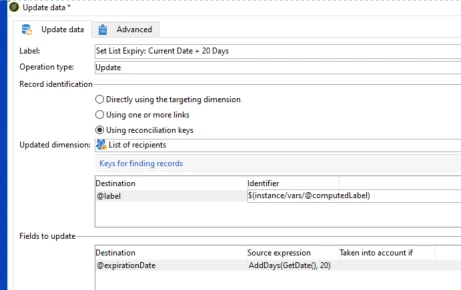
 

Thanks,

Deb

4 replies

New Participant
April 27, 2023

Hi Deb, I selected what you have above and when it populates it in the Updated dimension it's the same as what you have above ("List of recipients"). Same error. Thanks, Cindy

New Participant
April 19, 2023

Can you try using nms:group instead of what you are using in "updated dimension" and run the workflow?

Thanks,

Deb

DebTrAccepted solution
New Participant
February 25, 2021

Hi,

You can use the update data activity after the list creation to set the expiry date.

In case you want to have a computed label for your List,

1.you can store it in a instance variable first

2. set the label using instance variable.

3. set expiry date using a update data activity as per the following.


Thanks,

Deb

uz2020Author
New Participant
March 2, 2021
@debtr Thank you for your reply! Sorry for the late confirmation. What is a "list calculation label"? Is it the "Internal Name" of list? Thank you.
DavidKangni
New Participant
February 12, 2021

Yes You can set this up. Just create a workflow that read list table and select list without expiration date and update them with a data update activity.

Thanks,

David

David Kangni
uz2020Author
New Participant
February 16, 2021

@davidkangniThank you for your reply. Does that mean selecting "Delete" for "Record identification"? I want to delete unnecessary lists after the scheduled time. Thank you.