
Cannot start the web module | Community
Skip to main content
DavidKangni
New Participant
May 3, 2019 10:55 PM UTC
Solved

Cannot start the web module

Hi all,

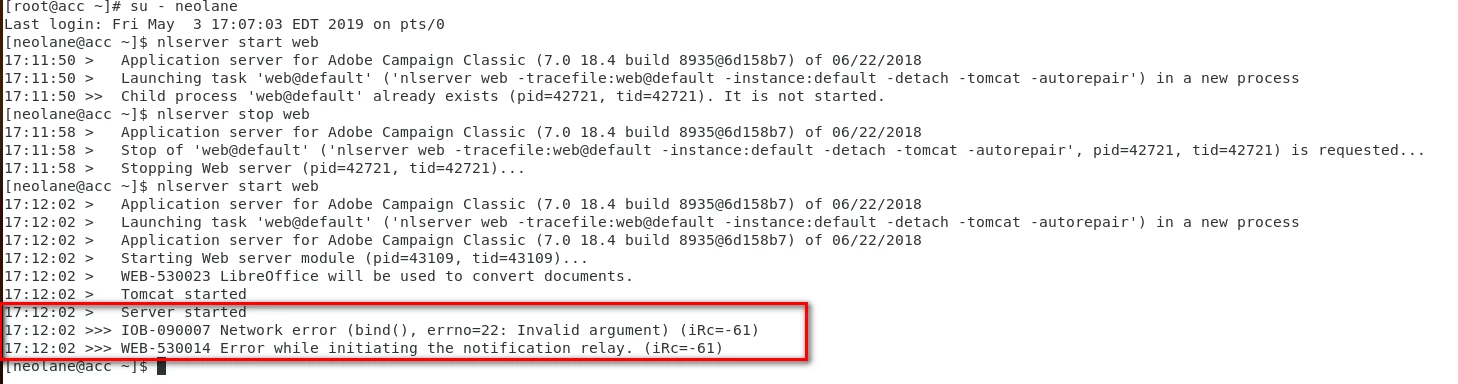
Can someone help in below issue. I have configured Adobe Campaign V7 on CentOS7 and trying to start the web module.

I can access an instance, run the /r/test but having this error

Any pointer on this would really be helpful.
Thanks

David

This post is no longer active and is closed to new replies. Need help? Start a new post to ask your question.
DavidKangni
DavidKangniAccepted solution
New Participant
May 6, 2019 10:14 PM UTC

I fixed the issue by reverting my hostname to localhost

Thanks

David

David Kangni

7 replies

Jonathon_wodnicki
New Participant
May 7, 2019 2:12 PM UTC

Ah, that makes sense. I think I've run into same issue before actually, thanks for follow-up.

Translate
DavidKangni
DavidKangniAuthorAccepted solution
New Participant
May 6, 2019 10:14 PM UTC

I fixed the issue by reverting my hostname to localhost

Thanks

David

Translate
David Kangni
Jonathon_wodnicki
New Participant
May 6, 2019 4:50 PM UTC

That's definitely odd. If you run `ps auxw | grep nlserver` now, does it list processes?

It could be something wrong with the instance configuration, though what I wouldn't know.

Translate
DavidKangni
New Participant
May 6, 2019 4:26 PM UTC

Hi Jon,

Same error when i'm trying to restart the web. the web seems to run. I'm able to access the instance but all the workflows are paused and i can't start wfserver

Thanks

David

Translate
David Kangni
Jonathon_wodnicki
New Participant
May 6, 2019 3:46 PM UTC

Hi,

Looks like nlserver's already running and listening on 8080. Try in order (as root):

  • systemctl stop nlserver6
  • pkill nlserver
  • kill -9 `pidof nlserver`

Running `ps ax | grep nlserver` in-between to see if all nlserver processes are dead.

Thanks,

-Jon

Translate
DavidKangni
New Participant
May 6, 2019 2:35 PM UTC

Hi Jon,

I ran the command and here's the result

Thanks

David

Translate
David Kangni
Jonathon_wodnicki
New Participant
May 6, 2019 2:15 PM UTC

Hi,

Run netstat -plant, see if there's anything already listening on your ports, here 8080.

Thanks,

-Jon

Translate