Concatenate the segment code of parent segment with the child segment | Community
Skip to main content
New Participant
January 18, 2022
Solved

Concatenate the segment code of parent segment with the child segment

  • January 18, 2022
  • 3 replies
  • 3043 views

I have two parent groups - Control and Offer and within them we will define multiple segments, say for example - Seg_A, Seg_B etc. When I get the final output I want something like this - Control.Seg_A, Offer.Seg_A etc.


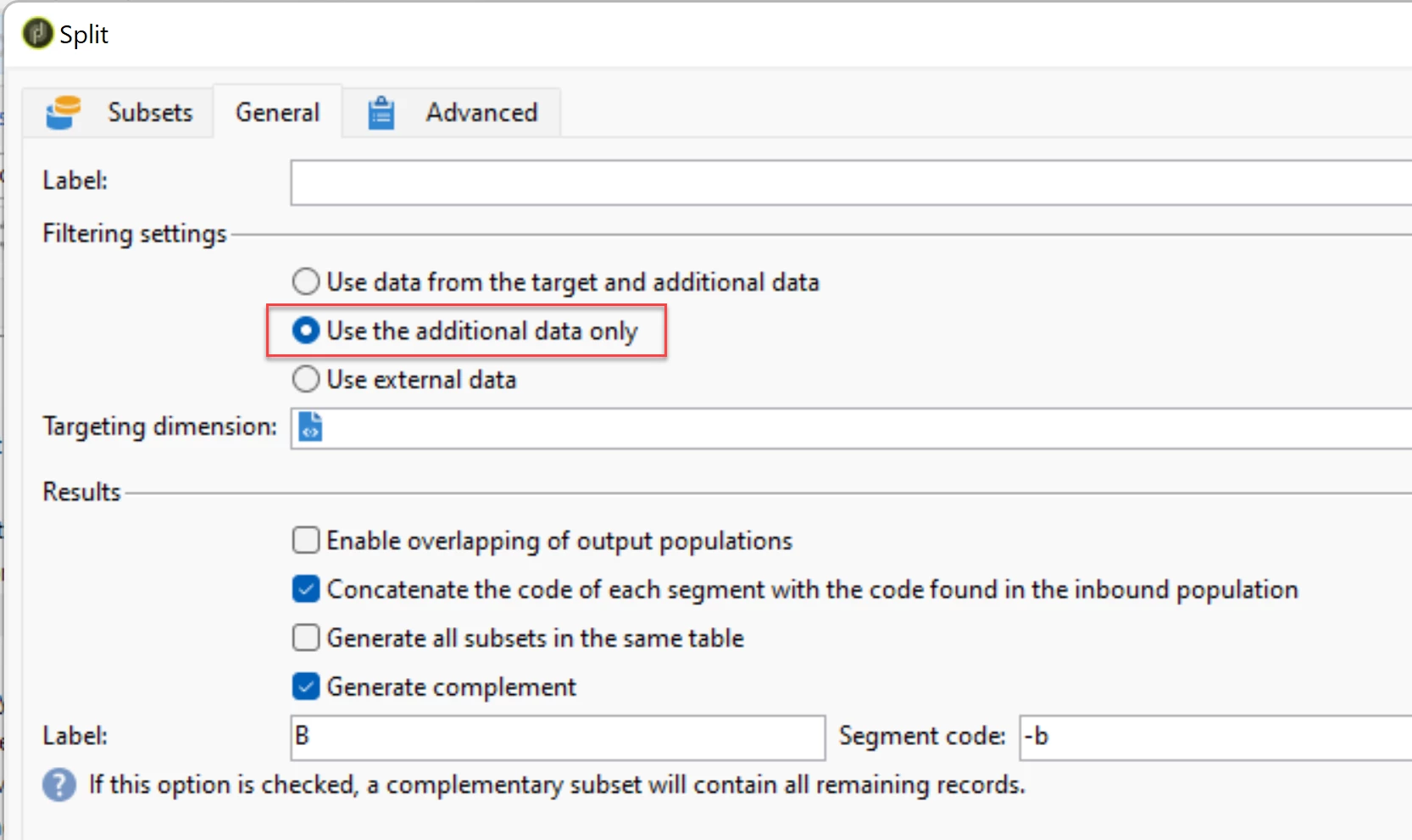
When I check the option 

in the Split activity I get the following error - XTK-170036 Unable to parse expression '[targetData/@segmentCode]+'Seg_A''


Is there a way to make this work or any workaround that can be used. I want to avoid manually entering the extended code every time.
This post is no longer active and is closed to new replies. Need help? Start a new post to ask your question.
Best answer by Kishore_Padamata

Hello @saurav_pincha 
In the second split activity (where you see the error) > General tab please update the Filtering settings to Use the additional data only

Hope this helps!

3 replies

Kishore_Padamata
Kishore_PadamataAccepted solution
Employee
February 4, 2022

Hello @saurav_pincha 
In the second split activity (where you see the error) > General tab please update the Filtering settings to Use the additional data only

Hope this helps!

Sukrity_Wadhwa
Employee
February 16, 2022

Hi @saurav_pincha,

Was this solution helpful to resolve your query? Do let us know.

Thanks!

Sukrity Wadhwa
Sukrity_Wadhwa
Employee
January 27, 2022

Hi @saurav_pincha

Were you able to resolve this query or do you still need more help here? Do let us know.

Thanks!

Sukrity Wadhwa
New Participant
January 27, 2022

Hi @sukrity_wadhwa , 


The issue is not resolved. We are manually setting the concatenated segment codes for now. 


This looks like a bug in the activity code, which is preventing me from using it as intended.

Sukrity_Wadhwa
Employee
January 27, 2022

Thanks for the update! I will escalate it further among SMEs and see if they can help you further.

Sukrity Wadhwa
David_Loyd
Employee
January 18, 2022

Have you double checked the usage of quotes? Sometimes you have to go into the expression editor to check them. The visual is sometimes odd. The error you have looks like your quotes are in the wrong place.

I believe you want something like this.

'[targetData/@segmentCode]' + 'Seg_A'


New Participant
January 18, 2022

The expression is being generated within the activity.

The error is because it is looking for targetData/@segmentCode, whereas the segmentCode from the previous activity is accessible directly as @segmentCode.

David_Loyd
Employee
January 18, 2022

Can you add a screen shot of the activity with the targeting?