Creating a calculated attachment where File name is computed at the time of delivery for each recipient (it can depend on the recipient) | Community
Skip to main content
Employee
July 8, 2017
Solved

Creating a calculated attachment where File name is computed at the time of delivery for each recipient (it can depend on the recipient)

  • July 8, 2017
  • 23 replies
  • 15697 views

Hi,

We are trying to attach a pdf file (from the folder placed on C:// drive for testing because, FTP is not supported) during the email delivery in the template.

  1. Specified the label  to apply to the attachment.
  2. Specified the access path of the file and its personalized name in the definition window (based on the customer name, it picks the respective file to attach).
  3. Uploaded the file to server from local drive in a different workflow as this is a mandatory step.

s_ncs_user_wizard_email_calc_attachement_010.png

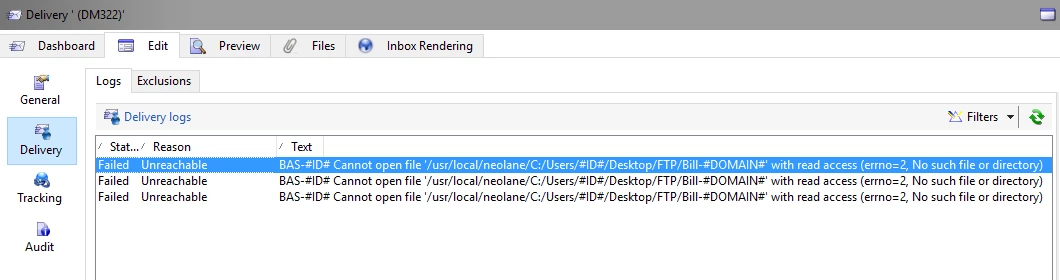
I got an error below.

Questions:

1. How to resolve this issue?

2. Post the testing of attaching the files from desktop, i would like to do the same from an FTP location. How can i do this (any SFTP/other server location Adobe provides from where i can attach the files)?

PS: We have a hosted version of Adobe Campaign v6.1

Thanks,

Rajesh

This post is no longer active and is closed to new replies. Need help? Start a new post to ask your question.
Best answer by Adhiyan

Hello Rajesh,

This is a known limitation when using calculated attachments uploaded from the local system . The reason is that when the attachment is prepared during delivery analysis , the MTA is responsible for preparing the attachment. The MTA for a hosted environment runs on a debian(linux) server and the local file being on a Windows OS causes a compatibility issue and creates the wrong path for the file by appending usr/local/neolane/ (default location of a campaign instance) ahead of the file name.

To overcome this you can :

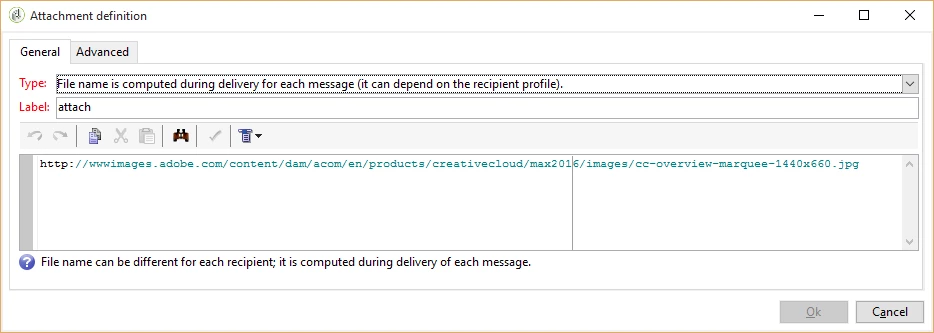
1>. Use a file from a public location like this :

2>. Else , like you have mentioned , you can have the file on a SFTP server and mention the path of the server here like :

/sftp/<user>/incoming/<file_name> in place of the public url

3>. Create a workflow to generate the file on the workflow execution and then export the file to the var/<instance_name>/export folder using the data extraction activity and then use the delivery ,attachment name should be : export/<file_name>

Hope this helps

Regards,

Adhiyan

23 replies

Employee
January 31, 2024

We have some workarounds for this limitation.

1. You can use SFTP, which is hosted on the same URL (location), as the marketing instance URL. After that, you can directly use the file path to access the file.

2. Use any public file hosting environment that provides a file name in the resource URL.

3. Add the files to a folder on the Adobe campaign marketing server and then we will be able to use the same path to access the files in the attachment.


Regards,

Harish Pandey

New Participant
June 26, 2019

Hi All,

Can we pull the file from SFTP location if we are using message center?

Thanks

Souvik

damandeepk75615
New Participant
June 1, 2022

Hi Souvik,


Wanted to check if the you got information regarding the query 'Can we pull the file from SFTP location if we are using message center?' 


Thanks

Daman


joydeep_kundu
New Participant
June 11, 2018

Hi Adhiyan,

I saw that once the calculated attachment is configured in message center template and for any reason MTA is not able to locate the file; emails are not getting delivered. Is it a expected behavior Or we can do something in configuration so that emails can be delivered even if the file to be attached is not found ?

Kindly let me know.

Thanks,

Joydeep 

Adhiyan
Employee
November 1, 2017

Hi Cavallo,

No , unfortunately not . This is a limitation . The personalization of the calculated attachment is done by the Mid MTA and hence the path will be appended when using mid-sourcing.

You can see the solution described at the beginning of the topic and see if it works for you.

1>. Use a SFTP location to pull the files.

2>. Use the URL of a public location (like google drive) to fetch the files.

Regards,

Adhiyan

New Participant
October 31, 2017

Hi Adhiyan​ do you happen to have an idea about the above?

New Participant
October 24, 2017

Hello Adhiyan,

Yes we are using a mid-sourced server.

Is there a way to prevent the path from being appended with the linux file path?

Thanks,

Lee

Adhiyan
Employee
October 24, 2017

Hello Lee,

The SFTP path appears to be correct and if the same location syntax works for file collector it should work in delivery attachment as well.

It does look like though a Linux server is involved . May I know which mode you send the delivery from, are you using a mid-sourced server by any chance ?

Regards,
Adhiyan

New Participant
October 20, 2017

Hi Adhiyan,

Yes the file name is being passed in the target data. The data in flat file is reconciled to the recipient in nms:recipient and then the target data from the file is still passed for dynamic use. This setup works fine when there is no attachment involved. If I do a standard delivery (no attachment) the file attachment data is populated successfully in the content of the delivery within the <%= targetData.cAttachment %> block, so there is no issue of the file name being directly passed correctly.

See screenshot:

Here is a screenshot of the logs -- it failed and went into retry pending. It looks like it was due to adobe appending the location with the standard linux sftp location. How do i prevent this since we are not adobe hosted and I do not want the path to be appended, and still remain dynamic

General question. Is it possible to do a dynamic pull of a file from an on prem sftp with this delivery setup? Am I setting up the delivery correctly? The file path works fine when using a file collector/export.... which is why I find this strange.

Adhiyan
Employee
October 19, 2017

Hello Lee,

When you are using targetData.cAttachment , is the value for cAttachment being passed via a workflow ?

Can you share the logs of the delivery which is failing , it can provide some idea about the failure .

Regards,

Adhiyan

New Participant
October 19, 2017

Hi Adhiyan,

I have a similar issue; however, in my situation we are using an on prem hosted solution on windows server. I am trying to pull a file, dynamically, based off data that is passed in the targeting. The path to the SFTP which has been successfully tested via a file collector is as follows: E:\SFTP_ROOT\sftpuser01\AdobeCampaign\Inbound\AbuseCampaign\

Here is what does work:

1. File collector referencing the above path is able to pull the file, so there is no access issues.

2. Hardcoded File Path attachement --- A delivery is successfully able to attach the file if the attachment setting is set to "File name is specified when creating the delivery template." This works if I put the above sftp location and hardcode the file name. A personalization block does not work here, so dynamic pull of the file does not work here.

Here is what does NOT work:

3. Dynamic file pull test based on target data --- If I select "File name is computed during delivery for each message" and include the file path as either the hardcoded path or one that includes a personalization block, the delivery fails and goes into pending . There is no information in the log about the file. Am I incorrectly referencing this path? Is this feature  not able to pull a file based off the SFTP using a file path that has a dynamic variable produced in the targeting?

Any advice is greatly appreciated.

Best,

Lee