Deleting a archived field while creating survey | Community
Skip to main content
This post is no longer active and is closed to new replies. Need help? Start a new post to ask your question.
ParthaSarathy
ParthaSarathyAccepted solution
New Participant
Aug 21, 2023 10:19 AM UTC

Hi @jayan_sk ,

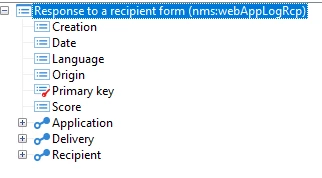
Extend the nms:webAppLogRcp schema.
Data schema > new > Select Extension of a schema > Schema: nms:webAppLogRcp
> modify the element tag as below,
<element label="Responses to recipient forms" labelSingular="Response to a recipient form" name="webAppLogRcp"> <attribute _operation="delete" name="language"/> </element>
  
Save it and Update the database structure, disconnect & Reconnect. Now the 'Language' field will be removed from nms:webAppLogRcp schema.
(Test this in Lower environment.)
 ~  ParthaSarathy S~  Click here to join ADOBE CAMPAIGN USER GROUP for Quarterly In-person | Hybrid | Virtual Meetups
2 replies

ParthaSarathy
ParthaSarathyAccepted solution
New Participant
Aug 21, 2023 10:19 AM UTC

Hi @jayan_sk ,

Extend the nms:webAppLogRcp schema.
Data schema > new > Select Extension of a schema > Schema: nms:webAppLogRcp
> modify the element tag as below,
<element label="Responses to recipient forms" labelSingular="Response to a recipient form" name="webAppLogRcp"> <attribute _operation="delete" name="language"/> </element>
  
Save it and Update the database structure, disconnect & Reconnect. Now the 'Language' field will be removed from nms:webAppLogRcp schema.
(Test this in Lower environment.)
Translate
 ~  ParthaSarathy S~  Click here to join ADOBE CAMPAIGN USER GROUP for Quarterly In-person | Hybrid | Virtual Meetups

Jayan_SkAuthor
Level 2
Aug 21, 2023 10:25 AM UTC

Thank you @parthasarathy 

Translate