Edit Unsubscribe Page | Community
Skip to main content
New Participant
August 13, 2020
Solved

Edit Unsubscribe Page

  • August 13, 2020
  • 4 replies
  • 3019 views

Hello,


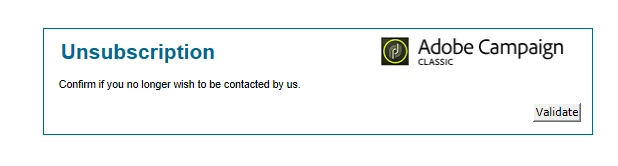
I am hosting the unsub page for emails in ACC and I wanted to update the template by changing the Adobe Campaign logo in the form as well as updating the button from "Validate" to "Confirm".  I can update the text in the messages but I am having trouble locating where I can make the other updates.  Any ideas?
 

This post is no longer active and is closed to new replies. Need help? Start a new post to ask your question.
Best answer by amritakedia_epsilon
In the Edit tab of the Web App , there should be a Page Activity . Check there

4 replies

Sukrity_Wadhwa
Employee
August 27, 2020

Hi @mlong1427,

were you able to resolve this issue? Do let us know.

Thanks!

Sukrity Wadhwa
kapilKochar
New Participant
August 18, 2020

Hi,


You can build your custom rendering using "Form Rendering" section under Administration .

Here your webapp is using default "Form Rendering". You can change it to your customized one in the webapp properties.


Thanks,

Kapil

New Participant
August 13, 2020

Hi All the web Apps are usually located here


Administration -> Configuration -> Web Application .

isahore
New Participant
August 13, 2020

Hi @mlong1427,


You can change it in the webApp that is used to host the unsubscription page. You can find the name of the webApp in the unsubscription link like this:

https://yourcampaignhost.com/webapp/unsub?id=2381490


Here "unsub" is the internalname of the webApp. You can find it in your instance.


Regards,

Ishan

MLong1427Author
New Participant
August 13, 2020

I am able to find the webapp that is used for the unsub but I am having trouble finding where to update the logo used and the name on the validate button.