Error in AEM content Synchronization - Adobe Campaign Classic | Community
Skip to main content
New Participant
January 14, 2020
Solved

Error in AEM content Synchronization - Adobe Campaign Classic

  • January 14, 2020
  • 2 replies
  • 7129 views

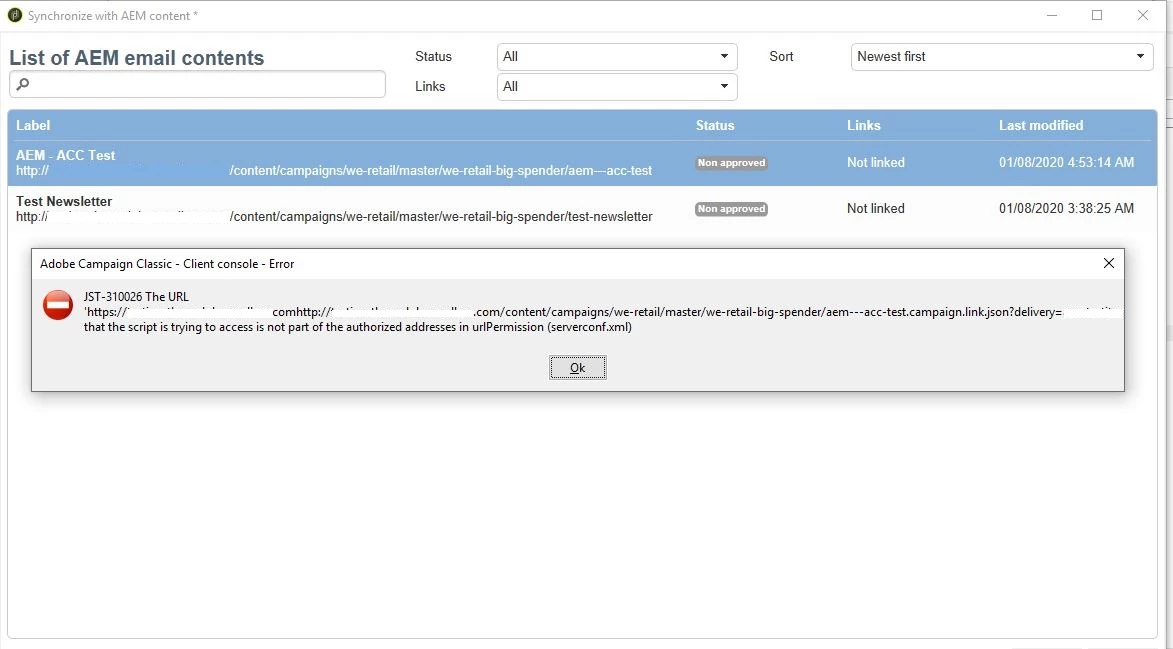
I'm facing an error while accessing the ontent from AEM in ACC. Attached is the screenshot. 

While the connectivity is established, I'm unable to fetch the content into delivery. Basically the content leisted from AEM is having absolute path (http://xxxx.com/content/campaign etc) while i think the relative path is only expected. As a result the original path is also getting appended and is throwing the error. 

Any help to fix this please.

Note: I've all the required changes in the serverConf.xml for urlpermission of the domain, still didnt help.
This post is no longer active and is closed to new replies. Need help? Start a new post to ask your question.
Best answer by Jonathon_wodnicki

Hi,


Looks like you have 2 url's concatenated together there.


Thanks,

-Jon

2 replies

saikatk2447661
New Participant
January 16, 2020

Got this issue before. This has to be fixed from AEM side. Just some configuration change.

SivaKAuthor
New Participant
January 16, 2020
Can you let me know what is the configuration change? Is it to do with externalizer in OSGi, I've the correct configuration in there. Let me know if you recollect what should be changed in AEM side.
Jonathon_wodnicki
Jonathon_wodnickiAccepted solution
New Participant
January 14, 2020

Hi,


Looks like you have 2 url's concatenated together there.


Thanks,

-Jon

SivaKAuthor
New Participant
January 15, 2020
Hi , Yes. When the email assets list in the dialog box, only the relative path is expected and the https://xxx.com should be added automatically. Since the asset listing shows up with http path it is showing 2 urls. Not sure if any settings should be changed in OSGi or somewhere to get the assets listed with the relative path.