Error in uploading file to SFTP | Community
Skip to main content
New Participant
April 4, 2022
Solved

Error in uploading file to SFTP

  • April 4, 2022
  • 2 replies
  • 1399 views

Hello,


I'm exporting campaign data through csv file and uploading the file onto SFTP server, but in file transfer activity I'm getting below error:


"CRL-290003 Upload error in cURL"


the external account for SFTP is already setup.

any pointers to fix this issue would be highly appreciated.


Thanks in advance.
This post is no longer active and is closed to new replies. Need help? Start a new post to ask your question.
Best answer by DebTr

Hi @parmeshwarr3905 ,

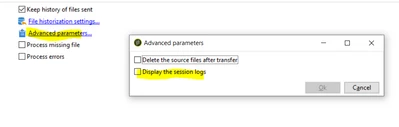
You can try enable session logs it may give you more details.

There can be multiple reasons.

1. The credentials are not correct.

2. The connectivity from Adobe to the external sftp in terms of networ/firewall.

3. Access of the account/user mentioned in External Account to the external sftp folder.


2 replies

DebTrAccepted solution
New Participant
April 4, 2022

Hi @parmeshwarr3905 ,

You can try enable session logs it may give you more details.

There can be multiple reasons.

1. The credentials are not correct.

2. The connectivity from Adobe to the external sftp in terms of networ/firewall.

3. Access of the account/user mentioned in External Account to the external sftp folder.


New Participant
April 4, 2022

Hi,


Try to check with the credentials for the external account being used in the File transfer activity.

Mostly the error can be assosciated with it.


Thanks