Exporting labels instead of internal values of enumeration | Community
Skip to main content
New Participant
April 12, 2022
Solved

Exporting labels instead of internal values of enumeration

  • April 12, 2022
  • 3 replies
  • 1912 views

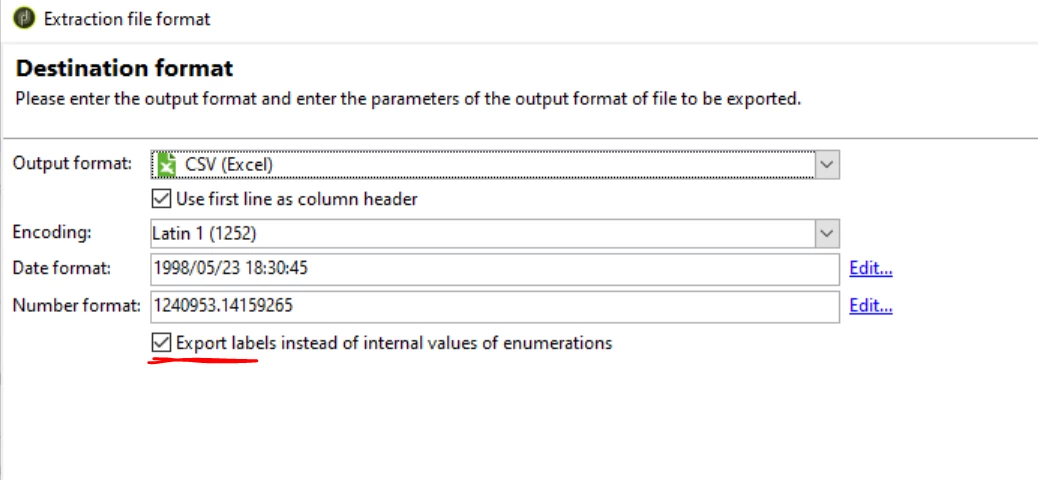
In campaign classic v7 I have selected the checkbox to export labels instead of enumeration values and still i'm getting the enumeration values in csv file instead of labels. 

I'm exporting extracted data using file transfer to SFTP.


I'm trying to export as 'Yes', 'No' instead of '1', '0' but it's not working, any advise would be appreciated.


This post is no longer active and is closed to new replies. Need help? Start a new post to ask your question.
Best answer by _Manoj_Kumar_

Hello @parmeshwarr3905 


You can add this condition in the export expression of your column.

Iif(@COLUMN=1,'Yes' ,'No' )

3 replies

_Manoj_Kumar_
_Manoj_Kumar_Accepted solution
New Participant
April 13, 2022

Hello @parmeshwarr3905 


You can add this condition in the export expression of your column.

Iif(@COLUMN=1,'Yes' ,'No' )
     Manoj     Find me on LinkedIn
DavidKangni
New Participant
April 12, 2022

Check if you're using a boolean type for your field. Which means you don't have any defined enumerations for this field.

Thanks,

David

David Kangni
New Participant
April 12, 2022

Yes @davidkangni the field type is of boolean. could you please suggest how shall I proceed?

New Participant
April 12, 2022

Hi @parmeshwarr3905,

Are you getting any errors in the audit of export activity?


One possible solution could be to add an enrichment before the export and have a string column added to it.

In the expression you can write some code (an Iif() shall do) to find the string value based on the integer.


Cheers,

Deb

New Participant
April 12, 2022

There is no error.