GA integration with Adobe | Community
Skip to main content
CIGM
New Participant
November 27, 2017
Solved

GA integration with Adobe

  • November 27, 2017
  • 12 replies
  • 10397 views

Hi there,

I have a generic question regarding GA integration with Adobe Campaign. Any help would be much appreciate it.

- How can I integrate GA data to feedback back to Adobe Campaign? Would this be done by the Adobe Genesis connector (Web Analytcis) External Account?

Thanks,

C

This post is no longer active and is closed to new replies. Need help? Start a new post to ask your question.
Best answer by Adhiyan

Hello ,

Yes you can integrate with Google analytics via the genesys connector and then configure the utm tags in GA to pickup the data from enriched URLs.

Please find attached the document you can follow for the same .

Creating a new Web Analytics Account

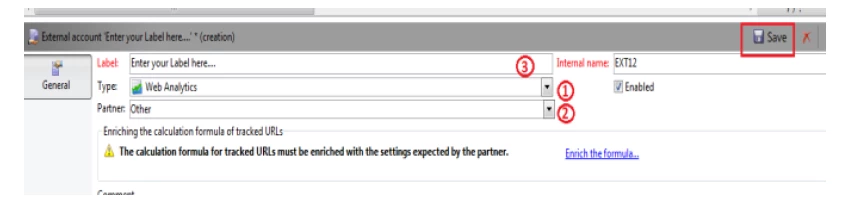
Go to Administration > Platform

On the right hand side of the screen click 'new' as shown below

Steps

Select the Type to 'Web Analytics'

Select Partner to 'Other'

Then enter the Label

Then click Save
Setting up the Web Analytics Account

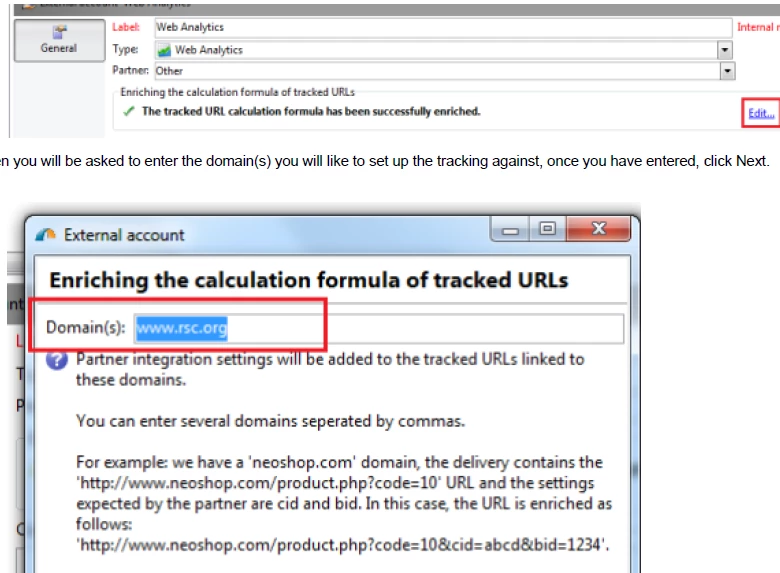
Go to Administration > Platform> External Account, click on Web Analytics as you can see below

Click Edit on the General Tab as you can see below

Then you will be asked to enter the domain(s) you will like to set up the tracking against, once you have entered, click Next.

Once you click Next, you will be presented with the Formula, now click the option to overload the function as shown below
In the same screen as above, you will see a text area below with the tracking code. This is place where you overload the script

with your Google tracking code.
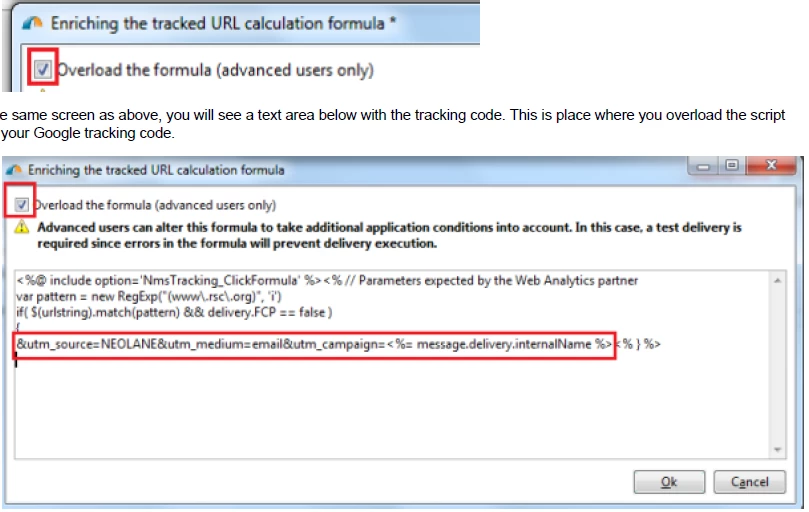
As you can see in the above screen shot, the following code has been added:

&utm_source=NEOLANE&utm_medium=email&utm_campaign=<%= message.delivery.internalName %>

Note: message.delivery.internalName will get the internal name of the delivery and that will you're the value of utm_campaign

Setting up Web Analytics option on the delivery :

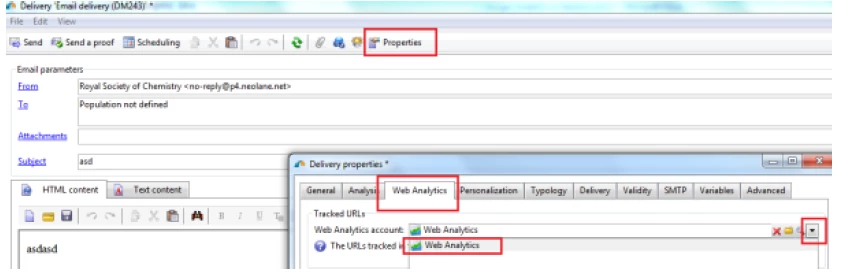
Now go to the delivery where you wish to set the tracking on.

Inside the delivery, click Properties and then go to Web analytics connector. From here you can choose the web analytic account

you would like to use for your delivery.
Regards,
Adhiyan

12 replies

CIGM
CIGMAuthor
New Participant
December 14, 2017

Thanks Adhiyan.

Just to clarify, if I follow all these steps it will meana that I don't need to add the tracking URLs on the delivery template as they would be automatically generated once the email is sent. Am I right?

Thanks,

C

Adhiyan
AdhiyanAccepted solution
Employee
November 29, 2017

Hello ,

Yes you can integrate with Google analytics via the genesys connector and then configure the utm tags in GA to pickup the data from enriched URLs.

Please find attached the document you can follow for the same .

Creating a new Web Analytics Account

Go to Administration > Platform

On the right hand side of the screen click 'new' as shown below

Steps

Select the Type to 'Web Analytics'

Select Partner to 'Other'

Then enter the Label

Then click Save

Setting up the Web Analytics Account

Go to Administration > Platform> External Account, click on Web Analytics as you can see below

Click Edit on the General Tab as you can see below

Then you will be asked to enter the domain(s) you will like to set up the tracking against, once you have entered, click Next.

Once you click Next, you will be presented with the Formula, now click the option to overload the function as shown below

In the same screen as above, you will see a text area below with the tracking code. This is place where you overload the script

with your Google tracking code.

As you can see in the above screen shot, the following code has been added:

&utm_source=NEOLANE&utm_medium=email&utm_campaign=<%= message.delivery.internalName %>

Note: message.delivery.internalName will get the internal name of the delivery and that will you're the value of utm_campaign

Setting up Web Analytics option on the delivery :

Now go to the delivery where you wish to set the tracking on.

Inside the delivery, click Properties and then go to Web analytics connector. From here you can choose the web analytic account

you would like to use for your delivery.

Regards,
Adhiyan