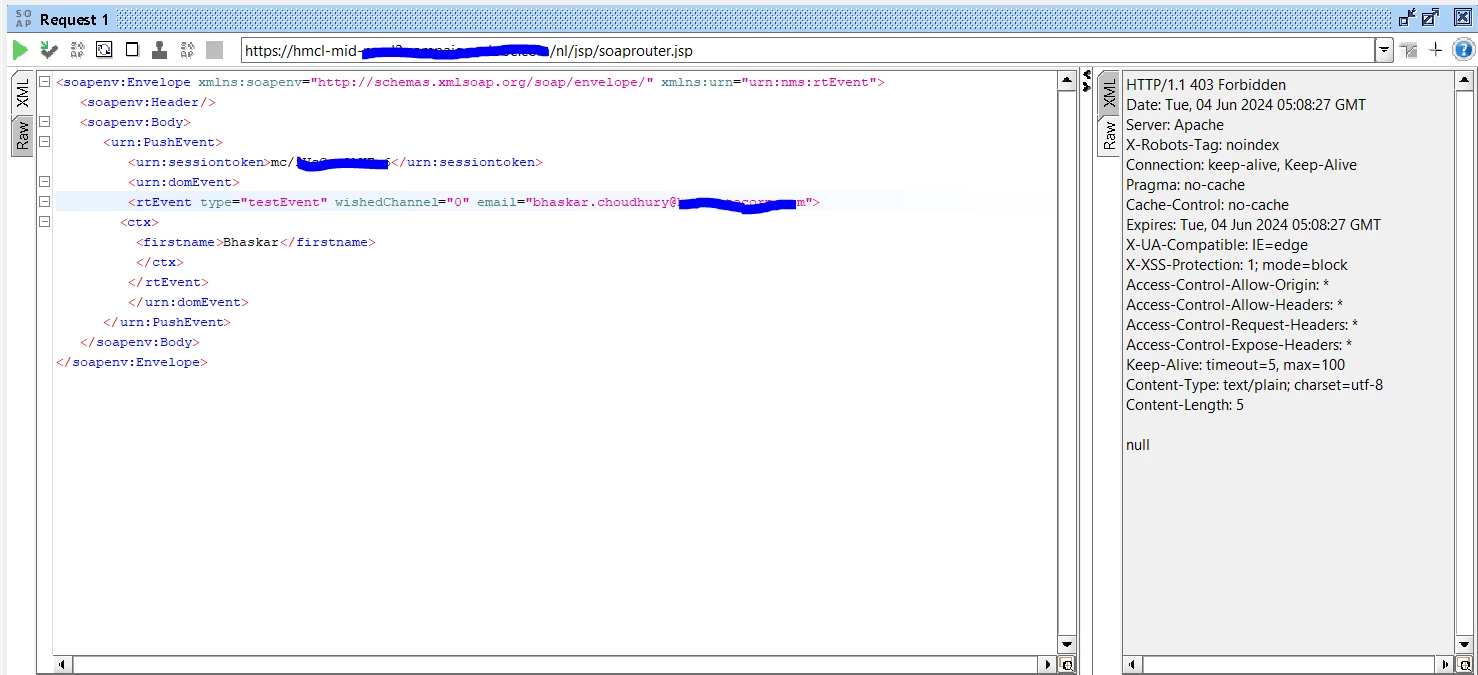
Getting HTTP/1.1 403 Forbidden when I Try Transactional Messaging via SOAP UI | Community
Skip to main content
This post is no longer active and is closed to new replies. Need help? Start a new post to ask your question.
Best answer by CampaignerForLife

You've to use first a logon call to your instance, like this:

<soapenv:Envelope xmlns:soapenv="http://schemas.xmlsoap.org/soap/envelope/" xmlns:urn="urn:xtk:session"> <soapenv:Header/> <soapenv:Body> <urn:Logon> <urn:sessiontoken></urn:sessiontoken> <urn:strLogin>xxxxxx</urn:strLogin> <urn:strPassword>xxxxxxx</urn:strPassword> <urn:elemParameters></urn:elemParameters> </urn:Logon> </soapenv:Body> </soapenv:Envelope>

And with SOAPAction=xtk:session#Logon as header. 


it will give you a session token, which you have to use in your actual call, between sessiontoken brackets. Remember to change the header, now it must be SOAPAction=nms:rtEvent#PushEvents


If this fails, check instance url, instance users and that you're using a technical operator or one with enough rights

3 replies

CampaignerForLife
CampaignerForLifeAccepted solution
New Participant
June 5, 2024

You've to use first a logon call to your instance, like this:

<soapenv:Envelope xmlns:soapenv="http://schemas.xmlsoap.org/soap/envelope/" xmlns:urn="urn:xtk:session"> <soapenv:Header/> <soapenv:Body> <urn:Logon> <urn:sessiontoken></urn:sessiontoken> <urn:strLogin>xxxxxx</urn:strLogin> <urn:strPassword>xxxxxxx</urn:strPassword> <urn:elemParameters></urn:elemParameters> </urn:Logon> </soapenv:Body> </soapenv:Envelope>

And with SOAPAction=xtk:session#Logon as header. 


it will give you a session token, which you have to use in your actual call, between sessiontoken brackets. Remember to change the header, now it must be SOAPAction=nms:rtEvent#PushEvents


If this fails, check instance url, instance users and that you're using a technical operator or one with enough rights

DavidKangni
New Participant
June 4, 2024

@bhaskarjc 

Your URL seems to point to mid. Please check if you have the correct URL and try again.

Also per default username/password is not enabled (excepted if you request the support to allow it), so you may need to use logon method to get the session method.


Thanks,

David

David Kangni
_Manoj_Kumar_
New Participant
June 4, 2024

@bhaskarjc 


If you are on v8.5 and above then you will have to use the technical operator.


Documentation is available here: https://experienceleague.adobe.com/en/docs/campaign/technotes-ac/tn-new/ims-migration

     Manoj     Find me on LinkedIn