How can i transform a field into lowercase? | Community
Skip to main content
Level 2
Jul 18, 2023 10:07 AM UTC
Solved

How can i transform a field into lowercase?

Hi! the field @2503248 of my database is formated all in Uppercase (example: DAVID, JOHN,MARIE...) But i would like to personalise my  email delivery so i can use correctly the names (David, John, Marie).


How can i do to preserve the first letter as uppercase but transform the others to lowercase?


Thank you!

LakshmiPravallika
LakshmiPravallikaAccepted solution
New Participant
Jul 18, 2023 10:35 AM UTC

Hi @javi_landa ,

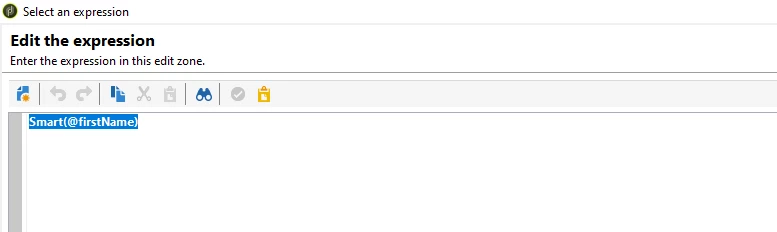
You can use the below in built function to convert the @FirstName of the Database Value to Proper Case(First Letter Upper Case and other letters in Lower Case), by below:


Inside the query activity pull @FirstName field, in the Additional Data section, configure the field in this way:


Smart(@firstName)


after doing this , try pulling the configured Variable inside the delivery activity as shown below:


Regards,

Pravallika.

3 replies

isahore
New Participant
Jul 18, 2023 2:27 PM UTC

Hi @javi_landa,

alternatively, if you do not wish to use the enrichment and the "smart()" function - you can simply do the following in your email template:

<%= recipient.firstName.substring(0,1).toUpperCase()+recipient.firstName.substring(1,100).toLowerCase() %>

I am assuming that the field to be used for personalization is "firstName" in the recipient schema, and that the max length of the field is 100 characters. You can adjust these accordingly as per your data model and personalization need.


Regards,

Ishan

Translate
Level 5
Jul 18, 2023 10:41 AM UTC

Hi @javi_landa ,

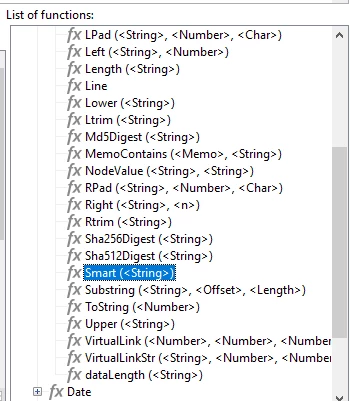
I just tested below function and it is working. You can use the same and it will convert into your use case. Just do the same in Enrichment Activity.


Regards

Abhishek


Translate
LakshmiPravallika
LakshmiPravallikaAccepted solution
New Participant
Jul 18, 2023 10:35 AM UTC

Hi @javi_landa ,

You can use the below in built function to convert the @FirstName of the Database Value to Proper Case(First Letter Upper Case and other letters in Lower Case), by below:


Inside the query activity pull @FirstName field, in the Additional Data section, configure the field in this way:


Smart(@firstName)


after doing this , try pulling the configured Variable inside the delivery activity as shown below:


Regards,

Pravallika.

Translate