How to access the XML of a workflow? | Community
Skip to main content
New Participant
June 1, 2024
Solved

How to access the XML of a workflow?

  • June 1, 2024
  • 3 replies
  • 1141 views

I have a workflow failing because the person who created it does not work any longer with us. 

I've changed the "assiged to" , in the edit tab, to a current employee. Still the error mentions that the ex employee has no the necesarry permissions to change it. 

I've found this documentation and it says I need to access the XML of the workflow to fix it. How to do that?

Unable to start workflow | Adobe Campaign

This post is no longer active and is closed to new replies. Need help? Start a new post to ask your question.
Best answer by _Manoj_Kumar_

Hello @god_prophet 


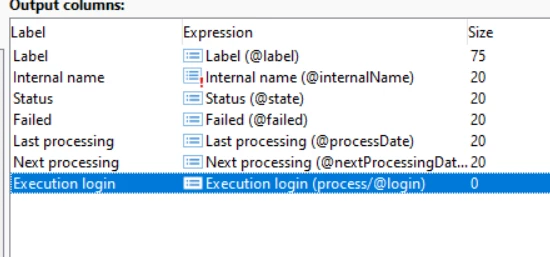
Update the value of execution login (highlighted in the screenshot below) to your operator and restart the WF.


3 replies

_Manoj_Kumar_
_Manoj_Kumar_Accepted solution
New Participant
June 2, 2024

Hello @god_prophet 


Update the value of execution login (highlighted in the screenshot below) to your operator and restart the WF.


     Manoj     Find me on LinkedIn
ParthaSarathy
New Participant
June 2, 2024

Hi @god_prophet ,

This issue will be fixed by Restarting the workflow with existing user.

 ~  ParthaSarathy S~  Click here to join ADOBE CAMPAIGN USER GROUP for Quarterly In-person | Hybrid | Virtual Meetups
Heku_
New Participant
June 1, 2024

Hello, @god_prophet, to access the XML of the workflow you can double click a workflow to open it, then you can right click anywhere inside the workflow editor and choose the option "Edit XML Source", it's a very useful option and now you know how to access it!

Hope this helps!