How to display date and time in UTC format i.e, 2018-05-02T13:47:33.743Z? | Community
Skip to main content
Level 2
Oct 23, 2018 8:31 AM UTC
Solved

How to display date and time in UTC format i.e, 2018-05-02T13:47:33.743Z?

Hi,

I have an Export workflow, that extracts data from tracking logs and recipient schema and is storing the data in a .csv file. I have a requirement that while extracting date-time data we should be displaying in file (example as 2018-05-02T13:47:33.743Z) this.

My campaign database is configured to store data in UTC format but I want the data while placing in file in the above mentioned format. How to achieve this? Currently I am getting data as: 10/23/2018  8:38:01 AM.

Thanks in Advance.

This post is no longer active and is closed to new replies. Need help? Start a new post to ask your question.
DebTrAccepted solution
Level 6
Oct 24, 2018 3:28 PM UTC

Hi Sonika,

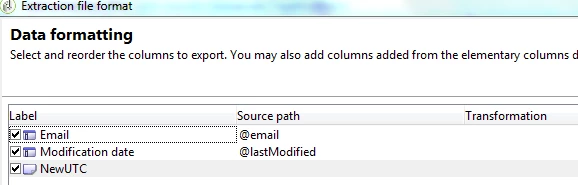
This can be achieved using an "Export File" activity with help of calculated fields.

New Calculated Field

Code

Output file

4 replies

DebTrAccepted solution
Level 6
Oct 24, 2018 3:28 PM UTC

Hi Sonika,

This can be achieved using an "Export File" activity with help of calculated fields.

New Calculated Field

Code

Output file

Translate
david--garcia
Level 10
Oct 24, 2018 12:15 PM UTC

You are referring to ISO 8601 time, The Z suffix in the ISO 8601 time representation is sometimes referred to as "Zulu time" because the same letter is used to designate the Zulu time zone.

ISO 8601 - Wikipedia

Should get the following.

As for the extract, you need to use an expression with SQL, there are other ways, but this is the quickest I knew

In the column expression use the following, where GetDate() can be replaced with your tsColumnName (name of your field with timestampt) and append the Z manually for (ZULU timezone otherwise known as UTC )

[SQLDATA[CONVERT(VARCHAR(30), tsyourdatehere, 126)+'Z']]

Translate
New Participant
Oct 23, 2018 12:01 PM UTC

Hi there,

I don't think you can do that in the export file activity.

One way to do this would be to convert the date you want in a SQL activity just before the extract file activity.

Do you happen to know which DBMS your Adobe instance is using ?

Mohamed

Translate
Level 2
Oct 23, 2018 10:23 AM UTC

Vipul Raghav​, Adhiyan​ Can you please help in this?

Translate