How to get the most ordered product via adobe campaign ? | Community
Skip to main content
New Participant
October 2, 2020
Solved

How to get the most ordered product via adobe campaign ?

  • October 2, 2020
  • 2 replies
  • 1589 views

Hi Adobe Community!


I'm trying to get the product most ordered by a customer based on the below table:
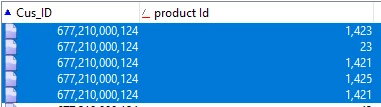
 

What I'm trying to achieve is to get a final table with Cus_ID | Most ordered 

Ex with the above:

Cus_ID             |  Most ordered 

677210000124 |  1,421


The main table is the Recipient table and the other table is linked via a "one to many" link.

What should I do to get to this outcome?


Thanks in advance,

Olivier

This post is no longer active and is closed to new replies. Need help? Start a new post to ask your question.
Best answer by _Manoj_Kumar_

Hello @oliviergroux ,


You can query all your data from this orders schema and then add an enrichment after this.


In the enrichment add these two columns product id and the customer Id. Check the checkbox which says groupBy for product id column and then in the recipient column 

Something like this


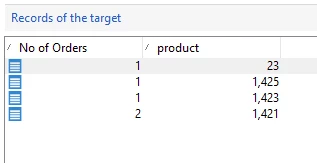
Then after running the query you will get the output where you will have the total number of orders against a product like this:


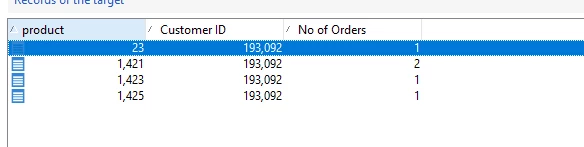
Then you can again enrich this data on the basis of product id with the original table to get the desired output. I have added an additional column of no orders.


Let me know if that helps.


Thanks


2 replies

Sukrity_Wadhwa
Employee
October 12, 2020

Hi @oliviergroux,

Were you able to resolve this query with the given solution? Do let us know.

Thanks!

Sukrity Wadhwa
New Participant
October 12, 2020
Yes all good !
_Manoj_Kumar_
_Manoj_Kumar_Accepted solution
New Participant
October 3, 2020

Hello @oliviergroux ,


You can query all your data from this orders schema and then add an enrichment after this.


In the enrichment add these two columns product id and the customer Id. Check the checkbox which says groupBy for product id column and then in the recipient column 

Something like this


Then after running the query you will get the output where you will have the total number of orders against a product like this:


Then you can again enrich this data on the basis of product id with the original table to get the desired output. I have added an additional column of no orders.


Let me know if that helps.


Thanks


     Manoj     Find me on LinkedIn