Initializing javascript values into dropdown list in web forms | Community
Skip to main content
New Participant
June 4, 2018
Solved

Initializing javascript values into dropdown list in web forms

  • June 4, 2018
  • 1 reply
  • 1645 views

Hi Team,

I am facing some challenge on calling java script values into next page drop down list  so please provide me the solution on this ASAP.

This is my script:

var query = xtk.queryDef.create(

<queryDef label="Campaigns" namespace="nms" operation="select"

          schema="nms:operation" startPath="/" xtkschema="xtk:queryDef">

      <select>

    <node   expr="@label" />

  </select>

</queryDef>

)

var res = query.ExecuteQuery(); 

if (ctx.vars.length() == 0) {

  ctx.appendChild(<vars/>)


ctx.vars.appendChild(res);

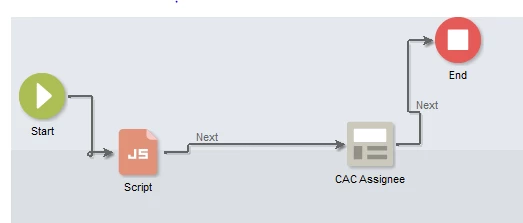
2)This is my web form flow
This post is no longer active and is closed to new replies. Need help? Start a new post to ask your question.
Best answer by Jean-Serge_Biro

Hi Jitendrat,

Please may you check the context content (for vars elements) by selecting the Debug checkbox in the Preview tab?

Take care, you must retrieve 2 nodes, not only the label but the ID or internal name.

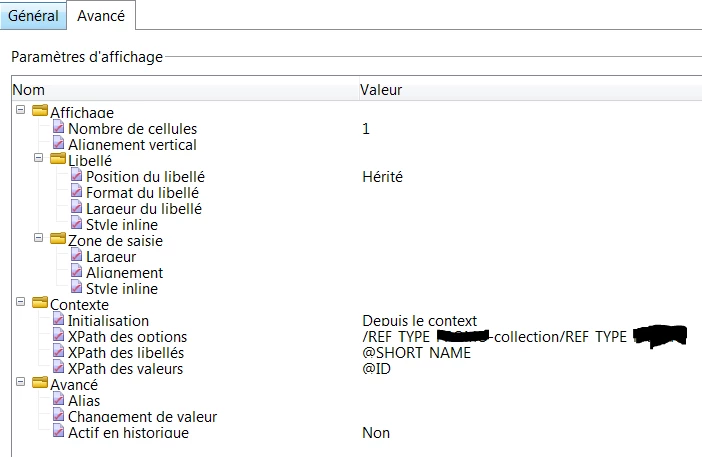
And in the web page activity section, if it is a web page compatibility v5, you must set the listbox in the Advanced tab.

Whatever you need to use a list box value dynamically set from your database, custom or standard tables values, you can set the XPath it as is in the Advanced tab of the Web page form (compatibility v5):

If the activity web page is a Web page v6 (standard one, not a compatibility v5 one), you can manage the values in the source page directly doing your queryDef in Javascript and assigning values to the <input select...> element values.

Regards
J-Serge

1 reply

Jean-Serge_Biro
Jean-Serge_BiroAccepted solution
New Participant
June 5, 2018

Hi Jitendrat,

Please may you check the context content (for vars elements) by selecting the Debug checkbox in the Preview tab?

Take care, you must retrieve 2 nodes, not only the label but the ID or internal name.

And in the web page activity section, if it is a web page compatibility v5, you must set the listbox in the Advanced tab.

Whatever you need to use a list box value dynamically set from your database, custom or standard tables values, you can set the XPath it as is in the Advanced tab of the Web page form (compatibility v5):

If the activity web page is a Web page v6 (standard one, not a compatibility v5 one), you can manage the values in the source page directly doing your queryDef in Javascript and assigning values to the <input select...> element values.

Regards
J-Serge