Multiple end points - Ensure Workflow completion | Community
Skip to main content
New Participant
December 16, 2022
Solved

Multiple end points - Ensure Workflow completion

  • December 16, 2022
  • 2 replies
  • 1606 views

Hello All,


I have a workflow which has multiple end points, based on various criteria.

I have an Option that notes the time of the last successful run. In this case where there are multiple end points which place should code to update the Option date be written. ?


If 1 Transition finishes and other ends up in error, how this cases can be handled ?


Please suggest some best practice for errors, last run successful 


Regards,

DG


This post is no longer active and is closed to new replies. Need help? Start a new post to ask your question.
Best answer by AdrianESanchez

Hi, I'll describe two possible options that I just came up with:

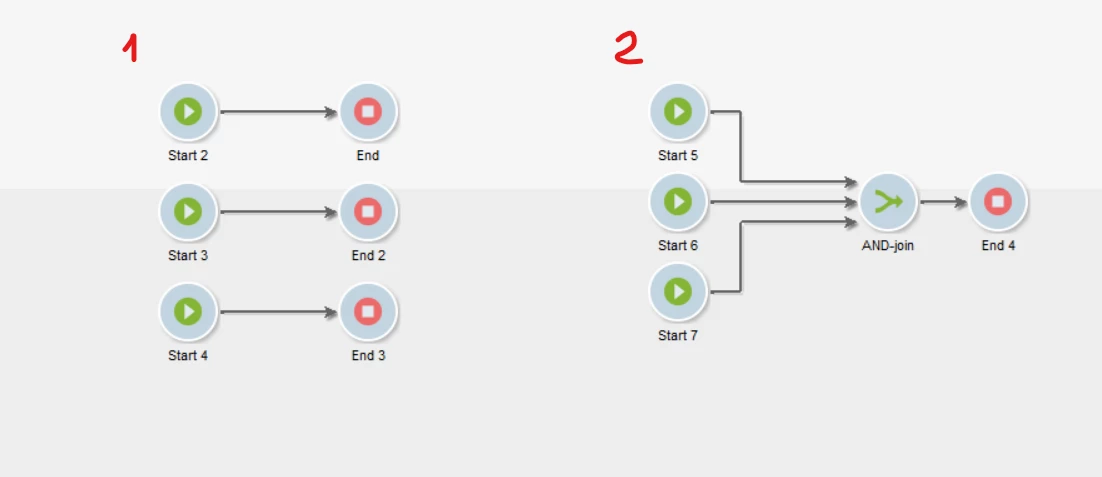
1. Using an instance variable for the counting of "ends":

That is using the advance tab on the End activities (or a JS activity) to increase the value of the variable each time an end is reached:

instance.vars.wkfEndCounts = (instance.vars.wkfEndCounts || 0) + 1;

Then just check if the count is the same as expected (3 in this example) and execute your piece of code.


2. Using a basic AND-join and leave errors to the workflow error management.

It is a better and simple approach, if all the transitions came into the AND-join activity, then the next activity will be executed.


Which one use? For that decision I'll leave an additional question: Are your errors being managed? (e.g. by error transitions) or left to the default workflow error management?


If your errors are left to workflow error management, just go ahead with the simplest one, using a basic AND-join.

2 replies

AdrianESanchez
AdrianESanchezAccepted solution
New Participant
December 19, 2022

Hi, I'll describe two possible options that I just came up with:

1. Using an instance variable for the counting of "ends":

That is using the advance tab on the End activities (or a JS activity) to increase the value of the variable each time an end is reached:

instance.vars.wkfEndCounts = (instance.vars.wkfEndCounts || 0) + 1;

Then just check if the count is the same as expected (3 in this example) and execute your piece of code.


2. Using a basic AND-join and leave errors to the workflow error management.

It is a better and simple approach, if all the transitions came into the AND-join activity, then the next activity will be executed.


Which one use? For that decision I'll leave an additional question: Are your errors being managed? (e.g. by error transitions) or left to the default workflow error management?


If your errors are left to workflow error management, just go ahead with the simplest one, using a basic AND-join.

New Participant
December 20, 2022

Hi @adrianesanchez,


Thanks a lot for a detailed explanation.


Regarding Error management, can you give me some details about custom and default ones, any articles, that can help me understand this better


Regards,

DG


AkshayAnand
New Participant
December 20, 2022

Hi 


You can find an article here. You can also refer here


Regards

A

AkshayAnand
New Participant
December 16, 2022

Hi @dipendu_g 


You can set the Option in the desired activity which you want to finish and then update the Option Variable. for ex, if there are 3 End activities then you can write the script to update in the activity which finished last or which you want to finish and then update the end Option.


For error handling if you want the flow to be in finished state then either you can handle it in the desired activity in the advanced tab like below 


or the same can be updated in the execution tab of properties of the workflow.


But the option can't be updated if the transition hasn't reached to that particular activity in which you are updating the Option Variable. You can segregate the flow into different workflow so that one doesn't hamper the others.


Regards

A

dipendu_gAuthor
New Participant
December 16, 2022

Hi Akshay,


All the 3 end activities are important. If one of them fails the Option variable should not be updated. The Option variable can update only after all transitions has reached its end.


In this scenario, do I need a cntr or an intermediate variable to keep track as to which all end activities reached ?


If yes, if there a common way to achieve this, as many workflows has this scenario and wanted to check any common way of doing the same, so that the same piece of code is not copy pasted across multiple workflows


Regards,

DG


AkshayAnand
New Participant
December 19, 2022

Hi @dipendu_g 


If that is the case then you can add the And-Join activity before a end activity so that it will check if all the prior activities are finished then only the end activity will write the Option Variable which you might have written in the advanced tab.

Let me know if this helps.


Regards

A