Personalize csv files in delivery attachment for each recipient | Community
Skip to main content
New Participant
April 2, 2024
Solved

Personalize csv files in delivery attachment for each recipient

  • April 2, 2024
  • 2 replies
  • 1469 views

Hi everyone,

I'm trying to figure out if there's any way to add personalized attachments in email deliveries.

I have 5 recipients, and for each recipient, a file will be created separately. I need to attach the file to my email delivery.
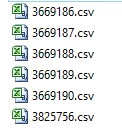


The files have been created, and I need to attach them to my delivery.
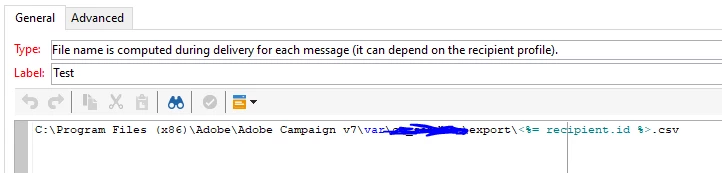
 

I'm not receiving the test. Am I doing anything wrong here?

Even when I use targetData.CsvPath as personalization, I'm getting the error "targetData is not defined" in the audit logs.

Can someone help me with this?


Thanks & Regards,

Sujith Kumar


This post is no longer active and is closed to new replies. Need help? Start a new post to ask your question.
Best answer by Sujith_02kumar

Hello @sujith_02kumar 

Could you please share the screenshot of actual code used there?


Hi @_manoj_kumar_ ,


Thanks for your reply. It is solved using file class and publishing file to public resources through script 

2 replies

Sukrity_Wadhwa
Employee
May 2, 2024

Hi @sujith_02kumar,

Were you able to resolve this query on your own or do you still need help here? Do let us know.

Thanks!

Sukrity Wadhwa
New Participant
July 18, 2024

@sukrity_wadhwa 


Thanks for helping. It is solved in my own.


Regards,

Sujith Kumar 

Sukrity_Wadhwa
Employee
July 18, 2024

Thanks for sharing that! 🙂

Sukrity Wadhwa
_Manoj_Kumar_
New Participant
April 3, 2024

Hello @sujith_02kumar 


These files should be available on the Adobe Server for this to work. It won't pick from your local machine.

     Manoj     Find me on LinkedIn
New Participant
April 4, 2024

@_manoj_kumar_ ,


We are picking from server only the above one is only for example.

_Manoj_Kumar_
New Participant
April 4, 2024

Hello @sujith_02kumar 

Could you please share the screenshot of actual code used there?

     Manoj     Find me on LinkedIn