Query add data: Calculating a number that should be a floating point evaulates to 2 zeros as decimals | Community
Skip to main content
New Participant
May 24, 2022
Solved

Query add data: Calculating a number that should be a floating point evaulates to 2 zeros as decimals

  • May 24, 2022
  • 1 reply
  • 796 views

Hi there! 


I have a use case where I want to find out the week number of the year. To do that I am using the following formula using built-in JS functions from ACC: Ceil((WeekDay(GetDate())+1 + DayOfYear(GetDate())) / 7)

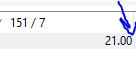
However! It seems that when dividing a number that would lead to a decimal number like: 21,58 - This does not work, since ACC always returns 21,00 no matter the subsequent digits. 


So that of course gives me the wrong result from the formula. 


Any chance someone knows why this happens, and how to fix that?? 

See images for reference. 

 

This post is no longer active and is closed to new replies. Need help? Start a new post to ask your question.
Best answer by Amine_Abedour

Hello @sorendp ,

it's because SQL performs integer division.

you have to ''trick'' sql into thinking that on your division ther is at least one float.

Try this : ToDouble(151)/7 

or this with your formula : Ceil(ToDouble((WeekDay(GetDate())+1 + DayOfYear(GetDate()))) / 7)

results : 

Br,

1 reply

Amine_Abedour
Amine_AbedourAccepted solution
New Participant
May 24, 2022

Hello @sorendp ,

it's because SQL performs integer division.

you have to ''trick'' sql into thinking that on your division ther is at least one float.

Try this : ToDouble(151)/7 

or this with your formula : Ceil(ToDouble((WeekDay(GetDate())+1 + DayOfYear(GetDate()))) / 7)

results : 

Br,

Amine ABEDOUR
SorenDPAuthor
New Participant
May 24, 2022

Works like a charm, thanks a lot!