Scroll button in inputs panel | Community
Skip to main content
New Participant
May 25, 2020
Solved

Scroll button in inputs panel

  • May 25, 2020
  • 1 reply
  • 3320 views

Hi everyone,


In Adobe Campaign Classic, we have created a custom delivery template with content management forms.

In some cases, it is impossible to fill out all the inputs because they display out of the screen size and no scroll is possible.

See example here:
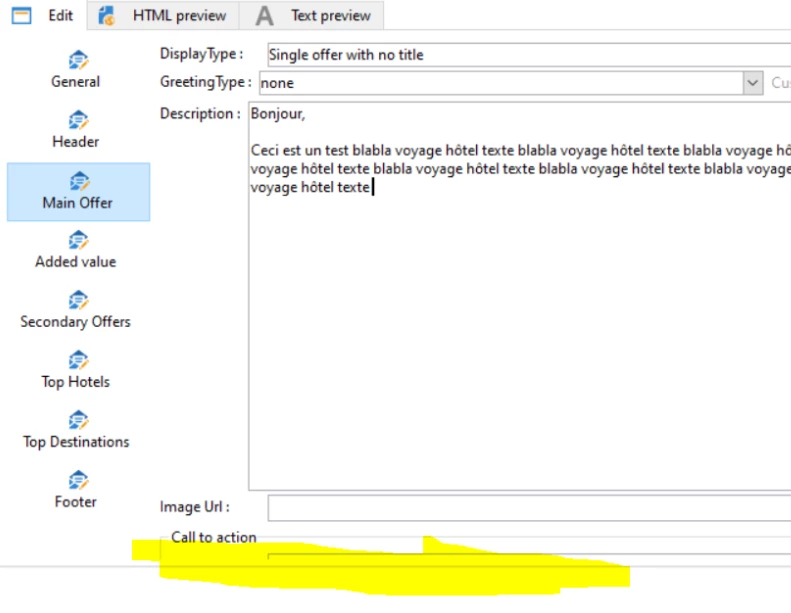
 

How would you manage this situation?

(Given that, it is not an option to have the view divided in 2 columns.)


It looks, we're limited by the screen size/resolution here and no scroll button appear..


Thank you for your help,


R

This post is no longer active and is closed to new replies. Need help? Start a new post to ask your question.
Best answer by _Manoj_Kumar_

Hello @roro_coeur ,

There are 2 solutions to this

  • Open delivery on High resolution screen.
  • Instead of adding new fields to Edit Tab. Create another tab and add the fields there.

Recipient form automatically adds a scroll bar when the extra fields are added. I believe the scroll behavior depends on what type of Container frame we are using. 

1 reply

_Manoj_Kumar_
_Manoj_Kumar_Accepted solution
New Participant
May 25, 2020

Hello @roro_coeur ,

There are 2 solutions to this

  • Open delivery on High resolution screen.
  • Instead of adding new fields to Edit Tab. Create another tab and add the fields there.

Recipient form automatically adds a scroll bar when the extra fields are added. I believe the scroll behavior depends on what type of Container frame we are using. 

     Manoj     Find me on LinkedIn
New Participant
June 30, 2020
Thank you!