Send an attachment delivery | Community
Skip to main content
rajansingh
New Participant
April 18, 2023
Solved

Send an attachment delivery

  • April 18, 2023
  • 1 reply
  • 656 views

How to send a delivery with a file attachment extracted from data extraction activity?

This post is no longer active and is closed to new replies. Need help? Start a new post to ask your question.
Best answer by Marcel_Szimonisz

Hello @rajansingh,

you have to save it to the Adobe Campaign file system(which is automatically and path is saved do instance variables vars.filename) and then refer to it in delivery attachment settings.

Is this one attachment for all? Or are you downloading attachments for all recipients in the workflow?
Either way you can set up attachment to be dependant on recipient profile or not, you will just provide path to it in the calculated field 
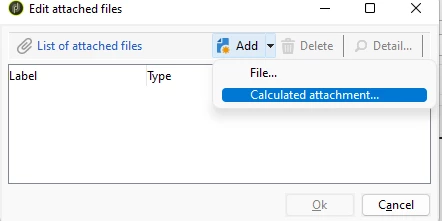
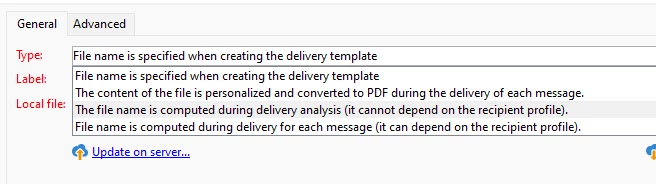
  • Create calculated attachment


  • select option - computed for all of one file for all 


  • Add path to the file


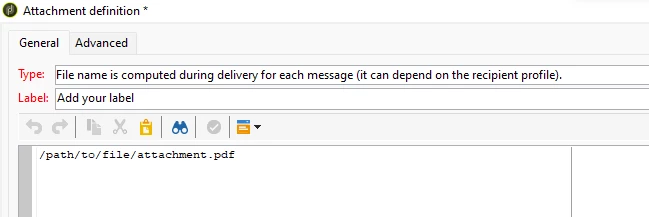
You can pass the file name as variable:


Marcel Szimonisz

MarTech Consultant
for more tips visit my blog
https://www.martechnotes.com/

1 reply

Marcel_Szimonisz
Marcel_SzimoniszAccepted solution
New Participant
April 18, 2023

Hello @rajansingh,

you have to save it to the Adobe Campaign file system(which is automatically and path is saved do instance variables vars.filename) and then refer to it in delivery attachment settings.

Is this one attachment for all? Or are you downloading attachments for all recipients in the workflow?
Either way you can set up attachment to be dependant on recipient profile or not, you will just provide path to it in the calculated field 
  • Create calculated attachment


  • select option - computed for all of one file for all 


  • Add path to the file


You can pass the file name as variable:


Marcel Szimonisz

MarTech Consultant
for more tips visit my blog
https://www.martechnotes.com/