SQL Activity in workflow | Community
Skip to main content
nitesha38268385
New Participant
September 16, 2020
Solved

SQL Activity in workflow

  • September 16, 2020
  • 1 reply
  • 1248 views

Hi Folks,


I want to use the SQL activity in the workflow and found that there is an option to use Conditional content in the SQL Code.
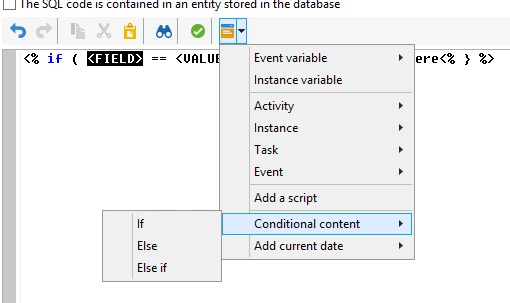


Just want to know, how to use the field name(highlighted in black) from the temp table in the workflow?


Thanks,

Nitesh.

This post is no longer active and is closed to new replies. Need help? Start a new post to ask your question.
Best answer by Jonathon_wodnicki

Hi,


That's a JS tag. The editor control you have open is the standard JS personalization one, <FIELD> just means left hand side of the == op.

NB You generally want to avoid using SQL activities/granting users SQL right, unless there's a perf issue that requires custom non-sproc code to resolve.


Thanks,

-Jon

1 reply

Jonathon_wodnicki
Jonathon_wodnickiAccepted solution
New Participant
September 21, 2020

Hi,


That's a JS tag. The editor control you have open is the standard JS personalization one, <FIELD> just means left hand side of the == op.

NB You generally want to avoid using SQL activities/granting users SQL right, unless there's a perf issue that requires custom non-sproc code to resolve.


Thanks,

-Jon