Switching from Div id | Community
Skip to main content
New Participant
May 3, 2022
Solved

Switching from Div id

  • May 3, 2022
  • 2 replies
  • 759 views

Hi all, 


I am trying to create a script in Campaign that will let me switch from one div id to another based on the language the recipient picked. The languages are English or French. I have a script I create below but now my page is blank. 


<script> var query = xtk.queryDef.create( <queryDef schema="nms:recipient" operation="getIfExists"> <select> <node expr="@language"/> </select> </queryDef> var language=@language var english=document.getElementById("engThanks") var french=document.getElementById("frThanks") if(language == ENG){ english.style.display = "block"; }else ){ english.style.display = "none"; french.style.display = "block"; } </script>


This post is no longer active and is closed to new replies. Need help? Start a new post to ask your question.
Best answer by Parvesh_Parmar

Hello,


Please check following points.


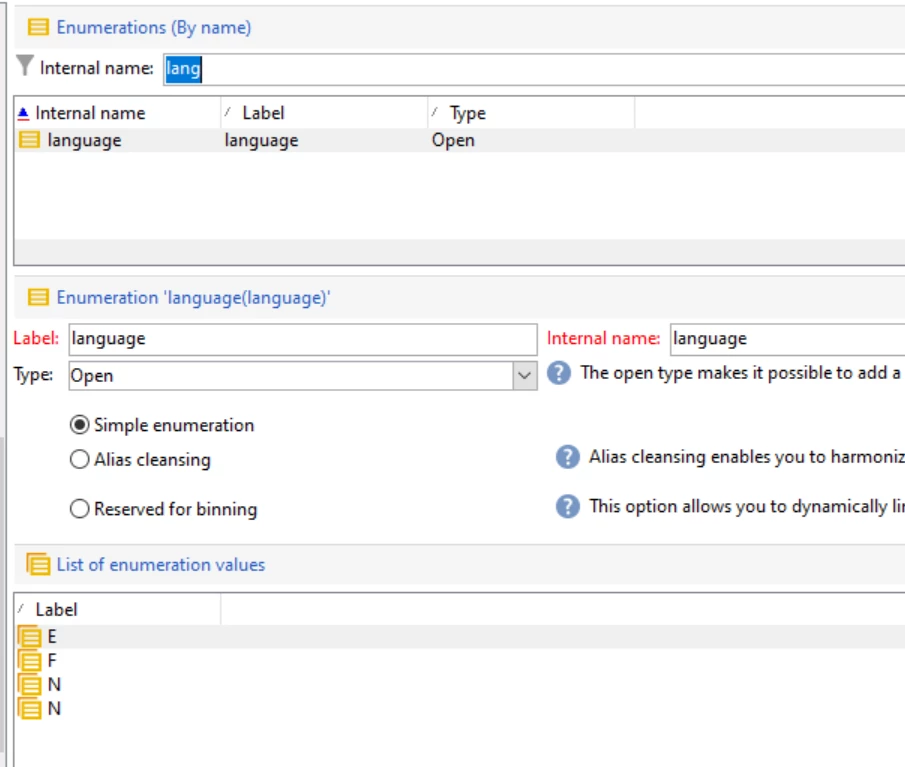
  1. Can you first check what is the value of language enumeration? In my case, it is like below.

             Go to Platform -> Enumeration.


2. If you want to check only for one recipient then you need to give some condition in the queryDef. In the below example I added Id.


                var query = xtk.queryDef.create(

                                            <queryDef schema="nms:recipient" operation="getIfExists">

                                                  <select>

                                                             <node expr="@language"/>

                                                   </select>

                                                           <where>

                                                                 <condition expr="@id = 1" />

                                                             </where>

                                                           </queryDef>


  // Run the query.

   var res = query.ExecuteQuery();


     if ( res.@language =='E' )

     {


                 // Add code to show english div


     }

       else {


       // Add the code to show French div


       }


Thanks.

Parvesh.


2 replies

Sukrity_Wadhwa
Employee
May 17, 2022

Hi @justinbr17,

Was the given solution helpful to resolve your query or do you still need more help here? Do let us know.

Thanks!

Sukrity Wadhwa
Parvesh_Parmar
Parvesh_ParmarAccepted solution
New Participant
May 4, 2022

Hello,


Please check following points.


  1. Can you first check what is the value of language enumeration? In my case, it is like below.

             Go to Platform -> Enumeration.


2. If you want to check only for one recipient then you need to give some condition in the queryDef. In the below example I added Id.


                var query = xtk.queryDef.create(

                                            <queryDef schema="nms:recipient" operation="getIfExists">

                                                  <select>

                                                             <node expr="@language"/>

                                                   </select>

                                                           <where>

                                                                 <condition expr="@id = 1" />

                                                             </where>

                                                           </queryDef>


  // Run the query.

   var res = query.ExecuteQuery();


     if ( res.@language =='E' )

     {


                 // Add code to show english div


     }

       else {


       // Add the code to show French div


       }


Thanks.

Parvesh.


Parvesh Parmar – Adobe Community Advisor https://www.linkedin.com/in/parvesh-parmar/