Timezone to EST | Community
Skip to main content
New Participant
March 18, 2020
Solved

Timezone to EST

  • March 18, 2020
  • 4 replies
  • 4287 views

How to change the timezones for everyone on the particular instance to EST in one go?


Like going to each operator and changing the timezone works but for it's not feasible to change for 100 users every time, so any possible solutions to change the entire instance timezone to EST?
This post is no longer active and is closed to new replies. Need help? Start a new post to ask your question.
Best answer by Darren_Bowers

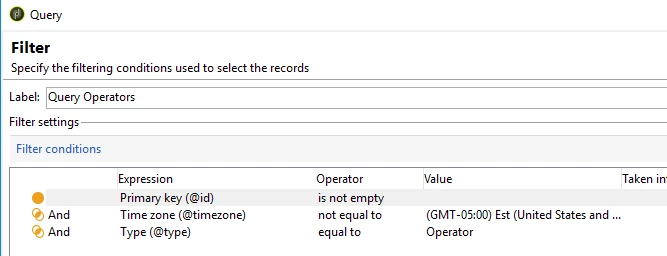
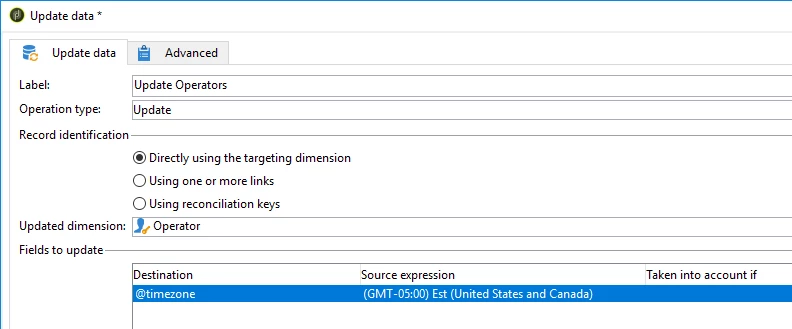
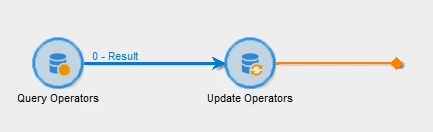
We had to do this - you can easily do it in a workflow using a query and update activity

Query and Update

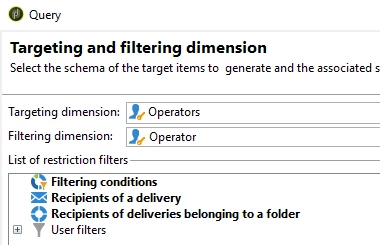
Set Targeting to Operators


Query the Operators you want


Update the Operators timezone

Cheers

Darren

4 replies

SheetalAgrawalSoni
New Participant
August 8, 2020

In Recepient you can use action > mass update and add field timezone and select EST as value .. Update all will update the timezone at user level 


For Server level timezone change you will have to insure below stuff if hybrid model .. 

Solution :-

Revert back the oracle client to match the oracle database server version and restart. After that timezone will work as expected. however while investigating we did couple things -->


1. Changed the user timezone setting on MTA server

2. Changed the MTA server timezone

3. on marketing Adobe Campaign software side changed user timezone

4. on marketing Adobe Campaign software side downgrade the oracle client on app and web server to match the database version i.e. 12.1.0.2.0

5. Restarted all


hetfidd
New Participant
April 3, 2020

We had that issue as well and were told that the server's time zone is the time zone it is hosted in.  Ours is hosted in California so on PST and we want to be on EST.    Best way to change everyone over is doing  a query update as was shown.   The problem is, your scheduler still schedules at server time.  example - we're on EST, server on PST which is 3 hours difference.  Scheduler gets set for 7am, but runs at 10am because for the server, 7am is 10am.   Three hours difference.  Just keep that in mind even though you switch everyone over to "see" EST.  The server still thinks in its own time.  

Jonathon_wodnicki
New Participant
March 20, 2020

Hi,


Use Actions > Mass update on the operator list, no need for a workflow.


Thanks,

-Jon

Darren_Bowers
Darren_BowersAccepted solution
New Participant
March 18, 2020

We had to do this - you can easily do it in a workflow using a query and update activity

Query and Update

Set Targeting to Operators


Query the Operators you want


Update the Operators timezone

Cheers

Darren