Unwanted seed address added to the delivery | Community
Skip to main content
New Participant
September 18, 2019
Solved

Unwanted seed address added to the delivery

  • September 18, 2019
  • 3 replies
  • 2318 views

Hi All,

Empty seed list has been added to the delivery and i am not able to find the record in my seedlist also, can you help me to resolve this issue.
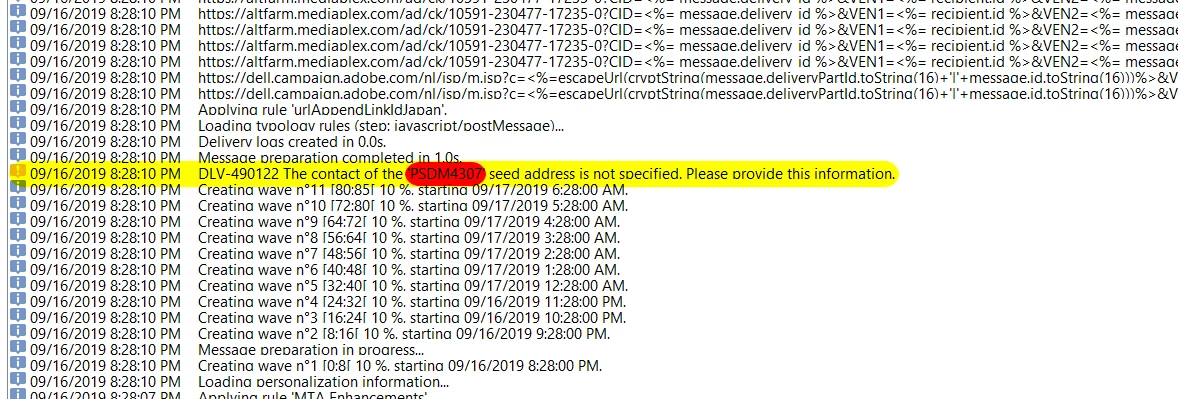
This post is no longer active and is closed to new replies. Need help? Start a new post to ask your question.
Best answer by Jyoti_Yadav

Hi Parthibanb,

Have you used one of the delivery template?

If yes, then check whether seed address is defined there.

Also, you can remove seed list, by right click in workflow an go to 'Edit XML Source'.

Remove the seed list added and save the XML.

This will permanently remove all your seeds from workflow.

Thanks,

Jyoti

3 replies

Jyoti_Yadav
Jyoti_YadavAccepted solution
New Participant
September 23, 2019

Hi Parthibanb,

Have you used one of the delivery template?

If yes, then check whether seed address is defined there.

Also, you can remove seed list, by right click in workflow an go to 'Edit XML Source'.

Remove the seed list added and save the XML.

This will permanently remove all your seeds from workflow.

Thanks,

Jyoti

New Participant
September 19, 2019

Hi Jyoti,

I didn't add any other seedlist To --> Seed Address tab

Jyoti_Yadav
New Participant
September 19, 2019

Hi Parthibanb,

Please check in your delivery To --> Seed Address tab, if you have added any seed address by mistake.

Thanks,

Jyoti