Using the 'Edit' tab of the Campaign Pallet to create Variables | Community
Skip to main content
New Participant
October 7, 2022
Solved

Using the 'Edit' tab of the Campaign Pallet to create Variables

  • October 7, 2022
  • 1 reply
  • 1053 views

All, 


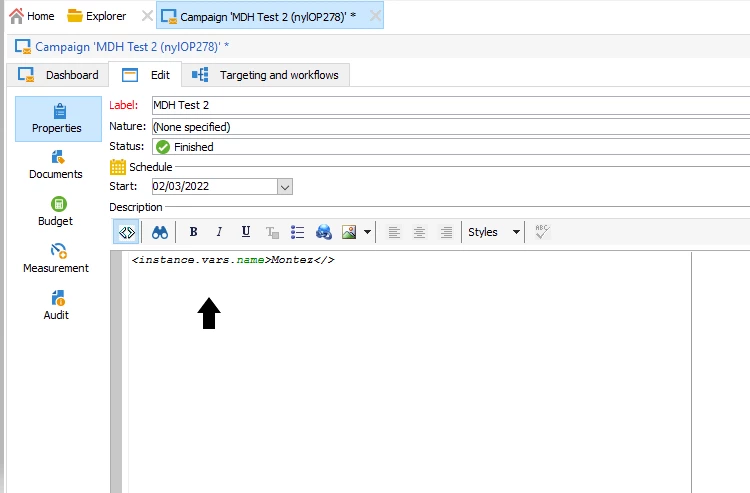
I was told that you can use the Edit tab of a Campaign, and I've seen it done back when I was just learning the tool. But I can't remember how it's done; can anyone help me?

Here's my example below (even though I know it's not correct); but it's something along these lines if I recall. 
 

This post is no longer active and is closed to new replies. Need help? Start a new post to ask your question.
Best answer by Shubham_Goyal__

Hi @montezh2001 ,

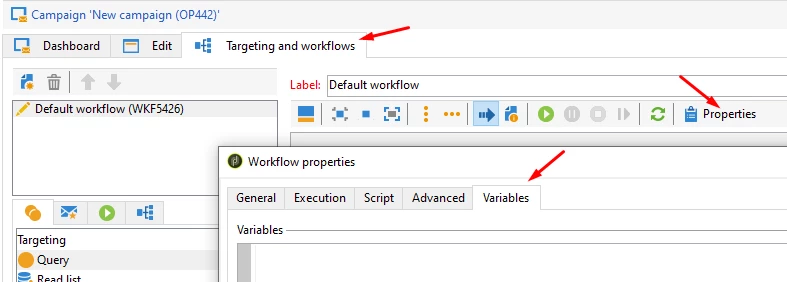
If you trying to create variables that can be used in the Targeting workflows you can do it from the 'Targeting and workflows' palet > Properties > Variables. (screenshot)


Br,
Shubham


1 reply

Shubham_Goyal__
Shubham_Goyal__Accepted solution
New Participant
October 8, 2022

Hi @montezh2001 ,

If you trying to create variables that can be used in the Targeting workflows you can do it from the 'Targeting and workflows' palet > Properties > Variables. (screenshot)


Br,
Shubham


New Participant
October 10, 2022

@shubham_goyal__  thanks for your feedback. 


I can perform this kind of variable by using the advanced tabs. What I'm looking for is the ability to use this type of function in the Edit tab. 


Thank you. 

ParthaSarathy
New Participant
October 10, 2022

Hi @montezh2001 ,

In Property tab of campaign edit tab, You can use description part for describing the purpose of the campaign or business requirement of the campaign etc. 

In Documents tab, You can associate various documents with a campaign: reports, photos, web pages, diagrams, etc. These documents can be in any format (Microsoft Word, PowerPoint, PNG, JPG, Acrobat PDF, etc). Refer this page to know more about adding document and its purpose.

Budget tab is related to marketing resource management and you can refer this link.

And Measurement tab is related to response management. Document.


So to add variables, As mentioned above by @shubham_goyal__ , we can declare instance variable in targeting and workflows > property > Variables tab


 ~  ParthaSarathy S~  Click here to join ADOBE CAMPAIGN USER GROUP for Quarterly In-person | Hybrid | Virtual Meetups