Web application - Call Error page in Script | Community
Skip to main content
tejashriw155148
New Participant
July 10, 2020
Solved

Web application - Call Error page in Script

  • July 10, 2020
  • 1 reply
  • 1648 views

Hi,


In web application, I have added code in script and want to call error page message(location- web application properties>Error page tab) in script.
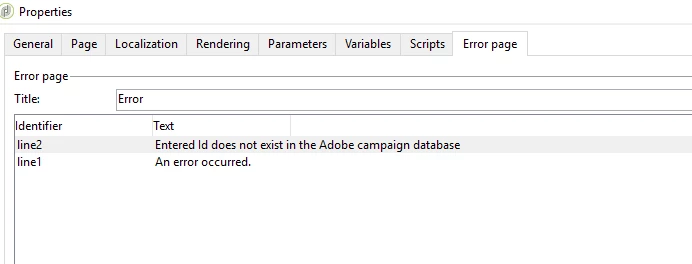


Example:

code in script like


if (condition==true)

{

}

else{

//display error page message

}


Any suggestions?


Regards,

Tejashri


This post is no longer active and is closed to new replies. Need help? Start a new post to ask your question.
Best answer by _Manoj_Kumar_
Instead of initializing the error in error page just create the ctx variables for the error and when the error happens then you can redirect the page to the display error by printing the ctx variable related to that error.

1 reply

_Manoj_Kumar_
New Participant
July 10, 2020

Hello @tejashriw155148,


Error page comes in action when there is some issue with the page and the error page content is displayed.


If you want to show error then you can store that error in content variables like 

ctx.vars.line1="ERROR_2_CONTENT HERE"; ctx.vars.line2="ERROR_2_CONTENT_HERE";


and then you can print the error like this.

<%if (condition==true){ your logc here }else{ %> <%= ctx.vars.line1 %> <% } %>


Let me know if that works.

     Manoj     Find me on LinkedIn
tejashriw155148
New Participant
July 10, 2020

Hi @_manoj_kumar_ 


Using alert I'm able to show the message but I want to display same which I have defined in Error page like below

Is it possible to call it in script?


Regards,

Tejashri