What does this error mean: "JST-#ID# Error while compiling script 'content htmlContent' line 157: targetData is not defined. SCR-#ID# JavaScript: error while evaluating script 'content htmlContent'." | Community
Skip to main content
New Participant
May 10, 2019
Solved

What does this error mean: "JST-#ID# Error while compiling script 'content htmlContent' line 157: targetData is not defined. SCR-#ID# JavaScript: error while evaluating script 'content htmlContent'."

  • May 10, 2019
  • 3 replies
  • 7262 views

Hi,

I am unable to send proofs when using a personalization block. It works fine when sending the delivery.
My delivery fails with the error message: "JST-#ID# Error while compiling script 'content htmlContent' line 157: targetData is not defined. SCR-#ID# JavaScript: error while evaluating script 'content htmlContent'."

Please help!

Thanks,

Vishal
This post is no longer active and is closed to new replies. Need help? Start a new post to ask your question.
Best answer by Venu_Reddy

Hello Vishal,

Recurring Delivery in Adobe campaign is unique as compared to standard delivery. If you are using Recurring delivery Adobe campaign doesn't create a delivery instance until you execute the workflow/delivery. If you want to use the send proof, follow given steps.

1. Enable content approval in delivery; this is used to validate that you are using the correct content.

2. start/execute the workflow/this will generate an instance of delivery under delivery execution folder.

3. Go to delivery execution folder; you will be able to see your delivery, open that delivery from there.

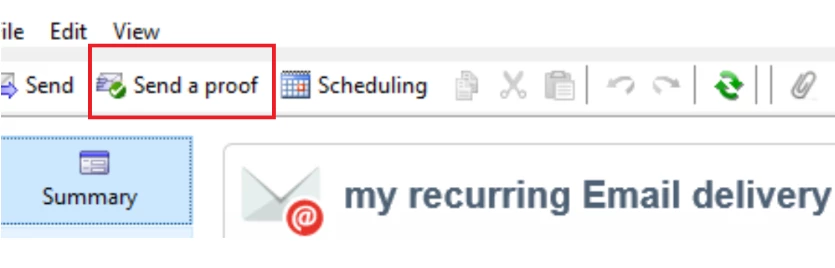
4. Now you can see a button, send proof use that to send a proof, once satisfied approve the content.

Regards,

Venu

3 replies

Venu_Reddy
Venu_ReddyAccepted solution
New Participant
May 10, 2019

Hello Vishal,

Recurring Delivery in Adobe campaign is unique as compared to standard delivery. If you are using Recurring delivery Adobe campaign doesn't create a delivery instance until you execute the workflow/delivery. If you want to use the send proof, follow given steps.

1. Enable content approval in delivery; this is used to validate that you are using the correct content.

2. start/execute the workflow/this will generate an instance of delivery under delivery execution folder.

3. Go to delivery execution folder; you will be able to see your delivery, open that delivery from there.

4. Now you can see a button, send proof use that to send a proof, once satisfied approve the content.

Regards,

Venu

New Participant
May 10, 2019

Hi,

Just realized that this happens when I am using a reoccurring delivery. For a one time delivery, the substitution of address works fine.

Why is that, can someone help?

Venu_Reddy
New Participant
May 10, 2019

Hello Vishal,

Please check the below similar thread and hope it helps

targetdata is not defined

Regards,

Venu