
workflow question: multiple variables from JS node into email template | Community
Skip to main content
Michael_Soprano
New Participant
August 13, 2024
Solved

workflow question: multiple variables from JS node into email template

  • August 13, 2024
  • 1 reply
  • 968 views

I am using Campaign V8 client console.

My workflow looks like this:
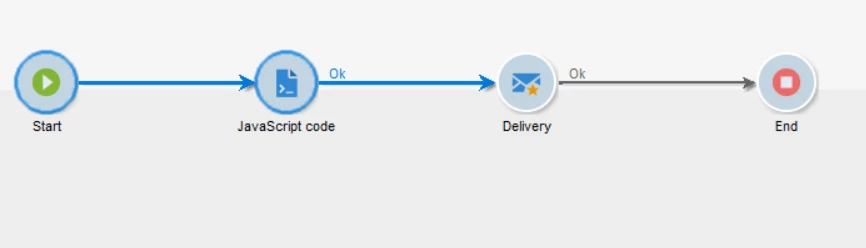
 

As an output of JS node in workflow I have these variables - I assume that these become workflow variables:

instance.vars.x1 = price1;
instance.vars.x2 = name1;
instance.vars.x3 = image1;


In the delivery script node I put something like this:
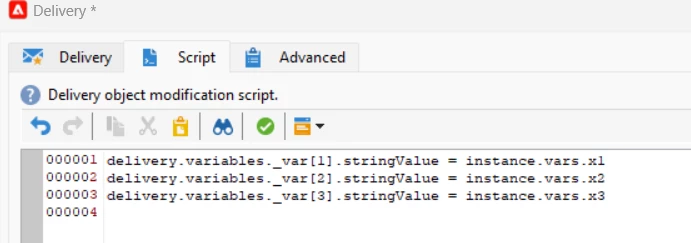
Then I would like to use them in the template. More or less like this: 
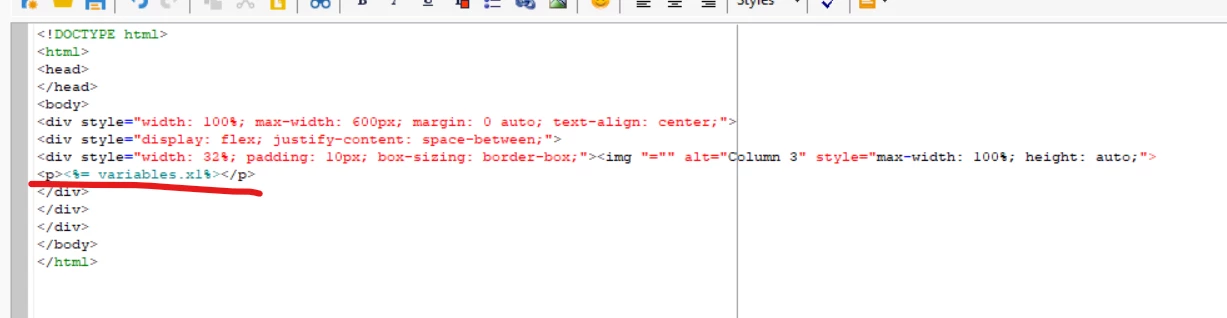
Could you tell me why its not working? 



This post is no longer active and is closed to new replies. Need help? Start a new post to ask your question.
Best answer by ALangridge

It's actually an annoyingly obtuse process! You need to define a variable in the properties section, then assign the instance.vars.XXXX variable to it in the initialisation script section. 

I wrote a quick guide here:
https://alexlangridge.com/adobe-campaign--use-defined-variables-in-an-email

1 reply

ALangridge
ALangridgeAccepted solution
New Participant
August 13, 2024

It's actually an annoyingly obtuse process! You need to define a variable in the properties section, then assign the instance.vars.XXXX variable to it in the initialisation script section. 

I wrote a quick guide here:
https://alexlangridge.com/adobe-campaign--use-defined-variables-in-an-email

Michael_Soprano
New Participant
August 14, 2024

Thanks a lot!

Do you know how to dynamically change the source of the photo in html email template like that?


ALangridge
New Participant
August 15, 2024

Hmm! Just checking, you may need to amend the delivery script node, because it's zero indexed. 

delivery.variables._var[0].stringValue would correspond to the FIRST variable you've set up in the properties > variables section.


In my example, 

delivery.variables._var[0].stringValue would be for mobileExistsCount,

delivery.variables._var[1].stringValue for validityCheckFail

and delivery.variables._var[2].stringValue for validityCheckPass