403 on /nl/jsp/soaprouter.jsp | Community
Skip to main content
New Participant
December 12, 2017
Solved

403 on /nl/jsp/soaprouter.jsp

  • December 12, 2017
  • 12 replies
  • 6940 views

Working on a (first time) test install of campaign v7 on a Debian 8 server and after following the install instructions, I get the following when I try connecting the console program for initial configuration. "403 Forbidden: You don't have permission to access /nl/jsp/soaprouter.jsp"
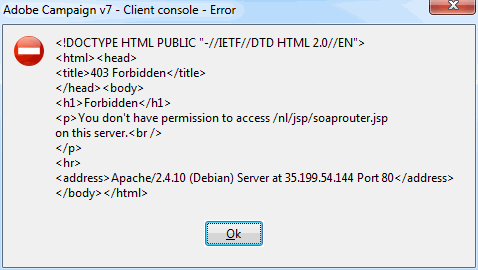
Not sure where to go next.

This post is no longer active and is closed to new replies. Need help? Start a new post to ask your question.
Best answer by Jean-Serge_Biro

Hi Leh,

Please may you execute this URL:

http://<domainname>/r/test

r/test is the more raw URL test to check your access/network configuration.

Regards.
J-Serge

12 replies

brianfmun
New Participant
July 26, 2018

I had this same problem and checked the error log for apache (httpd.service) and found the same repeating error every time this message was thrown (in browser and in my client login)- in my instance the issue was apache permissions. The fix was creating a new <Directory /[dirname here]/> block that granted permissions to all users cascading down from the earliest relevant folder.

I can't say if this is the answer you're looking for but the symptoms seem the same down to the /r/test returning success but still getting the exact same 403's.

Prasanna_Soni
New Participant
July 30, 2020
I am also getting the same problem Did you find any fix ? It seems permissions related
Gaurang-1
New Participant
July 26, 2018

Hi,

Were you able to find something relevant for your query here?

Gaurang

leh002Author
New Participant
January 2, 2018

I got pulled away with end of year activities, but plan to get back to this at some point this week, but no, have not figured out what I'm missing yet.

florentlb
New Participant
January 2, 2018

Hi Luis,

Please let us know if you managed to find the cause of your issue.

Florent

Jean-Serge_Biro
New Participant
December 20, 2017

Hi leh,

So it means there are not physical or Windows firewalls issue, nor network routing one, nor Apache or Tomcat misconfiguration.

It was quite obvious for Apache, seeing nothing in its log file (access.log).

Now, you should check again the serverConf.xml file to understand the issue.

But beforehand, please repeat the steps of installation checks.
The soaprouter can't be acceded directly, except if you provide the credentials as post parameters (login or better token session). See API documentation for that.

So the easiest way to check is to use the Adobe Campaign client, or the web version of Adobe Client:

http://yourinstancedomain/nl/jsp/logon.jsp?target=/xtk/dashboard.jssp

Regards
J-Serge

leh002Author
New Participant
December 20, 2017

/r/test responds with <redir status='OK' date='2017-12-20 14:16:10.955Z' build='8795' instance='default' sourceIP='x.x.x.x' host='x.x.x.x' localHost='campaign-test-app'/>

Jean-Serge_Biro
Jean-Serge_BiroAccepted solution
New Participant
December 18, 2017

Hi Leh,

Please may you execute this URL:

http://<domainname>/r/test

r/test is the more raw URL test to check your access/network configuration.

Regards.
J-Serge

Adhiyan
Employee
December 18, 2017

Hi Leh,

Probably there is a limitation on connections over http . Can you format the connection url to use https like https://10.42.98.xx and give it a try.

Also , try to open this link in a browser and try to login  <server_url>/xtk/dashboard.jssp. This will rule out issues with the local client console if any.

Regards,
Adhiyan

leh002Author
New Participant
December 13, 2017

Sure,

I'm logging in as internal as I'm in the initial configuration state https://docs.campaign.adobe.com/doc/AC/en/INS_Configuration__Creating_an_instance.html

I do know the internal password and I did make sure to put my ip in the zone that allows internal to log in.

connection url is the ip address and port that Apache is listening on. Again, I'm seeing the requests in Apache's access.log.

Adhiyan
Employee
December 13, 2017

Hi Leh,

I think of a couple of things.

1. The operator you are logging in with does not have rights to access the server via the console.

Can be checked under access management for the operator for the checkbox forbid access from rich client.

2. The url being supplied in the connection is wrong.

Can you please share these two details

Regards,

Adhiyan