A/B testing delivery configuration | Community
Skip to main content
james_icf
Level 2
Dec 18, 2017 4:34 PM UTC
Solved

A/B testing delivery configuration

Hello,

I used the following documentation to set up and send out an A/B test.

A/B testing

However, the Delivery item after the script didn't have clear directions on how to configure. I had the following options checked, and I got an error saying, "The transition does not specify a content identifier". How should the delivery object be configured to send out correctly?

Delivery

     Specified in the transition

Recipients

     Specified by the inbound event(s)

Content

     Specified by the inbound event

Offers

     Configured in the delivery

Actions to perform

     Prepare and start

This post is no longer active and is closed to new replies. Need help? Start a new post to ask your question.
Adhiyan
AdhiyanAccepted solution
Employee
Dec 18, 2017 4:56 PM UTC

Hi James,

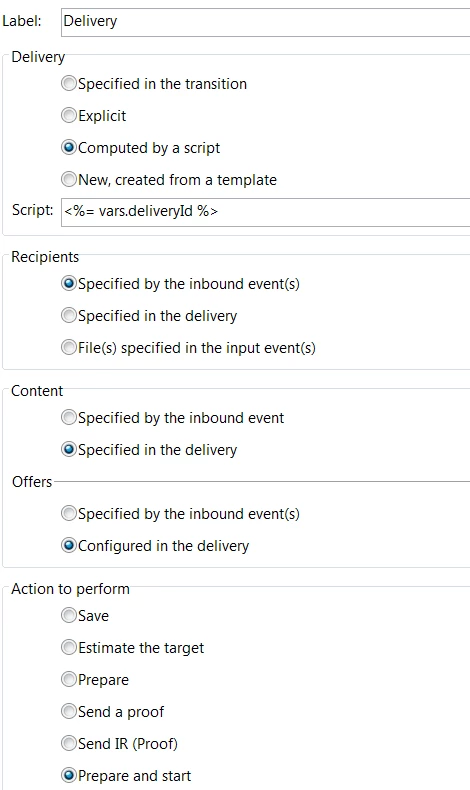
You should use these the option computed by a script in the delivery and provide the name of the script as vars.deliveryId.

This variable is defined in the JS script prior to the delivery.

The content should be specified in the delivery as we are duplicating the winner template already and that will have the content selected.

Find below a screenshot of the correct A/B test configuration.

Regards,
Adhiyan

6 replies

Level 3
Mar 2, 2018 8:39 PM UTC

Hi Vipul,

It works for me on the second option. (to define everything inside Initialization Script of the winner delivery activity.)

The first option (to create a JS activity right after the Wait activity in the winner transition) A/B testing  doesn't work for me. It always sent to campaign A even campaign B has higher open rate.  My question is, do I need to configure the Delivery item if I use this method? This tutorial A/B testing  doesn't mention anything about the Delivery item configuration, I assume there is no configuration needed?

Thanks,

Jason

Translate
vraghav
Employee
Feb 5, 2018 5:59 AM UTC

Hi romainr89040357,

There are multiple ways to calculate and assign a value to the deliveryId variable. Once way is to create a JS activity right after the Wait activity in the winner transition. This page explains the aforesaid process A/B testing

Another way is to define everything inside Initialization Script of the winner delivery activity. Here you can copy the entire code of JS activity into the Initialization script section of winner delivery Advanced tab.

Hope I've been able to answer your query.

Regards,
Vipul

Translate
romainr89040357
New Participant
Feb 2, 2018 1:41 PM UTC

Hello Adhiyan,

What do you exactly mean by "This variable is defined in the JS script prior to the delivery."

Do you mean we need to add a "js" activity that will gather the related variable?

If yes, could you give us an example of the js script to use?

Kr,

Romain

Translate
Adhiyan
Employee
Dec 20, 2017 7:37 PM UTC

Sure , let me know how it goes .

Translate
james_icf
james_icfAuthor
Level 2
Dec 18, 2017 5:05 PM UTC

Thank you for this information, Adhiyan. This makes sense. i will test it out and see how it goes!

Translate
Adhiyan
AdhiyanAccepted solution
Employee
Dec 18, 2017 4:56 PM UTC

Hi James,

You should use these the option computed by a script in the delivery and provide the name of the script as vars.deliveryId.

This variable is defined in the JS script prior to the delivery.

The content should be specified in the delivery as we are duplicating the winner template already and that will have the content selected.

Find below a screenshot of the correct A/B test configuration.

Regards,
Adhiyan

Translate