Adding data to a delivery icon from a javascript Icon | Community
Skip to main content
karanv22355550
New Participant
March 20, 2018
Solved

Adding data to a delivery icon from a javascript Icon

  • March 20, 2018
  • 4 replies
  • 4599 views

Hello! I recently called an API within the JavaScript Icon. I have some data from the API that I would like to use in an email delivery. How would get the data into the delivery Icon. The data will be different per individual we are sending to.

EX:

Individual 1  -> Object.acceptedPrize = 1

Individual 2  -> Object.acceptedPrize = 0

Individual 3  -> Object.acceptedPrize = 0

Thanks

This post is no longer active and is closed to new replies. Need help? Start a new post to ask your question.
Best answer by Kapil_Sharma_

Hi karanv22355550

Yes, you can use the Data from the API in the Email Delivery by using following Steps :

1. Define Some Instance Variables in the JavaScript which will hold the Data from the API.

     Instance Variables Can Be Defined As # instance.vars.xxxxx

2. Use one Enrichment Activity after the JavaScript. -> Add data ->  Data Linked To The Filtering Dimension -> Data of the filtering dimension -> Click On Add -> and add variable there in the below format :

     $(instance/vars/VariableName)


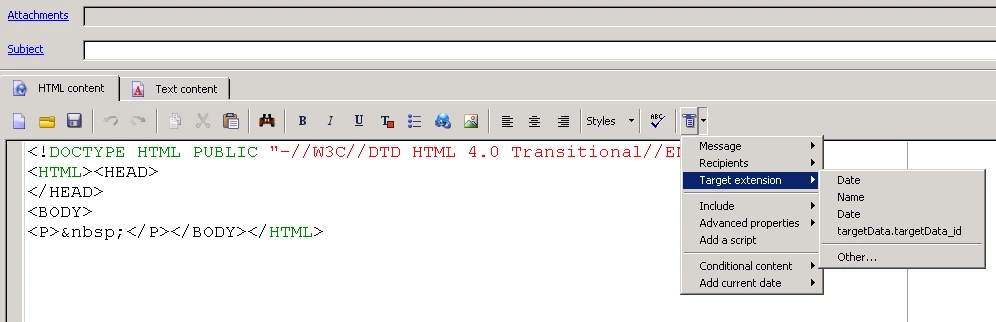
3. Now select one Delivery Activity -> Click On Source In The Delivery -> Click On Last Icon On The Tab -> Target Extension -> And Here You Can See Your Variable Defined Previously -> Just Click on that and now you can simply use it in the Delivery Activity.

4 replies

Marcel_Szimonisz
New Participant
March 21, 2018

Hello karanv22355550​,

Adobe instance vars and vars can hold string values only.

If you want to store objects in them you can  use built in JSON.stringify()

var myObject = {["obj1":"value1"]};

var myArray = [1,2,3];

//convert object to string

instance.vars.myObject = JSON.stringify(myObject);

instance.vars.myArray = JSON.stringify(mymArray);

/at any other place in the same worfklow

//convert string to object

var myObject = JSON.parse(instance.vars.myObject);

var myArray = JSON.parse(instance.vars.myArray);

Best Regards,

Marcel

karanv22355550
New Participant
March 21, 2018

Can you also store arrays of objects as instance variables?

Thanks!

karanv22355550
New Participant
March 21, 2018

Two Quick Questions,

1) Can I store Javascript Objects as instance.vars?

instance.vars.obj

So I could call them like this,  $(instance/vars/obj.name)

and it would return the persons name.

but if I do $(instance/vars/obj.number)

it would return their number.

2)Each API call has specific data to that individual. Same variables but different data. How can I associate that with the individual in adobe.

Example:

I call the api on 3 individuals

The object returns that the first individuals acceptedPrize is 1

Then the second individuals accepted price is 0

The thirds is 0.

Individual 1  -> Object.acceptedPrize = 1

Individual 2  -> Object.acceptedPrize = 0

Individual 3  -> Object.acceptedPrize = 0


Kapil_Sharma_
Kapil_Sharma_Accepted solution
Employee
March 21, 2018

Hi karanv22355550

Yes, you can use the Data from the API in the Email Delivery by using following Steps :

1. Define Some Instance Variables in the JavaScript which will hold the Data from the API.

     Instance Variables Can Be Defined As # instance.vars.xxxxx

2. Use one Enrichment Activity after the JavaScript. -> Add data ->  Data Linked To The Filtering Dimension -> Data of the filtering dimension -> Click On Add -> and add variable there in the below format :

     $(instance/vars/VariableName)


3. Now select one Delivery Activity -> Click On Source In The Delivery -> Click On Last Icon On The Tab -> Target Extension -> And Here You Can See Your Variable Defined Previously -> Just Click on that and now you can simply use it in the Delivery Activity.