Combining data from two data schemas | Community
Skip to main content
El_Loco
New Participant
March 16, 2018
Solved

Combining data from two data schemas

  • March 16, 2018
  • 15 replies
  • 10985 views

Hi,

I am trying to query data from two data schemas and combine all records that exist in both but I'm struggling.

  • I have a query that looks at all profiles where the email address is not empty.
  • I have another query that looks at the address scheme where the address is not empty.

I then want to take both sets of data and to combine them to produce one set of data that consists of all profile email addresses who also exist within the address schema.

I have tried using an intersection activity but it falls over because the two types of inbound events are incompatible.

Can anyone advise on the best way to achieve this?

Many thanks,

Bob
This post is no longer active and is closed to new replies. Need help? Start a new post to ask your question.
Best answer by florentlb

Hi Bob,

Sorry for answering so late.

I've tried the following:

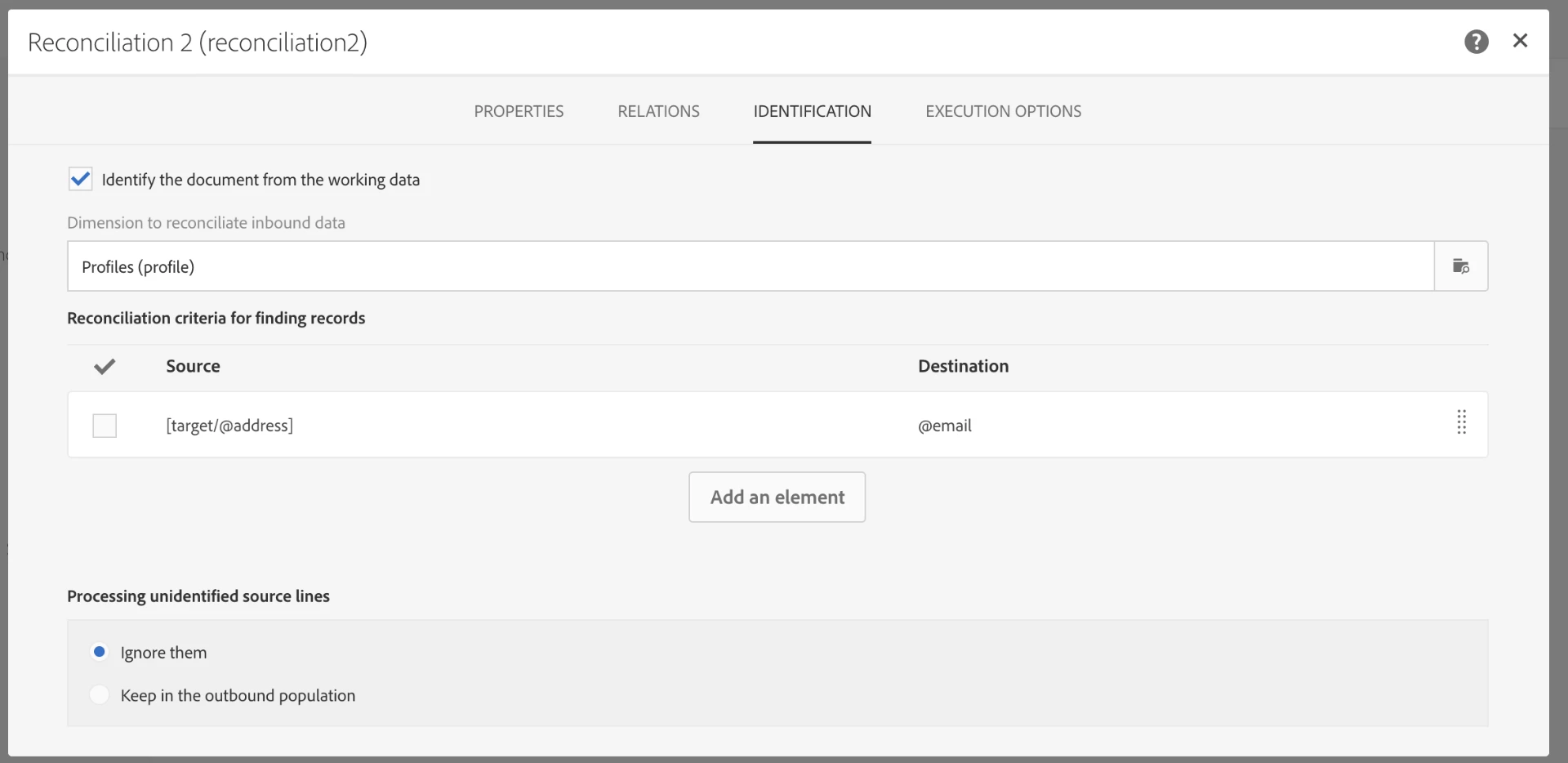
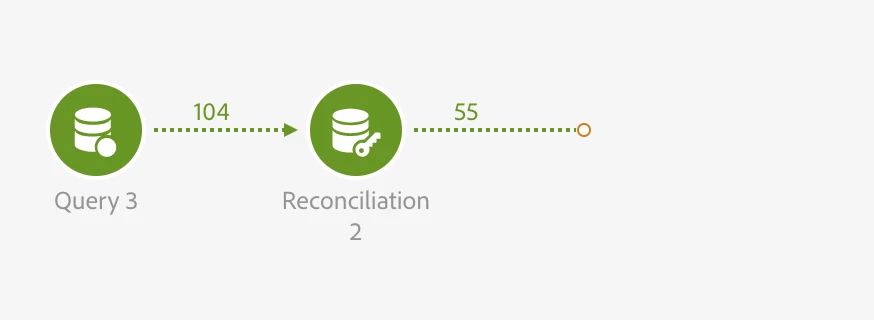
In this workflow, I query all addresses (dimension AddressStatus) for which the address field is not empty (Query). Then, I add a reconciliation activity, where I only fill the Identification tab as follows:

As you can see here:

  • I reconciliate the addresses from the Query with the Profiles schema, and specifically the email and address fields.
  • Unidentified source lines are ignored (so only identified records - which are found in both schemas - are kept).

The data of the transition after the Identification is one the Profiles dimension and corresponds to email addresses that were found in the address schema.

Would this work for you?

Florent

15 replies

El_Loco
El_LocoAuthor
New Participant
April 19, 2018

Florent, you hero! Thank you very much, that has worked perfectly.

I had actually just about managed to work out a way around it thanks to David (thank you David!), but my workflow included about 10 activities. This allows me to do it in only 2 and was staring me in the face the whole time.

I appreciate all the help.

florentlb
florentlbAccepted solution
New Participant
April 19, 2018

Hi Bob,

Sorry for answering so late.

I've tried the following:

In this workflow, I query all addresses (dimension AddressStatus) for which the address field is not empty (Query). Then, I add a reconciliation activity, where I only fill the Identification tab as follows:

As you can see here:

  • I reconciliate the addresses from the Query with the Profiles schema, and specifically the email and address fields.
  • Unidentified source lines are ignored (so only identified records - which are found in both schemas - are kept).

The data of the transition after the Identification is one the Profiles dimension and corresponds to email addresses that were found in the address schema.

Would this work for you?

Florent

davidk21713691
New Participant
April 9, 2018

Hi Bob,

You have to bring both transition to the one reconciliation activity. i'm my previous screenshot i want to keep users last transaction and retrieve their card information.

- In properties tab, You have to select the primary set (the one you want to keep)

- In advanced relations tab, you will define the reconciliation criteria

- in additional data tab, you will define the variables you want to retrieve for the second set9in my case i retrieved card information).

Hope that helps.

Thanks

David

El_Loco
El_LocoAuthor
New Participant
April 9, 2018

Thanks David. I've tried adding a Reconciliation activity but I'm not sure I'm configuring it correctly.

Do I bring both sets of data into the one reconciliation activity? If so do I then need to specify both dimensions in the 'List of relations with other dimensions' section?

It's driving me crazy trying to get this to work so a big high five is awaiting anyone who can help me resolve this!

Thanks,

Bob

davidk21713691
New Participant
March 29, 2018

Hi,

You can use reconciliation or enrichment activity then you will need to do a split to keep profile reconciled.

El_Loco
El_LocoAuthor
New Participant
March 29, 2018

Bump. Is anyone able to help with this issue?

El_Loco
El_LocoAuthor
New Participant
March 26, 2018

Hi Amit,

Just checking in - Are you able to advise on the error in my workflow?

Thanks,

Bob

El_Loco
El_LocoAuthor
New Participant
March 20, 2018

Hi Amit,

Thanks for your advice. I have set up the following but I am still experiencing problems where it says the ('head:profile' and 'head:addressStatus') are incompatible. Please let me know if I've misunderstood any of the steps.

Amit_Kumar
New Participant
March 19, 2018

Hi Bob,

Use Adobe Campaign Help | Exclusion

1. Query all profiles with the nonEmpty email address. Q1

2. Get all blacklisted address  Q2

3. Use a https://helpx.adobe.com/campaign/standard/automating/using/fork.html to split query Q1 in two parts i.e Q1A and Q1B

4. Use Exclusion with Q1A and Q2 with Q1 as the primary target and email address and a filter will give you E1

5. Use Intersection activity with E1 and Q1B

6. this intersection will give you a list of Quarantined profiles

Alternatively, add a new column in profiles i.e blacklistedFlag and update this flag from your nms:address  query using an email address as a key.

Regards,

Amit

El_Loco
El_LocoAuthor
New Participant
March 19, 2018

Hi Florent,

All of our blacklisted and quarantined contacts are listed within the nms:address schema. All of these contacts are automatically suppressed from all of our communications, so periodically I want to run a workflow to query how many of those contacts have active profiles and remove those profiles from our database.

I assumed the easiest way to achieve this would be by bringing the data of two queries together. I just don't know how to combine the data of the two where the same value is present in both. If you think there's an alternative solution I'm all ears!

Appreciate the advice.