Delete an Extended Schema | Community
Skip to main content
Jul 12, 2018 8:26 AM UTC
Solved

Delete an Extended Schema

Hi,

How can we delete an extended schema in Adobe Campaign.

For example, I extended the nms:Recipient schema in my own namespace and added a custom attribute to it. Now I don't need the custom attribute. How can I delete it?

Thanks,

Sadaf

This post is no longer active and is closed to new replies. Need help? Start a new post to ask your question.
kuthiala_ananya
kuthiala_ananyaAccepted solution
Employee
Jul 12, 2018 9:16 AM UTC

Hello sadafali​

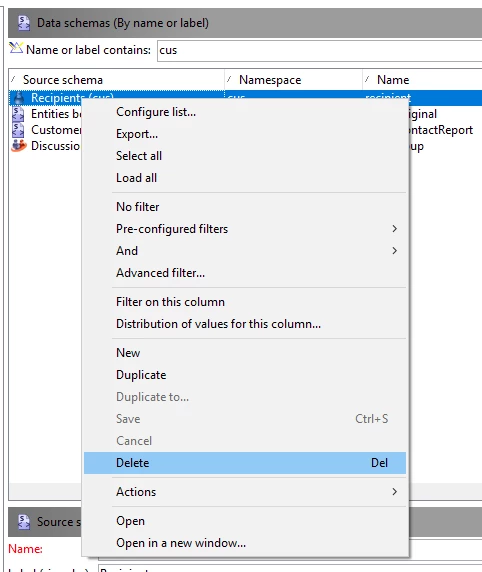
Incase you do not require the extended schema , Simply right click on the schema and click on delete. Below is the screenshot for the same

I Hope this helps !!!

Regards,

Ananya Kuthiala

4 replies

ShrawanSaxena-1
Employee
Jul 12, 2018 9:33 AM UTC

Deleting should be fine.

You can check after that if any pending updates are there

Translate
kuthiala_ananya
Employee
Jul 12, 2018 9:33 AM UTC

Hi sadafali​

If you are deleting the extended schema only then it would not change anything on the original schema. Post deleting the extended one if you will review the structure of nms:recipient then you will no longer see the filed which was mentioned in extended one. Updating the database structure would not be required.

Regards,

Ananya Kuthiala

Translate
Jul 12, 2018 9:28 AM UTC

Thanks for your response Ananya.

The extended schema has a new attribute so will just deleting it not affect the nms:Recipient schema?

Also, after deleting it do I need to update the database structure? Or just deleting it would be fine?

Regards,

Sadaf

Translate
kuthiala_ananya
kuthiala_ananyaAccepted solution
Employee
Jul 12, 2018 9:16 AM UTC

Hello sadafali​

Incase you do not require the extended schema , Simply right click on the schema and click on delete. Below is the screenshot for the same

I Hope this helps !!!

Regards,

Ananya Kuthiala

Translate