Delivery execution without drops | Community
Skip to main content
C_Canada
New Participant
November 29, 2017
Solved

Delivery execution without drops

  • November 29, 2017
  • 13 replies
  • 4869 views

I need to be able to execute a delivery for direct mail and/or Phone where the delivery just executes ALL rows, regardless of whether the recipient record has a terrestrial address or phone number on it.  The file is being appended externally with address and/or phone number elements that are (or may be) different than what is on the recipient record.  Unfortunately, I cannot find a way to force any delivery to NOT drop records for incomplete address or phone number. 
This post is no longer active and is closed to new replies. Need help? Start a new post to ask your question.
Best answer by Adhiyan

Hello ,

Yes this can be achieved if you do the following :

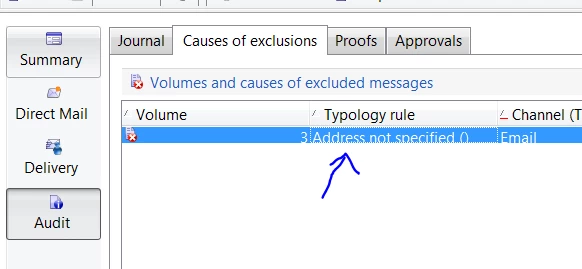
1>. Check the audit tab of the delivery to see which rules are excluding targets : Keep a note of the names to use in step3

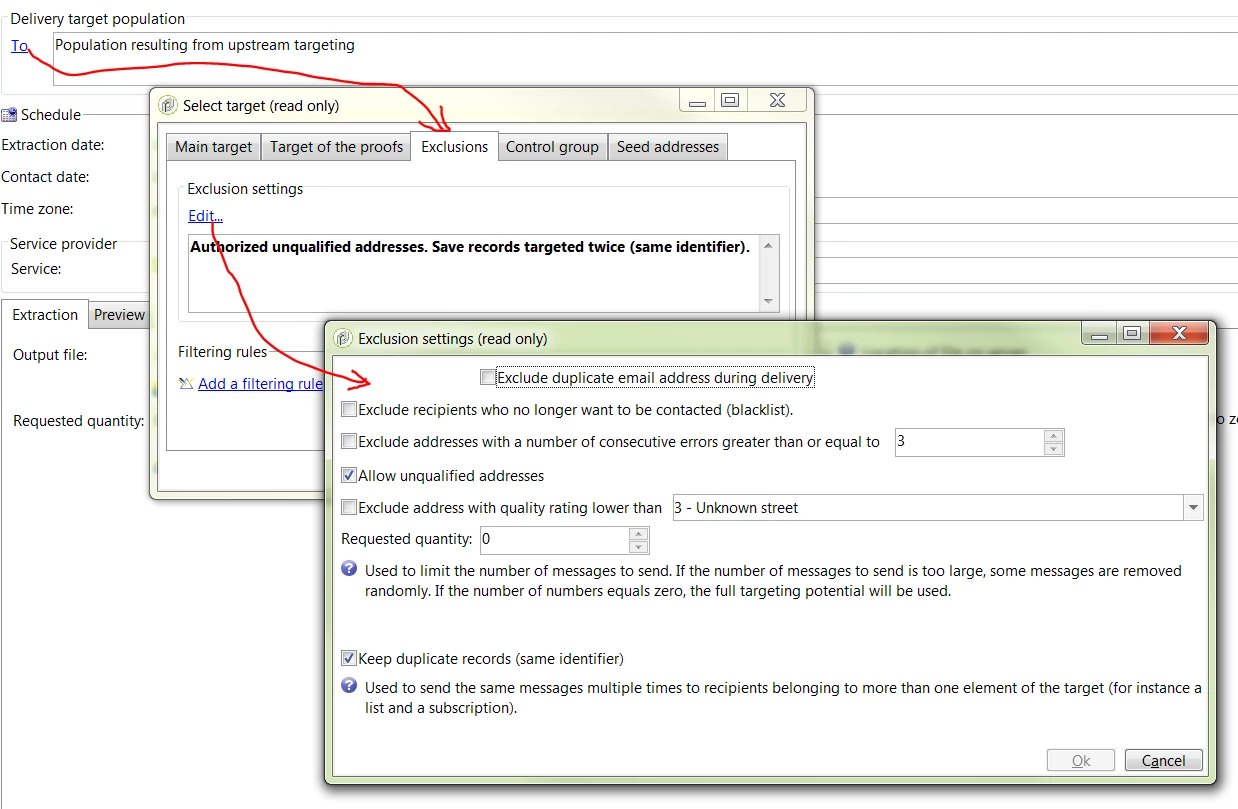
2>. Click on "To" in the delivery editor and uncheck all the exclusion settings :

You may want to do this change at the delivery template instead of the delivery to avoid recurrent work.

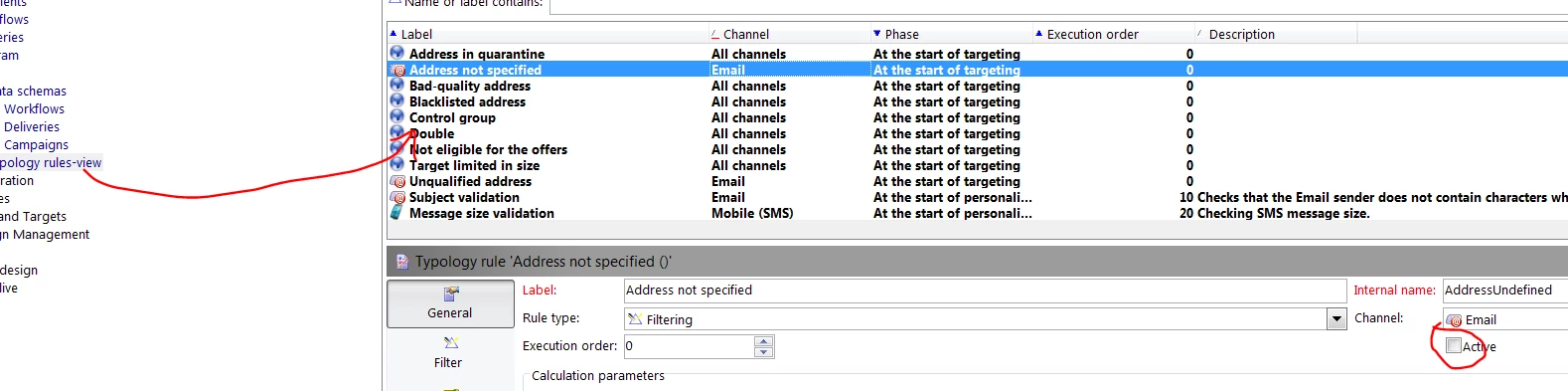
3>. Create a typology view folder and check the name of the rules which excludes the recipients from the delivery from step 1 .

Uncheck the active button from the rule and that rule will not be applied to the delivery after this.

One word of caution : Disabling these typology rules will have an impact on the whole platform and all deliveries, so you need to exercise caution while disabling these rules.

Regards,
Adhiyan

13 replies

Adhiyan
AdhiyanAccepted solution
Employee
November 30, 2017

Hello ,

Yes this can be achieved if you do the following :

1>. Check the audit tab of the delivery to see which rules are excluding targets : Keep a note of the names to use in step3

2>. Click on "To" in the delivery editor and uncheck all the exclusion settings :

You may want to do this change at the delivery template instead of the delivery to avoid recurrent work.

3>. Create a typology view folder and check the name of the rules which excludes the recipients from the delivery from step 1 .

Uncheck the active button from the rule and that rule will not be applied to the delivery after this.

One word of caution : Disabling these typology rules will have an impact on the whole platform and all deliveries, so you need to exercise caution while disabling these rules.

Regards,
Adhiyan

C_Canada
C_CanadaAuthor
New Participant
November 29, 2017

Exactly, I need records to not be dropped during analysis.  I don't have any typology rules set to drop where address is incomplete, but records are still dropping in the delivery analysis where address is incomplete.  (I believe it has to have at least a city & zip.  What I want is to execute a delivery where the only criteria for all records to create entries into the broadlog is that there is a recipient ID.  So, if I have 100 recipients in the transition into the delivery activity, I need 100 rows in the broadlog.

Adhiyan
Employee
November 29, 2017

Hi There,

So if I understood you correctly , you do not need any records to be dropped when a delivery is analyzed or you do not need any "exclusions"

Exclusions typically happens via typologies in deliveries and some of them are visible , some not in the properties of the delivery.

To check the reasons for the exclusions you go to audit>causes of exclusions to see which rules filters out the records , and once identified you can simply disable those rules.

Some rules are present in the "To" field of the delivery editor and others can be accessed via a typologies view folder.

Let me know if any doubts

Regards

Adhiyan