Enrichment Help | Community
Skip to main content
sqwgglz
New Participant
February 28, 2018
Solved

Enrichment Help

  • February 28, 2018
  • 16 replies
  • 13460 views

Hey everyone,

Hope someone can help.

I'm trying to enrich an email with some custom date fields which will act as the validity dates for the customer - I've added these in an enrichment.

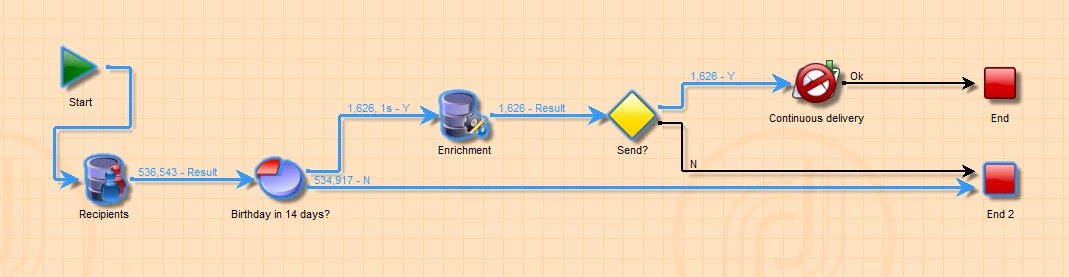
Here's my workflow - you might be able to workout that it's a birthday trigger email.
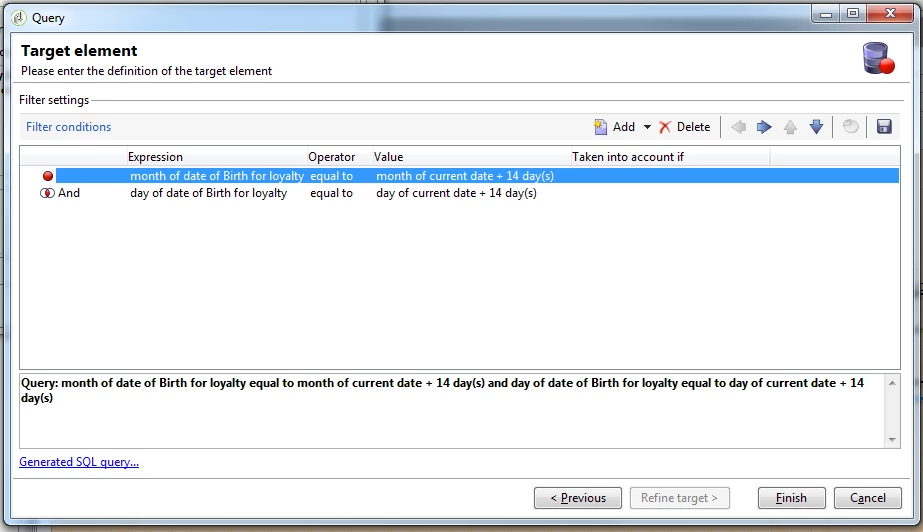
You'll see inside my split is nothing insane:
And here's my Enrichment:
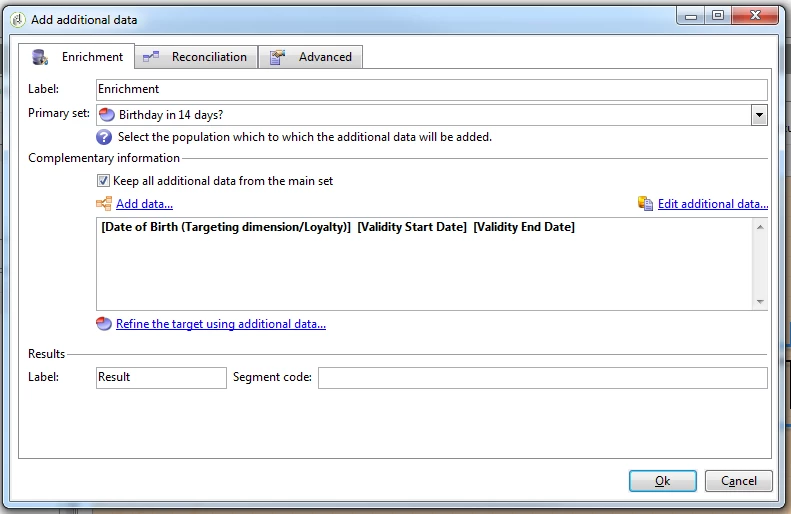
When I hit "Edit Additional data.."
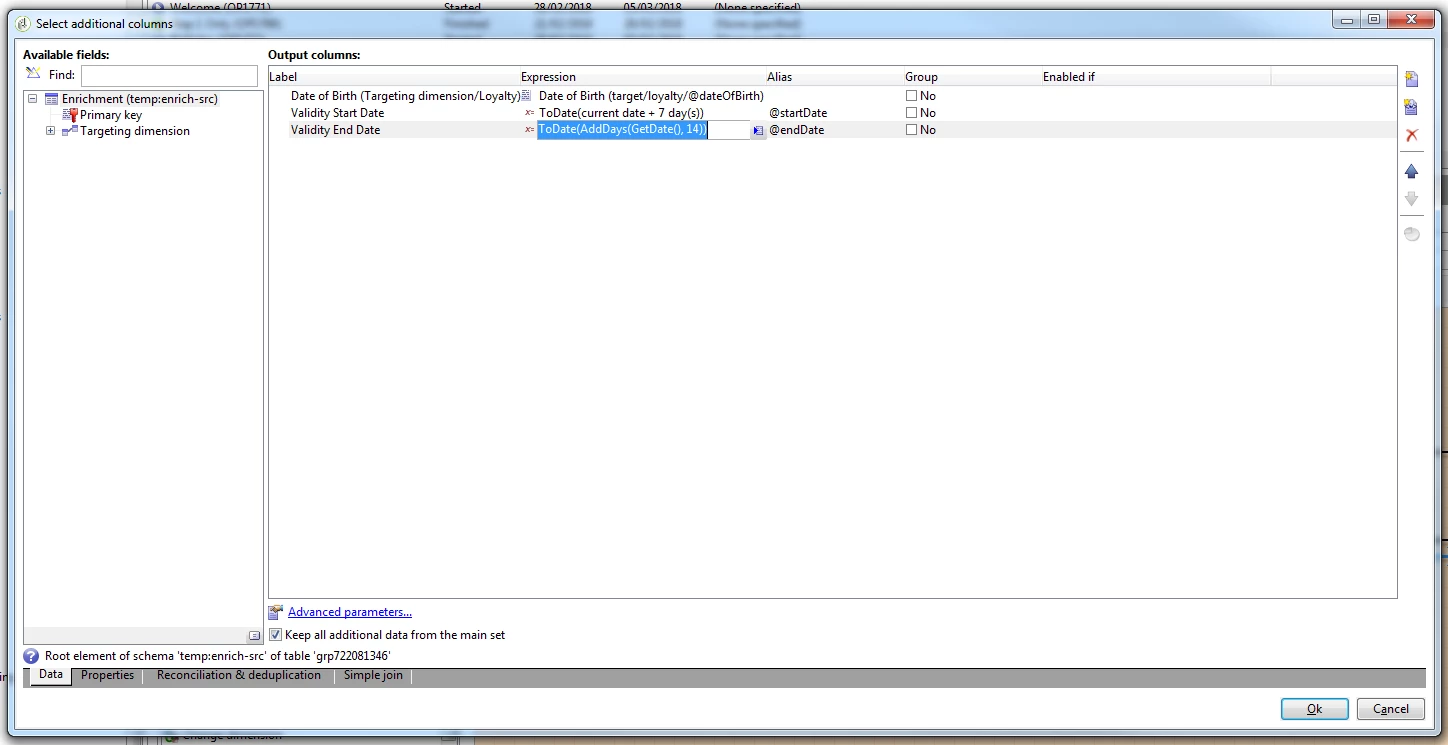
And going back to the Reconciliation table:
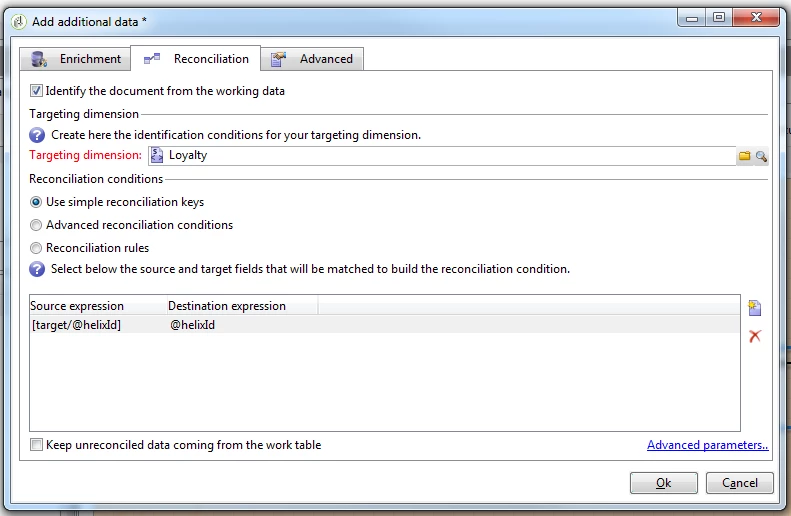
Note: I wasn't sure if this was necessary or not but hey ho!

Anyway, when I add these fields into a recurring delivery:
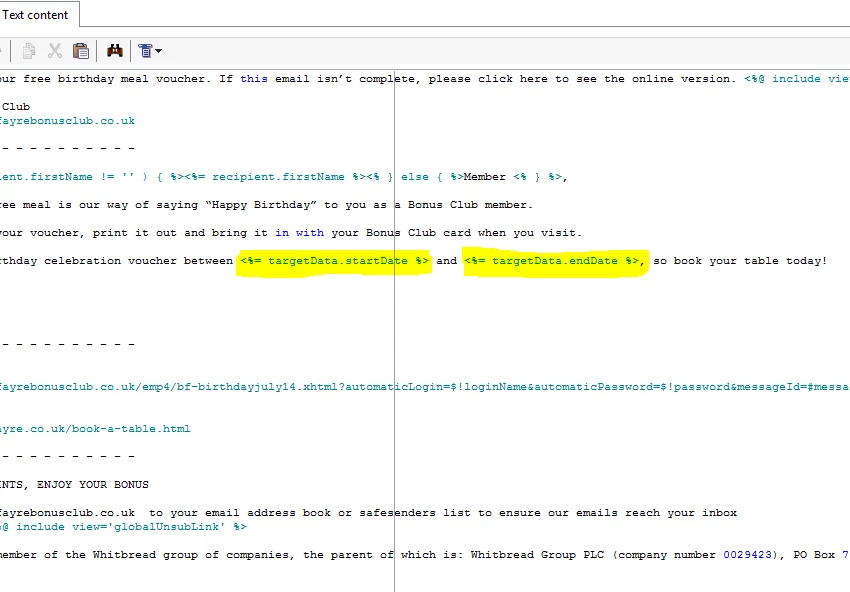
And when I preview... I get this:
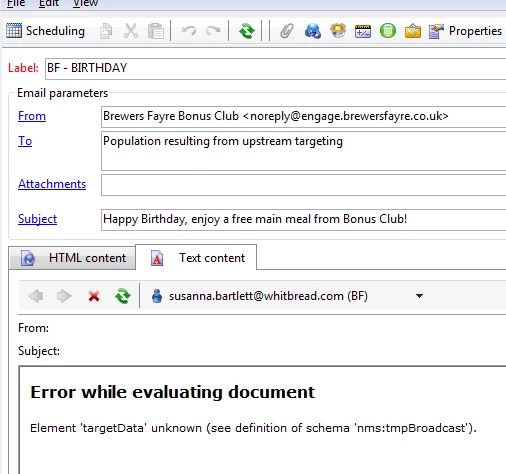
...and in a continuous delivery I get this:
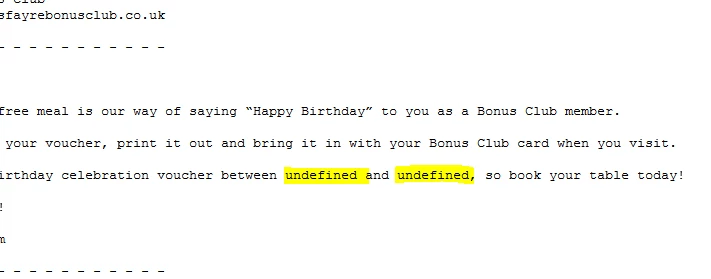
Any help?

This post is no longer active and is closed to new replies. Need help? Start a new post to ask your question.
Best answer by Amit_Kumar

Hi Kevin,

You should use a formatDate function to format your dates in deliveries.

in your case you have two options:

Options 1: efficient solution( if a developer is involved while preparing deliveries.)

add this script in the top of your delivery

<%

var currentDate = new Date();

var startDate = new Date();

var endDate = new Date();

// add a day

startDate.setDate(currentDate.getDate() + 7);

endDate.setDate(currentDate.getDate() +14);

%>

Use below syntax for adding these to your content wherever applicable

<%= formatDate(startDate, "%2D/%2M/%4Y") %>

<%= formatDate(endDate, "%2D/%2M/%4Y") %>

Options 2:

remove all extra formatting apart from adding days to current date and do not use toDate or any other function in your enrichment i.e use only AddDays(GetDate(),7 ) and then Use below option to include your dates.

<%= formatDate(targetData.startDate, "%2D/%2M/%4Y") %>

<%= formatDate(targetData.endDate, "%2D/%2M/%4Y") %>

Regards,

Amit

16 replies

sqwgglz
sqwgglzAuthor
New Participant
March 6, 2018

Thanks Amit,

Option 2 worked for me perfectly.

Thanks

Kevin

Amit_Kumar
Amit_KumarAccepted solution
New Participant
March 5, 2018

Hi Kevin,

You should use a formatDate function to format your dates in deliveries.

in your case you have two options:

Options 1: efficient solution( if a developer is involved while preparing deliveries.)

add this script in the top of your delivery

<%

var currentDate = new Date();

var startDate = new Date();

var endDate = new Date();

// add a day

startDate.setDate(currentDate.getDate() + 7);

endDate.setDate(currentDate.getDate() +14);

%>

Use below syntax for adding these to your content wherever applicable

<%= formatDate(startDate, "%2D/%2M/%4Y") %>

<%= formatDate(endDate, "%2D/%2M/%4Y") %>

Options 2:

remove all extra formatting apart from adding days to current date and do not use toDate or any other function in your enrichment i.e use only AddDays(GetDate(),7 ) and then Use below option to include your dates.

<%= formatDate(targetData.startDate, "%2D/%2M/%4Y") %>

<%= formatDate(targetData.endDate, "%2D/%2M/%4Y") %>

Regards,

Amit

jyotiyadav3
New Participant
March 5, 2018

Hi Kevin,

Try with this:

Left( ToDate(xxx),12)

This will truncate the time part and stores only initial 12 characters of the string.

Thanks,

Jyoti

sqwgglz
sqwgglzAuthor
New Participant
March 5, 2018

Hi Jyoti,

Thanks for reply so quickly.

I added DateOnly() to the enrichment..

but all it did is set the time as 00:00:00.

. I was thinking of using formatdate() in the delivery but it will only work with system date... any other suggestions?

Thanks

Kevin

jyotiyadav3
New Participant
March 5, 2018

Hi Kevin,

When you are saving dates in the variable,  save them as :

DateOnly(ToDate(xxx))

You will get only date parameter,  no timestamp.

Thanks,

Jyoti

sqwgglz
sqwgglzAuthor
New Participant
March 5, 2018

Note: I was expecting dates like this:

sqwgglz
sqwgglzAuthor
New Participant
March 5, 2018

Hi Jyoti,

Interestingly, I sent it to myself and the dates did compute as you suggested, though not as I intended.

Any ideas how to change the format to something else?

- Kevin

sqwgglz
sqwgglzAuthor
New Participant
March 5, 2018

Thanks Rajesh, I'll see if I can replicate.

jyotiyadav3
New Participant
March 5, 2018

Hi,

You will be able to see start date and end date correctly when you will send a delivery. Try to send some test data and you will see dates are displayed correctly. You get error because while previewing delivery in the workflow, it picks up data which is present in the schema columns. It does not picks up data stored in the workflow.

However, when you send a delivery, it does compute <%=targetdata.startdate%> correctly during analysis phase.

Thanks,

Jyoti

Employee
March 2, 2018

Hi Kjac,

Once you create the instance variable, you may not able to use the instance variable directly in the delivery (you can use it in the alert activity within the WF, though). Instead, create a variable (step 4) in the delivery properties (shown below) and use the script delivery.variables._var[0].stringValue = instance.vars.AKTEST in the delivery script (step 3).

Steps:

1. create a workflow (not a campaign with a workflow in it) with the type of delivery, shown below (which can be available only in a independent workflow and not in a targeting workflow of a campaign).

2. Follow the steps in screen grab till JS and connect the JS to a delivery (shown below).

3. Open the delivery and you see the screen below. Map the delivery template (RJS TEST Email Delivery below) you created under Delivery templates folder in the Delivery Tab and paste the script delivery.variables._var[0].stringValue = instance.vars.AKTEST in the script tab.

4. Save the WF and go to the delivery template you created under Delivery templates (RJS TEST Email Delivery in this case) and do the following.

This worked for me and please let me know, if you have any questions. However, using JS in the workflows will hamper performance of the instance. So i have tried to change and maintain the same targeting dimension at WF and delivery level for the target data to work. But, this did not work, too.

Thanks,

Rajesh