
Extract and transfer file assistance | Community
Skip to main content
jnolfo
New Participant
October 8, 2021
Solved

Extract and transfer file assistance

  • October 8, 2021
  • 2 replies
  • 2338 views

I have a extract and transfer of a delivery log that I am needing help with.


The workflow that I have works correctly and the file is being pushed into an Azure Blob (I can see the file there).  There are two issues that seem to be ACS related that I need help with.


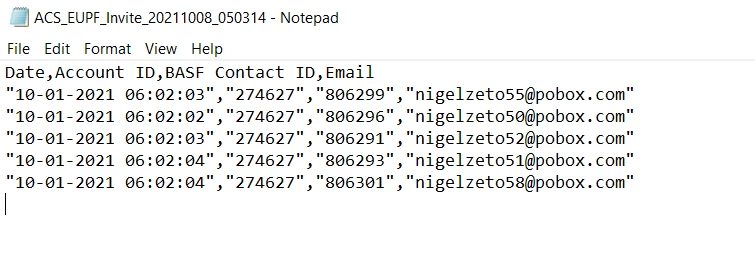
  1. The output file is a CSV (Excel) format. Each field has a set of double quotes around it.  Unfortunately, the process after the Blob is messed up with these.  Any way to not include those?
  2. ACS seems to be adding an additional "blank" record (shown by the cursor in the screenshot).  This is making the the process after the Blob to fail.  Thoughts to prevent a blank record?
This post is no longer active and is closed to new replies. Need help? Start a new post to ask your question.
Best answer by SatheeskannaK

Hi @jnolfo,


If you open the CSV file on text editor it will show extract with double quotes and same thing goes for additional blank line at the end. Try open the file using excel and it should be formatted properly with blank line.


Thanks!

2 replies

Sukrity_Wadhwa
Employee
October 20, 2021

Hi @jnolfo,

Were you able to fix this issue with the help of the given solution? Do let us know.

Thanks!

Sukrity Wadhwa
jnolfo
jnolfoAuthor
New Participant
October 20, 2021

Yes, this did.

Sukrity_Wadhwa
Employee
October 20, 2021

Thanks for the update. 🙂

Sukrity Wadhwa
SatheeskannaK
SatheeskannaKAccepted solution
New Participant
October 8, 2021

Hi @jnolfo,


If you open the CSV file on text editor it will show extract with double quotes and same thing goes for additional blank line at the end. Try open the file using excel and it should be formatted properly with blank line.


Thanks!

Thanks, Sathees
jnolfo
jnolfoAuthor
New Participant
October 8, 2021

Thanks for this.  Let me inform that group and see if they can fix on their end.