New Participant
October 12, 2018
Solved

Iterating through custom table in Email Attachment

  • October 12, 2018
  • 8 replies
  • 3831 views

Hi team,
I need to create a logic for dynamic table within a PDF attachment of email delivery .

please let me know of any appropriate approach in this scenario. I went through documentation,however there was no proper approach mentioned for the same. I tried using following script but that didn't work out.

<%=

for (var i = 0; i< customProduct.length; i++){ 

if(customProduct[i].email==targetData.email)) { 

document.write(customProduct[i].email); 

}

%>

Note: link to the documentation

Generating personalized PDF documents

Thanks
This post is no longer active and is closed to new replies. Need help? Start a new post to ask your question.
Best answer by DebTr

Hi Chetan,

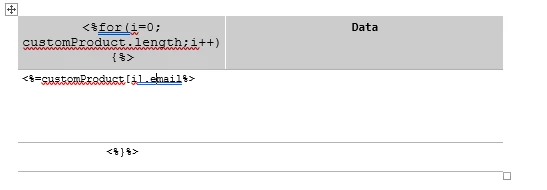
Are you trying to do something similar to this?

Regards,

Deb

8 replies

New Participant
October 17, 2018

Oh yeah.This works.
Gratitude.

DebTrAccepted solution
Level 6
October 16, 2018

Hi Chetan,

Are you trying to do something similar to this?

Regards,

Deb

New Participant
October 16, 2018

Hey Deb,
Have tried this query <%customProduct[i].email%> and its rolling perfectly. Even the query <%=customProduct.length%> got me proper results.
What I have observed is that running the whole script is giving me Error. Especially the loop part.
All of the Single statement Codes are working perfect.

Thanks.

Level 6
October 16, 2018

Hi Chetan,

Please can you try to put "<%customProduct[i].emai%>" instead of "document.write(customProduct[i].emai)" as explained in the following URL and give it a try.

Generating personalized PDF documents

Regards,

Deb

New Participant
October 16, 2018

Hey Deb,

Appreciate your help.
Since we were not able to render of send the campaign. I am attaching the preview.

thanks

Level 6
October 16, 2018

Please can you post the error message.

Regards,

Deb

New Participant
October 16, 2018

Hey Deb,

yeah, I did upload my primary file in open office document format(.odt). FYI I got proper results on using single scripts like <%=customProduct[1].email%>. However on using loop there seems to be some kind of error.

Thanks.

Level 6
October 15, 2018

Hi Chetan,

Are you using Open Office to create the attachment as mentioned in the documentation?

Regards,

Deb