Open Time Reporting | Community
Skip to main content
New Participant
November 21, 2023
Solved

Open Time Reporting

  • November 21, 2023
  • 1 reply
  • 1010 views

I am trying to report on what time people are opening across all recurring deliveries in a specific campaign. I can't find a way to aggregate the data to hourly without date, I can only find a breakdown that shows by date and hour.


Can anybody point me in the right direction?

This post is no longer active and is closed to new replies. Need help? Start a new post to ask your question.
Best answer by Anasso1337

I don't believe it's possible out of the box via the available reports.

But you can create a workflow to calculate the number of opens at each hour across all your recurrent deliveries of your campaign.


  • Query Tracking logs of type open for you specific campaign
  • Use the Hour function to get the log date hour only
  • Use the RowNum windowing function to calculate a partition of you log per hour
  • Add a Dedup step on your hour field and use the dedup method to keep the highest value of your partition field
  • Export results as a csv file or save as an audience.


Your final result should look something like this : 
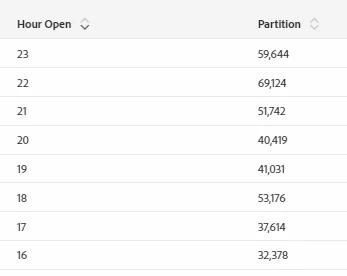


Bear in mind that your profiles can open the same delivery more than once. Adding a dedup step before your partition, to filter only the first open per profile and delivery might be useful.


Hope this helps.

1 reply

Anasso1337Accepted solution
New Participant
November 21, 2023

I don't believe it's possible out of the box via the available reports.

But you can create a workflow to calculate the number of opens at each hour across all your recurrent deliveries of your campaign.


  • Query Tracking logs of type open for you specific campaign
  • Use the Hour function to get the log date hour only
  • Use the RowNum windowing function to calculate a partition of you log per hour
  • Add a Dedup step on your hour field and use the dedup method to keep the highest value of your partition field
  • Export results as a csv file or save as an audience.


Your final result should look something like this : 


Bear in mind that your profiles can open the same delivery more than once. Adding a dedup step before your partition, to filter only the first open per profile and delivery might be useful.


Hope this helps.

New Participant
November 22, 2023

This is great, thank you very much.