Setting a control cell using javascript | Community
Skip to main content
chrisr17787094
Level 2
Mar 27, 2018 8:16 AM UTC
Solved

Setting a control cell using javascript

Hi there

I have recently started using javascript within a delivery to dynamically set certain fields and prevent the need for duplicating email templates (eg delivery.label = "Label for segment 1";)

I now have a desire to set options for a control cell in this way too, and was wondering if this was possible?

This post is no longer active and is closed to new replies. Need help? Start a new post to ask your question.
Marcel_Szimonisz
Marcel_SzimoniszAccepted solution
New Participant
May 10, 2018 10:14 AM UTC

Hello Chris,

1. set you template as you like

2. Edit -> Edit XML source
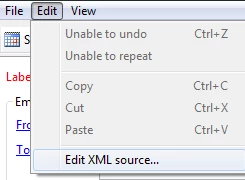
Find what you are looking for and set it in JS

In your case:

<delivery ....>

<execution broadEndDate="" broadStartDate="" maxRetry="5" nextPassDate="" passStartDate=""

             retry="0" retryPeriod="3600">

    <controlGroup activeOrder="0" enabled="true" fixed="10" percentage="10" schema="nms:recipient"

                  type="1">

      <where filteringSchema=""/>

      <humanConfig>Random sampling with size limited to 10 %</humanConfig>

    </controlGroup>

  </execution>

....

</deliver>

In JS of delivery activity set control group:

delivery.execution.controlGroup.type = 1;

delivery.execution.controlGroup.percentage= 50;

delivery.execution.controlGroup.fixed= 10;

delivery.execution.controlGroup.schema="nms:recipient";

In workflow
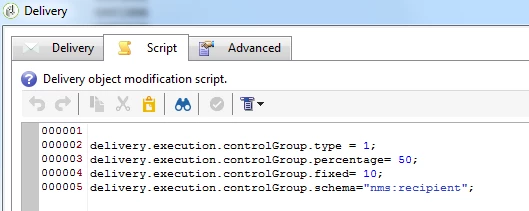
result:

50% control gruop

Marcel

6 replies

Marcel_Szimonisz
New Participant
May 10, 2018 10:26 AM UTC

yes I use this everywhere

Translate
chrisr17787094
Level 2
May 10, 2018 10:18 AM UTC

Thanks Marcel that's really helpful, for this problem and for other problems too.

Translate
Marcel_Szimonisz
Marcel_SzimoniszAccepted solution
New Participant
May 10, 2018 10:14 AM UTC

Hello Chris,

1. set you template as you like

2. Edit -> Edit XML source

Find what you are looking for and set it in JS

In your case:

<delivery ....>

<execution broadEndDate="" broadStartDate="" maxRetry="5" nextPassDate="" passStartDate=""

             retry="0" retryPeriod="3600">

    <controlGroup activeOrder="0" enabled="true" fixed="10" percentage="10" schema="nms:recipient"

                  type="1">

      <where filteringSchema=""/>

      <humanConfig>Random sampling with size limited to 10 %</humanConfig>

    </controlGroup>

  </execution>

....

</deliver>

In JS of delivery activity set control group:

delivery.execution.controlGroup.type = 1;

delivery.execution.controlGroup.percentage= 50;

delivery.execution.controlGroup.fixed= 10;

delivery.execution.controlGroup.schema="nms:recipient";

In workflow

result:

50% control gruop

Marcel

Translate
chrisr17787094
Level 2
May 10, 2018 8:47 AM UTC

Hi there

I'm referring to when you set a control group within a delivery:

Translate
florentlb
Level 10
May 9, 2018 12:44 PM UTC

Hello,

Any update on this issue?

Florent

Translate
florentlb
Level 10
Apr 18, 2018 11:49 AM UTC

Hi Chris,

I'm not sure of what you mean by "control cell". Can you give more details?

Florent

Translate