SMPP Not Sending - ClickSend | Community
Skip to main content
Level 2
Nov 28, 2020 6:47 PM UTC
Solved

SMPP Not Sending - ClickSend

Hi,


I have setup ClickSend as an external account using their guide:

https://help.clicksend.com/article/l6hbrh9y82-send-sms-with-adobe-campaign


I've sent them our IP addresses provided by Adobe Support to have them whitelisted.  However, when I try to send an SMS, nothing appears to happen.


I've enabled verbose logging, however, when I look at a delivery log, I don't see anything in the log.  Are those logs stored somewhere else?
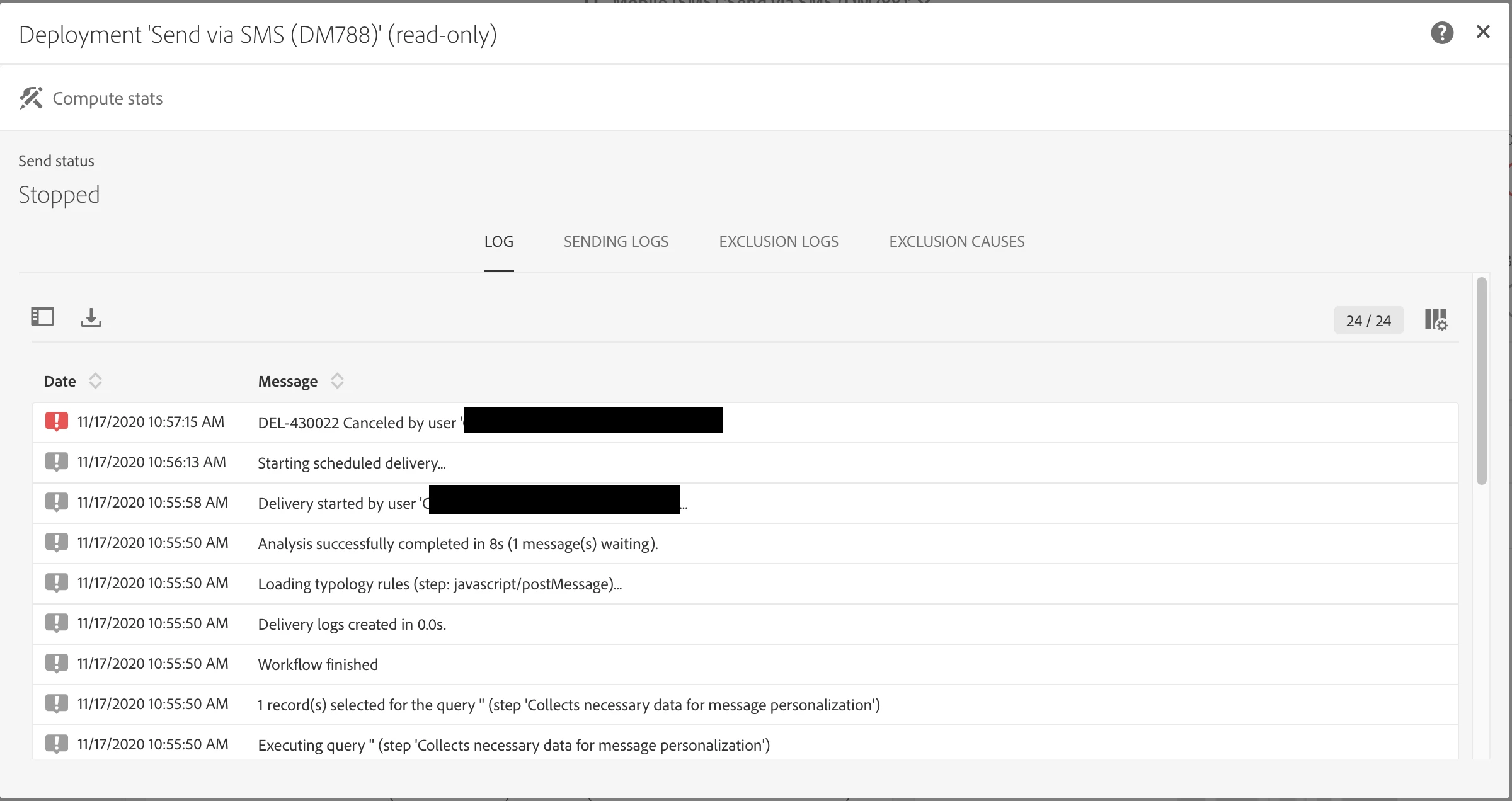


Any tips on what I should be looking at to debug this further?


Thanks,
Chris

This post is no longer active and is closed to new replies. Need help? Start a new post to ask your question.
cwammesAccepted solution
Level 2
Dec 3, 2020 4:31 PM UTC
Thanks for following up, we were able to determine this was a configuration issue on my end. I had mistyped the port number for the connection to the SMPP provider.

11 replies

Sukrity_Wadhwa
Employee
Dec 3, 2020 2:05 PM UTC

Hi @cwammes,

Was any of the given solutions helpful in resolving this query for you or do you need more help with it? Do let us know.

Thanks!

Translate
Sukrity Wadhwa
cwammesAuthorAccepted solution
Level 2
Dec 3, 2020 4:31 PM UTC
Thanks for following up, we were able to determine this was a configuration issue on my end. I had mistyped the port number for the connection to the SMPP provider.
Translate
xavierv6303633
Level 2
Nov 30, 2020 6:10 PM UTC

Hi @cwammes ,


We had the exact same issue with ClickSend a while back. Is the message you're trying to send bigger than 160 characters by any chance?


If so, you need to activate the 'message payload' option in the external account; this seems to be the only way to send multi-part messages with ClickSend through Adobe. This however has a big drawback : delivery receipts can't be sent back correctly to Adobe with this option actived, so any bounces won't be saved in Adobe; the delivery logs will all be set as 'sent' even though some had errors, and the 'billable sms count' will always be 1 sms per person, even if a single sms contains 8 messages (8*160chars).


https://helpx.adobe.com/campaign/kb/sms-connector-protocol-and-settings.html  (chapter ‘MULTIPART SMS (LONG SMS)’)


We had a nightmare of a time with Adobe Support (more than 1 month and several calls !), where they were refusing to acknlowledge there was something wrong on their side with the way they read the delivery receipts, and ClickSend was saying the problem was with Adobe, so we just ended up switching provider and now everything works fine.


Kr,

Xavier

Translate
cwammesAuthor
Level 2
Nov 30, 2020 6:47 PM UTC
Thanks for the response. So far I have been testing with very short messages to one phone number. I had the message payload option checked, I just tried unchecking it and sending another test. Still not getting the message and I don't see anything in the logs. Would you mind sharing what provider you switched to?
Translate
shelly-goel
Employee
Nov 29, 2020 2:26 AM UTC

@cwammes  In case you all the right settings from your end (country code is also included in the number) but sms remains in Pending state, please raise a ticket with Adobe support to validate the environment set up. Please refer: https://experienceleaguecommunities.adobe.com/t5/adobe-campaign-standard/help-can-t-send-sms-messages/qaq-p/357191

This thread also mentions that there are two IPs that needs to be whitelisted.

Translate
cwammesAuthor
Level 2
Nov 29, 2020 1:49 AM UTC

Thank you for the replies, I have tried to send another SMS message with the same result.  I have let this one run for about 3 hours, with no additional information appearing in the logs. 


Translate
shelly-goel
Employee
Nov 29, 2020 2:17 AM UTC
The status of the message in Sending Logs is "Pending" usually it will change to "Sent" in sometime. Please confirm you've not scheduled it for a specific time? (should be set to Send immediately once confirmed)
Translate
shelly-goel
Employee
Nov 29, 2020 1:09 AM UTC

@cwammes  In the logs that you've shared, it shows Send Status as "Stopped" and Canceled by User. Did you stop the delivery/ workflow by any chance? It does show "1 message waiting" before it is stopped. Additionally, check the sending logs (without stopping it) where it will show details of the message being sent.

Translate
DavidKangni
New Participant
Nov 28, 2020 10:42 PM UTC

Please wait 10-15 min to see if you sending logs are updated.

If you don't have nothing in the logs, you may check you exclusion logs or audit tab to see if the delivery was started without any errors.

Thanks,

David 

Translate
David Kangni