Tracking logs not generating for the deliveries | Community
Skip to main content
saraswatit61028
New Participant
April 15, 2015
Solved

Tracking logs not generating for the deliveries

  • April 15, 2015
  • 13 replies
  • 12675 views

I am sending the deliveries but the tracking log is not generating.Can anybody help

This post is no longer active and is closed to new replies. Need help? Start a new post to ask your question.
Best answer by Linda_Stinson

Hi Saraswati,

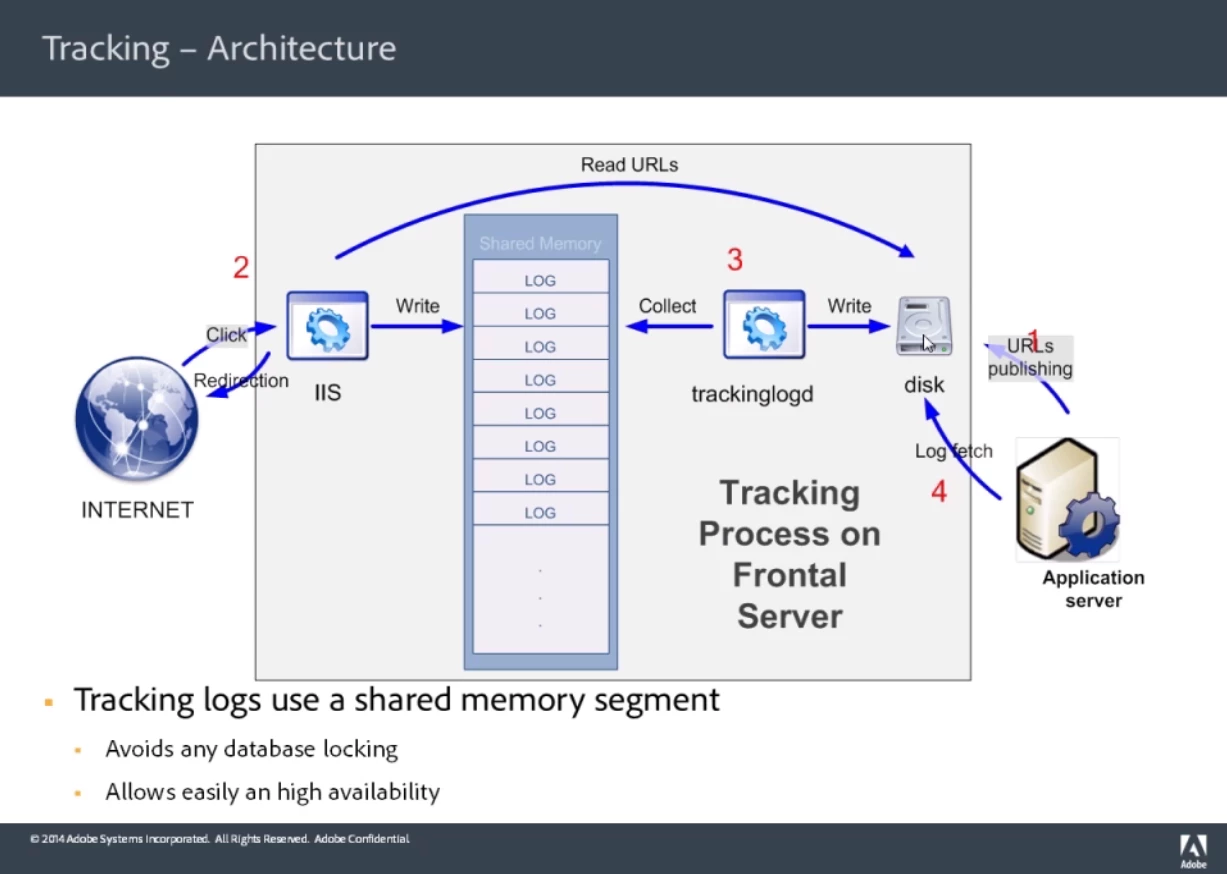
Below is an explanation of how tracking works. This is covered in the Production training course if you have access to it. Are you attempting to use the web tracking feature of Adobe Campaign? If so there might be an issue with the configuration of web tracking tags. I recommend that you contact support for further help with this issue.

Linda


Step 1

  1. Marketing user of Neolane wants to send an email
  2. Creates a campaign/delivery and analyze the email
  3. During analysis, URLs are published to the disk of the frontal/tracking servers (Step 1 in diagram)
  4. Marketing user sends the email

Step 2

  1. Recipient receives the email and clicks on the email
  2. Recipient is directed to the Apache/IIS server hosting the tracking
  3. NLSrvMod.dll/.so Library reads the URLs which have been published to the frontal server disk for this delivery
  4. Finds where it should redirect to and then redirects the rcp
  5. Writes tracking logs to the shared memory of the frontal server
  6. READS=quick; WRITES are slow

Step 3

    Trackinglogd collects all data in the shared memory segment and writes it to the disk of frontal server

Step 4

    AppServer runs a workflow every hour (tracking) and commit them to the marketing database.
13 replies

Linda_Stinson
Employee
March 4, 2016

Make sure the Tracking workflow is running on the application server and the trackinglogd process is running on the messaging server. You can check both of these in the Adobe Campaign client console.

From the Explorer view, go to the Technical workflows folder:

From the Home page, go to the Monitoring tab:

Amit_Kumar
New Participant
February 9, 2016

Hi Linda,

It's a client environment.

I will reach out to tech support.

Thanks

Amit

Linda_Stinson
Employee
February 8, 2016

Hi Amit,

Are you working in a training environment, in your sandbox, or in a client's environment? If you have a support contract on the environment, you could contact tech support.

Linda

Amit_Kumar
New Participant
February 4, 2016

I am facing the same issue(Production,Tracking,workflow,Error:,"There,is,no,index,on,the,source,current,web,tracking,mode."). Do you know how to resolve this error?

Linda_Stinson
Linda_StinsonAccepted solution
Employee
April 28, 2015

Hi Saraswati,

Below is an explanation of how tracking works. This is covered in the Production training course if you have access to it. Are you attempting to use the web tracking feature of Adobe Campaign? If so there might be an issue with the configuration of web tracking tags. I recommend that you contact support for further help with this issue.

Linda


Step 1

  1. Marketing user of Neolane wants to send an email
  2. Creates a campaign/delivery and analyze the email
  3. During analysis, URLs are published to the disk of the frontal/tracking servers (Step 1 in diagram)
  4. Marketing user sends the email

Step 2

  1. Recipient receives the email and clicks on the email
  2. Recipient is directed to the Apache/IIS server hosting the tracking
  3. NLSrvMod.dll/.so Library reads the URLs which have been published to the frontal server disk for this delivery
  4. Finds where it should redirect to and then redirects the rcp
  5. Writes tracking logs to the shared memory of the frontal server
  6. READS=quick; WRITES are slow

Step 3

    Trackinglogd collects all data in the shared memory segment and writes it to the disk of frontal server

Step 4

    AppServer runs a workflow every hour (tracking) and commit them to the marketing database.

Employee
April 28, 2015

I'm not sure why it's going in a paused state. Based on the screenshots you have provided, I can't really tell what's going on.

saraswatit61028
New Participant
April 28, 2015

Hi, Can you tell me is there any temporary file before the tracking logs get Updated.I want to know what happens in the background of the workflow.How the tracking logs are consolidated or from where they are getting updated during scheduler .

saraswatit61028
New Participant
April 27, 2015

I was getting the error as "There is no index on the sourceId filed NmsTrackinglogRcp Table required for the current web tracking mode Please add index" because of which the workflow was stopped and the tracking logs are not generating.I tried to restart the workflow but it is always going in paused state and not giving any error. Is it because of the above error it is going in paused state?But in logs it is not showing any error

saraswatit61028
New Participant
April 27, 2015

Thanks for such a useful information.I checked the Tracking workflow.Yes it was stopped due to some errors.The error was the Source id Index missing in the nmswebtrackinglog table.So I am just identifying how I can resolve this.

Hope once the workflow starts I will get the tracking logs.I will try to change the schedular to receive the logs Asap.

Thanks a lot

Employee
April 24, 2015

The tracking logs are generated by the built-in Tracking Technical workflow. The scheduler that triggers the execution of the workflow is configured to trigger every hour. If you want to change that configuration, you need to update the scheduler activity (see screenshot).

I'm not sure why you are experiencing issues with the tracking logs not triggering. If you don't want to change the schedule, you can also manually trigger the scheduler by right-clicking on the scheduler activity and selecting "Execute pending task(s) now" (see screenshot). This will execute the workflow immediately.