
New to the Community? Start here

The Experience League Community is a collaborative space where you can learn, inspire, and grow with a network of likeminded professionals. Whether you’re here to connect with peers or Adobe experts, seek advice, support others, share ideas, or develop your professional brand we’re thrilled to have you.
Understanding the Community sections
You will notice several different sections in each product Community. Here is an explanation of each:
- Questions: ask and answer questions related to a specific product.
- Discussions: start a conversation on a specific product-related topic and view announcements from the Adobe team.
- Ideas: share a product enhancement or feature request.
- Blogs: find best practices, use-cases, and success stories from advanced users.
- Events: discover threads for upcoming and past events hosted on Community. Most of these events, called “Coffee Breaks,” are ask-me-anything-style sessions hosted by Adobe employees and expert customers.
Now that you’re familiar with our site sections, we’ve outlined some steps to help you get started:
Step 1: Review our guidelines, code of conduct, and best practices
- Our Community is a peer-to-peer community, our members contribute the content and shape our community culture so it’s important that you are familiar with our guidelines and best practices.
Step 2: Find answers to your questions
- Search for your topic:
Before asking a question, we recommend searching to see if anyone else has asked your question before. The search bar is in the top right corner, Community will be preselected to show results only in the specific product community you are interested in. Questions with an accepted solution have a green checkmark next to the title, indicating that the question author or an Adobe team member marked a response as the correct answer. Open the question and the accepted solutions will be at the top of the thread highlighted in green.
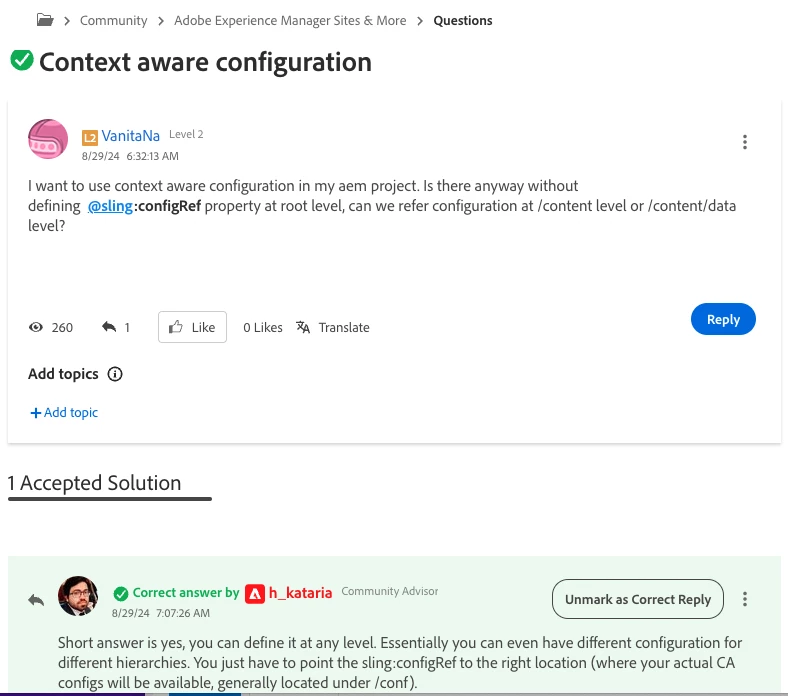
- Ask a question:
To ask a question, navigate to the relevant product community and click the “Ask a Question” button. It helps to include keywords in your question title so others can easily understand what your question is about. Remember to keep your post as detailed and specific to the product as possible — the more information you provide, the easier it will be for someone to help you.
- Accept the solution:
When you receive a reply that answers your question, click on the “Correct reply” button. This will turn the reply into an accepted solution and move the reply to the top of the thread making it easier for others to find the correct answer.
Step 3: Support others by answering a question
Your insights and experiences are valuable! Browse unanswered questions to see if there’s any guidance you can offer. If you think you can help with someone’s question, click “Reply” and type your response within the thread. If your answer solves their problem, it will be marked as an accepted solution and you will be notified based on your notification preferences.
Step 4: Connect with peer experts
Our community is filled with passionate individuals who are dedicated to helping you succeed with Experience Cloud. Our Experience Cloud Advocates are customers who go above and beyond to support the global Experience League Community. You can view and connect with the advocates here or by clicking on the “Experience Cloud Advocates” link from the Community dropdown menu.
Ready to dive in? These steps are just the start — there’s so much to explore, learn, and contribute as you dive deeper into the Experience League Community. But if you ever need assistance or have questions, we’re here to help!
Connect with a Community Manager
Our Community Managers are dedicated to your success. Reach out to them if you’re have any questions or want to learn about ways you can get involved in Community.
You can direct message them via their profile with the “Send a message” button. Below is our full list of Community Managers and their respective Communities:
- Analytics: Sukrity Wadwha
- Campaign Classic v7 + v8: Sukrity Wadwha
- Campaign Standard: Sukrity Wadwha
- Journey Optimizer: Sukrity Wadwha
- Experience Manager: Kautuk Sahni
- Experience Platform: Kautuk Sahni
- Real-Time Customer Data Platform: Kautuk Sahni
- Target: Jon Chen
- Workfront: Jon Chen
- Marketo: Jon Chen