メールテンプレート内の画像について/About images in email templates | Community
Skip to main content
New Participant
April 18, 2023
Solved

メールテンプレート内の画像について/About images in email templates

  • April 18, 2023
  • 1 reply
  • 354 views

Marketoを使い始めたばかりのため、初歩的な質問かもしれませんがよろしくお願いします。


オリジナルのテンプレートを作りましたが、テンプレート内の画像が一部のメーラーで表示されません。
また、同じメールであってもアプリケーションから開いた場合は表示されず、ブラウザで見ると表示される場合もあります(Outlookです)。
Marketoに最初から用意されているテンプレートの場合は表示されているため、おそらくテンプレートに問題があるのかと思いますが、こういった場合どういう原因が考えられるでしょうか。
なお、画像以外のテキストなどには問題がありません。

___________

I'm new to Marketo, so I'm sorry if this is a basic question.


I made an original template, but the images in the template are not displayed in some mailers.

Also, even if it is the same email, it may not be displayed when opened from an application, but displayed when viewed in a browser (Outlook).

Since it is displayed in the case of the template provided from Marketo, I think there is probably a problem with the template, but what can be the cause in this case?

In addition, there is no problem with texts other than images.
This post is no longer active and is closed to new replies. Need help? Start a new post to ask your question.
Best answer by Naoki_Kumagai

さまざまなアドバイスをいつもありがとうございます。

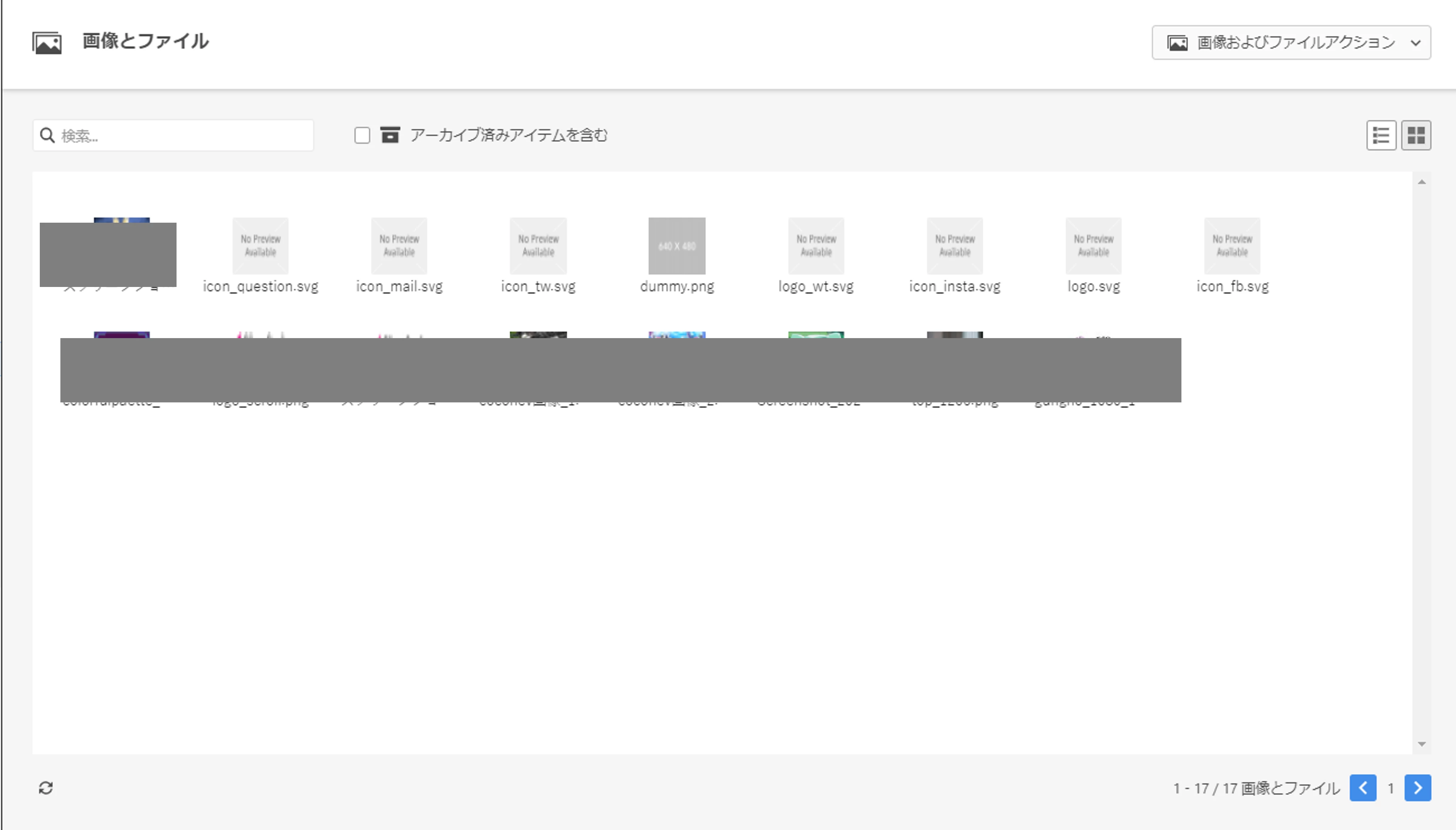
他に問題がないか改めて自社のMarketo内を確認いたしましたところ、デザインスタジオ内の画像が添付のような表示になっていました。
(リスト表示にしていたため気づいておりませんでした…)
このようにデザインスタジオ内でもうまく表示されていないため、使用している画像をJPeg等の他のタイプのものに差し替えてみたいと考えています。

こちらでもし対応ができた場合は念のためお知らせし、質問を完了しようかと思います。
もしなにかご意見などございましたらご教示ください。
______________
Thank you for all your advice.

When I checked the inside of our Marketo again to see if there were any other problems, the image inside the design studio was displayed as shown in the attachment.
(I didn't notice it because I was using list display...)
Since it is not displayed well in the design studio like this, I would like to replace the image used with another type such as JPEG.

I'll let you know just in case if I'm able to respond here, and I'll try to close the question.
If you have any comments, please let us know.


@ssa_marketing 様

追加の情報をありがとうございます。


デザインスタジオ内の画像が添付のような表示になっていました。

キャプチャ画像を拝見したところ、画像ファイル形式が「svg」のものが多いようですが、svg形式は一部のメールクライアント(メーラー、メールアプリ)で表示できません。

HTMLメールの場合、jpeg / png / gif などのファイル形式を使用されるのが無難かと思います。


メールテンプレートのHTMLソースも(まだざっとですが)拝見しましたが、SNSアイコンなどはsvgファイルを使用されているようですので、Marketoの操作画面上(ChromeなどのWebブラウザ上)では表示されていても、メール受信時には表示できない可能性はあり得そうです。


なにかのヒントになれば幸いです。

1 reply

Darshil_Shah1
Community Manager
April 18, 2023

メールクライアントで画像のダウンロードがブロックされていないことを確認しましたか?さらに、メール内の一部またはすべての画像に問題がありますか?まだお持ちでない場合は、まず Marketo の Design Studio に画像をアップロードしてから、メールで参照することをお勧めします。上記のすべてを確認しても画像が表示されない場合は、問題に直面しているクライアントと共に電子メール テンプレート コードを投稿して、ここにいる人々が見てもらえるようにすることができます。

-- 

Did you ensure the images aren't blocked from getting downloaded in your email client? Additionally, do you have issues with some or all of the images in the email? If not already, I'd advise you to upload the images in Marketo's Design Studio first and then reference them in your emails. If all of the above checks out and you still can't see images, you could post your email template code along with the email clients (mailers) you're facing issues with so people here could take a look.


New Participant
April 20, 2023

ご回答ありがとうございます。
メール受信側で画像のダウンロードはブロックしていないことは確認ができました。
そのため、テンプレートを作成したデザイナーにどのように画像をテンプレートに挿入したか確認しています。
もし、MarketoのDesign Studioを使用していなかった場合は、Design Studioを使用して再度作成しなおそうと思っていますが、使用していた場合はこちらにコードを掲載させていただきたいと思います。

___________________

Thank you for your reply.
I have confirmed that the image download is not blocked on the receiving side of the email.
So I'm currently checking with the designer who created the template how they inserted the image into the template.
If Marketo's Design Studio was not used, I will recreate it using Design Studio, but if I was using it, I would like to post the code here.

New Participant
April 20, 2023

書き忘れていたことを補足します。
テンプレート内の画像は、すべての画像が表示されない方もいらっしゃいますし、一部の画像が表示されない方もいらっしゃいます。

______________

Add what I forgot to write.

Some people may not be able to display all the images in the template, and some may not be able to display some images.