
Email Tracking URL Security Enhancement | Community
Skip to main content
Mike_Reynolds2
New Participant
June 6, 2017

Email Tracking URL Security Enhancement

  • June 6, 2017
  • 23 replies
  • 3359 views

Overview

For added security, we have added functionality to validate that email tracking URL hash codes originate from the same domain in the subscription. A unique email tracking URL hash code is what is used to identify which Marketo instance the link is coming from, enabling the tracking functionality in your emails.

Example

Here’s an example of how an email tracking URL is constructed:
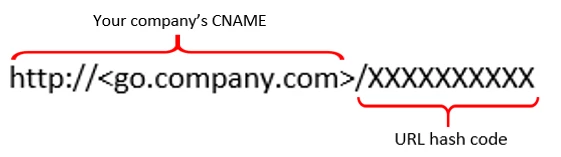
Enhancement being made:

This enhancement will add extra validation to the tracking URLs used in your emails.

When our tracking server receives the link, it will use the URL hash code to identify the Marketo instance. It then looks up the branding domains associated with the subscription.

If the domain presented in the URL matches a branding domain we have listed for you, the link will connect just as it should. If the domain in the URL does not match a domain in our database, it will be considered suspicious and will be stopped and a "404 error" will be displayed.
This post is no longer active and is closed to new replies. Need help? Start a new post to ask your question.

23 replies

SanfordWhiteman
New Participant
June 22, 2017

You may be on to something, but careful not to mix different concepts of "secured" -- this particular bugfix relates to security, but not (directly) to http​s://.

AFAIK, tracking (branding) domains are still rewritten to plain-text http​:// in the email itself, then redirected from http​:// → http​s:// only if you have HSTS (a special HTTP header) set up for your click domain.  At least in the instance I just spot-checked, even if your tracking domain has an SSL cert installed by Marketo, email content won't take that into account (which defeats real security, but I digress).

In other words, will be up to your webmaster/DNS team to ensure that people are redirected from the insecure to the secure form of your click domain, and in turn redirected to the original target URL. I don't think it's even possible to turn off plain-text on your branding domain at this time, so even if the person is not redirected from http​://tracking → http​s://tracking → http​://external but only from http​://tracking → http​://external they'll be fine.

Anna_Blanchet1
New Participant
June 22, 2017

Hi Mike,

I have an open ticket with Support because tracked links in our emails are displaying 404 errors for a portion of program members.

"If the domain presented in the URL matches a branding domain we have listed for you, the link will connect just as it should. If the domain in the URL does not match a domain in our database, it will be considered suspicious and will be stopped and a "404 error" will be displayed."

Is it possible that this update has disrupted the use of tracked links in our instance? I noticed that tracked links are not secured. The browser I use updates the URL to https:// but I'm wondering if other browsers are not completing the redirect so it's treated as suspicious and doesn't load.

I would love any thoughts you have on this issue.


Thanks!

Anna

June 10, 2017

Well said Robb. I consider myself a technical person... most people would consider me a technical person. I had to read every single comment and reply in order to feel like I fully understood it. Security issues in particular are extremely difficult to communicate and understand and, as you stated, require internal iteration and vetting to get right. Exploits are very difficult to understand and illustrations can sometimes help. After reading all of this thread, I would summarize it as follows...

Corrected a potential exploit in which tracking-enabled links could be made to appear as if they were pointing to one Marketo instance domain but which actually redirected to another, potentially unrelated or unexpected Marketo instance domain

Tracking-enabled urls or web links are typically used to track user engagement within e-mails. While e-mail links can point to any 3rd party site, the specific links impacted by this security enhancement are those that link back to a customers own Marketo instance and which have a tracking hash on the end - for example go.friendlycompany.com/XXXYYYZZZ. "XXXYYYZZZ" is a randomly generated identifier which is parsed by Marketo when the link is clicked by a user. Prior to this fix, another Marketo instance (e.g. go.naughtycompany.com) could have created a trackable e-mail link (e.g. go.naughtycompany.com/erhen492df4h4dss3f34fd) and simply replaced go.naughtycompany.com with the domain of another Marketo customer (e.g. go.friendlycompany.com) followed by the same tracking hash (e.g. go.friendlycompany.com/erhen492df4h4dss3f34fd). This would lead a user to believe that, when clicked, the user would be visiting friendlycompany.com when, in reality, the presence of the unique tracking hash created by go.naugthycompany.com (e.g. erhen492df4h4dss3f34fd) in the URL would have resulted in sending them to go.naughtycompany.com's Marketo instance. NOTE: While the exploit scenario requires both companies to be Marketo customers, leveraging Marketo with the intent to deceive or misrepresent the functionality of an electronic message is a gross misuse of this service and may also be in violation of privacy and communications laws which vary by country. If discovered, electronic violations of this nature may result in fine or imprisonment.

==================

At least that's how I would have written it.

SanfordWhiteman
New Participant
June 8, 2017

I agree, Robb, this has nothing to with "authorization" as is currently understood.

The branding domain merely rewrites the URLs and requires no proof at all that the envelope sender domain and/or From/Reply-To: domain is "authorized" to use the branding domain.

In fact before multiple branding domains were introduced (was that this year or late last year?) you had to have mismatched envelope, header, and branding domains when you sent mail on behalf of multiple domains.

Robb_Barrett
New Participant
June 8, 2017

Well, hold on a moment. What you're saying about the branding domain is giving me a confuse. Aren't you talking about the SPF / DKIM SDID? That's the one that lets other email servers know that Marketo is authorized to act as an agent for a company, right?

The branding domain is used to re-code links in the body of the email to point them to a Marketo tracking service, so it would overwrite www.thisdomain.com with click1.companywebsite.com/1234ABCD and then redirect to www.thisdomain.com. What you stated in a previous email is that in the past, Marketo only looked at 1234ABCD and not exactly the branding domain in front of it. If that's the case, then every couple of billion links sent in all the emails Marketo sends someone would get sent to the wrong page, potentially.

If email servers looked at branding domains then any time my wife sent me an amazon.com link for a dog bed she thinks our dogs need, it would block the email and I'd be a happy man.

Mike....do me a favor buddy....I'm on Lisinopril for high blood pressure and I almost had to see my Doctor yesterday for a stronger dose after this announcement. Next time you guys make an announcement like this, run it past the least techy person you know and see if they understand it. If they nod their head, start drooling and can only say "uh-huh" then they don't really get it.

Robb Barrett
Mike_Reynolds2
New Participant
June 8, 2017

The branding domain does have a big part to play. It's a combination of identifying the instance in Marketo and authorizing the Marketo servers to send emails on your behalf. If you're a recipient mail server and you receive an email saying that it's from one company (your company) but the address that sent it is actually from someone else (Marketo), then it looks suspicious. The branding domain is a way to authorize the other entity to send emails on your behalf. The issue with the hash code isn't to avoid duplicates - with that long of a code string, it's extremely difficult to end up with duplicates. It's an extra layer of security validation.

Robb_Barrett
New Participant
June 8, 2017

Got it.  The branding domain actually did nothing in the past then, if that's my understanding. It's all on the string after the domain.  With as many Marketo users as there are sending out as many emails as they do, how often was it that a duplicate string could have occurred?

Is the solution meant to thwart malicious users or just the chance of duplicates?

Robb Barrett
SanfordWhiteman
New Participant
June 8, 2017

Turns out this has nothing to do with the URLs added to the email by email authors.

It just means Marketo users can't use other users' branding domains (which shouldn't have been possible in the first place).

New Participant
June 8, 2017

I think this makes sense to me. In Robb's example, can he check to see if his branding domain includes GE.com? If not, can he add it? Would he need to?

June 7, 2017

Yep, that's my understanding... and I'm stealing your phrasing, as long as nobody corrects the both of us. That is a good way to describe it.