Add multiple emails in "To Recipient" in Workfront Fusion microsoft email module | Community
Skip to main content
New Participant
October 5, 2023
Solved

Add multiple emails in "To Recipient" in Workfront Fusion microsoft email module

  • October 5, 2023
  • 1 reply
  • 1503 views

Hi,


I was working on a fusion scenario where I was trying to send a single email to multiple users by using Microsoft 365 email module. Here If I add more emails by clicking "add items" button its sending separate emails to users. I want to do a single send email operation to mulitple users. Please let me know if this is possible.

This post is no longer active and is closed to new replies. Need help? Start a new post to ask your question.
Best answer by Rafal_Bainie

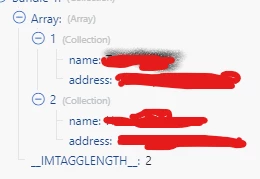
make sure that the input array for the recipient field has this format:


it should be ok, that's how it works for us

1 reply

Rafal_Bainie
New Participant
October 5, 2023

Hi,

this is actually doable!

Recipients field needs to contain an Array:


that array comes from processing all "tagged users" in our case (we read them from note, all users tagged on an update) in a simple loop:

module 36 uses "Tags" array as input from Read note module, important here is that you read user's email address.

Hope this helps

New Participant
October 5, 2023

Hello,


Thanks for your quick response and I tried this but unfortunately it's not providing the expected result. I'm able to get the required email address from Workfront but facing the problem when Microsoft 265 email module comes into play. I was not able to enter multiple emails in "To Recipient" field. I have attached the screenshot of the error.

Please let me know if you need any more details

Rafal_Bainie
Rafal_BainieAccepted solution
New Participant
October 9, 2023

make sure that the input array for the recipient field has this format:


it should be ok, that's how it works for us