Assistance with timesheet reporting | Community
Skip to main content
New Participant
December 12, 2024
Solved

Assistance with timesheet reporting

  • December 12, 2024
  • 2 replies
  • 527 views

Hi,

We have recently begun using the timesheet feature in Workfront.  I'm trying to build a report but it seems like what I am wanting is a combination of what I can get in an hour report and a timesheet report.  Is there a way to get a report that has both elements.  

I'm wanting to group by user and then by timesheet (which I can do in a timesheet report) but then under the timesheet I want to see the source and hours (which I can get in an hour report).   I would also like a link to the timesheet, which I see in timesheet report but not in hours.

Any suggestions and help is appreciated.

Thanks

Heather
 

Best answer by Madalyn_Destafney

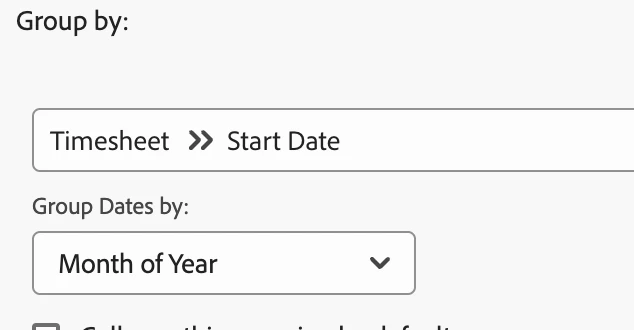
Hi, you can group by certain timesheet elements in an hour report. For example, can group the hours by timesheet start date:

 You can add columns in the hour report for timesheet ID (if you need to copy/search it to go to it) but it's also already grouping by the timesheet..I'm sure there's a way to link to the timesheet in text mode.

2 replies

KellieGardner
New Participant
December 13, 2024

Typically with reporting you want to start at the lowest object and report up in the hierarchy. So, I would start with an hour report and then pull in the data you can regarding timesheets.


Then you can add columns for timesheet data to display.

  • Display Name is the name of the timesheet itself but it doesn't hyperlink.


You can use the following text mode in a grouping to group by timesheet name:


group.0.linkedname=timesheet
group.0.valuefield=timesheet:displayName
group.0.valueformat=string
textmode=true


Madalyn_Destafney
Madalyn_DestafneyAccepted solution
New Participant
December 12, 2024

Hi, you can group by certain timesheet elements in an hour report. For example, can group the hours by timesheet start date:

 You can add columns in the hour report for timesheet ID (if you need to copy/search it to go to it) but it's also already grouping by the timesheet..I'm sure there's a way to link to the timesheet in text mode.

If this helped you, please mark correct to help others : )