
compare columns and put in colours | Community
Skip to main content
MattEl5
New Participant
January 17, 2025
Solved

compare columns and put in colours

  • January 17, 2025
  • 2 replies
  • 854 views

HI Team! Trying to compare 2 Duration columns in a Task report. 
Original Duration (task)  VS. Duration (task) 

Both ive got in Days and i would really like it to give me a colour if the date in the Duration column is Greater than the days in the Original Duration column. 
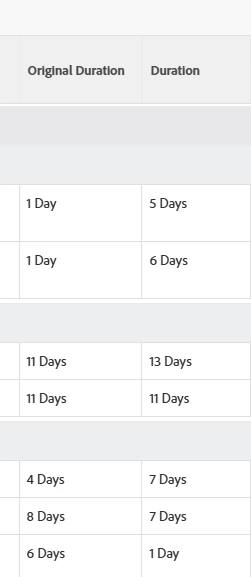
 I have tried and failed with syntax. any help would be fab thanks! 

Best answer by MattEl5

Ok so i took a bunch from another report. Here is a final system to make backgrounds colour coded. 
Less than = green, Equals = yellow, Greater than = red. 

descriptionkey=durationMinutes
displayname=
durationunitfield=durationUnit.value
linkedname=direct
listsort=intAsInt(durationMinutes)
namekey=duration
querysort=durationMinutes
styledef.case.0.comparison.icon=false
styledef.case.0.comparison.leftmethod=intAsInt(durationMinutes)
styledef.case.0.comparison.operator=gt
styledef.case.0.comparison.operatortype=int
styledef.case.0.comparison.rightmethod=intAsInt(originalDuration)
styledef.case.0.comparison.trueproperty.0.name=textcolor
styledef.case.0.comparison.trueproperty.0.value=000000
styledef.case.0.comparison.trueproperty.1.name=bgcolor
styledef.case.0.comparison.trueproperty.1.value=eac6c9
styledef.case.0.comparison.truetext=
styledef.case.1.comparison.icon=false
styledef.case.1.comparison.leftmethod=intAsInt(durationMinutes)
styledef.case.1.comparison.operator=eq
styledef.case.1.comparison.operatortype=int
styledef.case.1.comparison.rightmethod=intAsInt(originalDuration)
styledef.case.1.comparison.trueproperty.0.name=bgcolor
styledef.case.1.comparison.trueproperty.0.value=feecc8
styledef.case.1.comparison.truetext=
styledef.case.2.comparison.icon=false
styledef.case.2.comparison.leftmethod=intAsInt(durationMinutes)
styledef.case.2.comparison.operator=lt
styledef.case.2.comparison.operatortype=int
styledef.case.2.comparison.rightmethod=intAsInt(originalDuration)
styledef.case.2.comparison.trueproperty.0.name=bgcolor
styledef.case.2.comparison.trueproperty.0.value=def6e2
styledef.case.2.comparison.truetext=
textmode=true
valuefield=durationMinutes
valueformat=compound
viewalias=duration

Thanks both! couldnt have got there without you! 


2 replies

KellieGardner
New Participant
January 21, 2025

There is some documentation on this to support Richard's answer. Compare fields in conditional formatting | Adobe Workfront


@nicholevargas  - I think you did a tutorial on this for a community event. Do you know the link for that? 

MattEl5
MattEl5Author
New Participant
January 21, 2025

HI Both thank you for these links!! Great work! 

Richard is there a way to make the Background Red instead of the text? 

going to play around and see if i can get it have a secondary comparison for Less than. Which im hoping will be similar syntax but with "lt"? and a diff colour. 

thanks both! 

MattEl5
MattEl5AuthorAccepted solution
New Participant
January 21, 2025

Ok so i took a bunch from another report. Here is a final system to make backgrounds colour coded. 
Less than = green, Equals = yellow, Greater than = red. 

descriptionkey=durationMinutes
displayname=
durationunitfield=durationUnit.value
linkedname=direct
listsort=intAsInt(durationMinutes)
namekey=duration
querysort=durationMinutes
styledef.case.0.comparison.icon=false
styledef.case.0.comparison.leftmethod=intAsInt(durationMinutes)
styledef.case.0.comparison.operator=gt
styledef.case.0.comparison.operatortype=int
styledef.case.0.comparison.rightmethod=intAsInt(originalDuration)
styledef.case.0.comparison.trueproperty.0.name=textcolor
styledef.case.0.comparison.trueproperty.0.value=000000
styledef.case.0.comparison.trueproperty.1.name=bgcolor
styledef.case.0.comparison.trueproperty.1.value=eac6c9
styledef.case.0.comparison.truetext=
styledef.case.1.comparison.icon=false
styledef.case.1.comparison.leftmethod=intAsInt(durationMinutes)
styledef.case.1.comparison.operator=eq
styledef.case.1.comparison.operatortype=int
styledef.case.1.comparison.rightmethod=intAsInt(originalDuration)
styledef.case.1.comparison.trueproperty.0.name=bgcolor
styledef.case.1.comparison.trueproperty.0.value=feecc8
styledef.case.1.comparison.truetext=
styledef.case.2.comparison.icon=false
styledef.case.2.comparison.leftmethod=intAsInt(durationMinutes)
styledef.case.2.comparison.operator=lt
styledef.case.2.comparison.operatortype=int
styledef.case.2.comparison.rightmethod=intAsInt(originalDuration)
styledef.case.2.comparison.trueproperty.0.name=bgcolor
styledef.case.2.comparison.trueproperty.0.value=def6e2
styledef.case.2.comparison.truetext=
textmode=true
valuefield=durationMinutes
valueformat=compound
viewalias=duration

Thanks both! couldnt have got there without you! 


New Participant
January 20, 2025

Hi,


Give the following text mode a try:


descriptionkey=durationMinutes durationunitfield=durationUnit.value linkedname=direct listsort=intAsInt(durationMinutes) namekey=duration querysort=durationMinutes styledef.comparison.leftmethod=intAsInt(durationMinutes) styledef.comparison.operator=gt styledef.comparison.operatortype=int styledef.comparison.rightmethod=intAsInt(originalDuration) styledef.comparison.truetext=font-weight:900;color:#990000; textmode=true valuefield=durationMinutes valueformat=compound


This text mode should return the duration field as days in bold red if it is greater than the originalDuration field.


Best Regards,

Rich.